You need to enable JavaScript in order to use the AI chatbot tool powered by ChatBot

8 Best Single Sign On Tools in 2026

Share via:
blog-cms-banner-bg
Little-Known Negotiation Hacks to Get the Best Deal on Slack
cta-bg-blogDownload Your Copy

HIPAA Compliance Checklist for 2025

Download PDF

Imagine logging into your CRM, then your project management tool, followed by your finance software, each with a different password. This daily ritual wastes lots of your time and increases security risks.

For instance, forgotten passwords lead to countless reset requests, bogging down IT support. When team members leave, removing their access from multiple systems becomes a logistical nightmare.

Fortunately, there is a solution for all these: Single Sign-On (SSO) tools. These platforms help streamline access, allowing employees to enter one set of credentials for all their applications.

SSO enhances security by enforcing strong authentication policies across the board. It also simplifies user management, enabling quick provisioning and deprovisioning of access rights.

This article will discuss the 8 best SSO tools available for SaaS-focused businesses in 2026. We aim to guide IT, finance, and procurement teams toward informed decisions.

TL;DR

Tool Best For Pricing From G2
Okta Enterprise security & lifecycle management $2/user/mo 4.5★
Microsoft Entra ID Microsoft 365 / Azure-stack orgs $6/user/mo 4.5★
OneLogin Mid-market, ERP integrations $4/user/mo 4.4★
Ping Identity Enterprise hybrid & regulated industries Custom 4.4★
Keeper Security SSO + enterprise password vault bundled Custom 4.7★
Citrix Virtual workspace & remote access orgs Custom 4.4★
SecureAuth Behavioral risk & continuous auth Custom 4.4★
Auth0 Developer / customer-facing apps Free / $35+ 4.3★

1. What Is Single Sign-On?

Single Sign-On allows users to authenticate once with a central Identity Provider (IdP) and gain access to all connected applications without re-entering credentials. 

The IdP, such as Okta, Google Workspace, or Microsoft Entra ID, verifies the user's identity and issues a secure token that connected apps accept as proof of authentication.

The result: one login, all apps, zero password sprawl.


How Single Sign-On Works: IdP, Tokens, and the Protocols Behind It (SAML, OIDC, SCIM)

Here is the authentication flow in plain terms:

1.    A user attempts to access an app (e.g., Salesforce, Slack, or Zoom).

2.    The app redirects the request to the Identity Provider (IdP).

3.    If the user already has an active session with the IdP, they get instant access. If not, they log in once with their credentials (plus MFA, if configured).

4.    The IdP issues a cryptographically signed authentication token back to the app.

5.    The app validates the token and grants access; no password entry required.

Three protocols power this flow:

•      SAML 2.0: The enterprise standard for web-based SSO. Used by most legacy and enterprise apps.

•      OpenID Connect (OIDC): A modern, lightweight protocol built on OAuth 2.0. Preferred for mobile and API-driven applications.

•      SCIM: Not an authentication protocol, but a provisioning standard. SCIM automates user account creation and removal across connected apps,  the backbone of automated onboarding and offboarding.

2. Why Single Sign-On Is No Longer Optional for Modern IT Teams?

‍The average organization uses over 130 SaaS applications. Expecting users to manage separate credentials for each is a security liability, and research confirms it. 

According to Security Boulevard, 59% of employees reuse the same password across multiple systems. A single credential breach can cascade across your entire stack.

Three forces are accelerating SSO adoption in 2026:

•      Zero Trust mandates: Identity is now the primary security perimeter. Zero Trust frameworks require every access request to be continuously verified. SSO is the enforcement layer.

•      Remote and hybrid work: Distributed teams accessing apps from multiple devices and locations make perimeter-based security obsolete. SSO centralizes control regardless of where users are.

•      Compliance pressure: HIPAA, SOC 2, ISO 27001, and GDPR all require demonstrable access controls. SSO creates the audit trail that proves who accessed what and when.

130 Apps. One Weak Password. That's All It Takes.

Here's how to shut down unauthorized access before it shuts you down.
Get the Shadow IT & AI Guide

3. Top 8 Single Sign-On Tools for 2026

1. Okta

‍Okta offers an SSO solution that streamlines access to your organization's applications. You can manage user authentication centrally, eliminating the need for multiple passwords.

Additionally, Okta automates user lifecycle management, adjusting access rights as employees join or leave your company.

Key Features

  • Access without passwords: Eliminate traditional passwords by using biometrics or one-time codes.
  • Multi-factor authentication: Implement multiple verification steps for user login. Combine passwords with push notifications or biometrics to strengthen your access security.
  • Adaptive security policies: Set dynamic access rules based on user context. Adjust permissions according to location, device, or behavior.

Pricing

  • SSO - $2/user/month.
  • Adaptive SSO - $5/user/month.

Rating

2. Azure Active Directory (Azure AD)

Microsoft Azure Active Directory provides comprehensive SSO capabilities, allowing your users to access multiple applications with a single set of credentials.

This solution simplifies access management and enhances security across your organization's SaaS portfolio.

Key Features

  • Enhanced authentication: Implement multi-factor authentication to add an extra layer of security, requiring users to verify their identity through secondary methods like mobile notifications or biometrics.
  • Self-service password management: Enable users to reset their passwords securely, reducing IT workload while maintaining robust security policies.
  • Centralized identity control: Manage user identities consistently across all applications and services from a single platform to ensure uniform security standards.

Pricing

  • Microsoft Entra ID P1 - $6.00 user/month.
  • Microsoft Entra ID P2 - $9.00 user/month.
  • Microsoft Entra Suite - $12.00 user/month.

Rating

3. OneLogin

‍OneLogin streamlines user authentication and access management, allowing your team to use a single set of credentials for multiple applications. This solution reduces your IT department's administrative burden and enhances overall security.

Key Features

  • Advanced authentication: Implement multi-factor authentication using biometrics, SMS verification, or tokens to ensure only authorized users access your systems.
  • Comprehensive logout function: Enable users to sign out of all connected applications simultaneously.
  • Access control: Manage user access to all applications from a single dashboard to ensure tight control over sensitive data and resources.

Pricing

  • Single Sign-On (SSO) - $4/user/month.

Rating

4. Ping Identity

‍Ping Identity's SSO enhances your organization's security while boosting productivity. It allows your employees to access multiple applications with a single set of credentials, simplifying authentication processes.

Key Features

  • Simplified compliance management: Enforce access policies and generate detailed audit logs, streamlining your compliance reporting process.
  • User-driven account management: Enable users to reset passwords and manage profiles independently, reducing IT workload and fostering employee autonomy.
  • Application integration: Seamlessly connect with various cloud-based and on-premises systems.

Pricing

Automated pricing.

Rating

5. Keeper Security

‍Keeper Security provides a robust password management and security platform, integrating seamlessly with SSO solutions. It helps you enforce strong password policies across your organization, enhancing overall security.

Key Features

  • Multi-factor authentication: Implement multi-factor authentication, requiring users to verify their identity through multiple means, significantly reducing unauthorized access risks.
  • Endpoint access: Control access to various endpoints, including computers and mobile devices, ensuring secure connections across all platforms.
  • Password policy enforcement: Set and enforce specific password policies to allow you to maintain stringent security standards throughout your organization.

Pricing

Automated pricing.

Rating

6. Citrix

‍Citrix offers SSO solutions as part of its Secure Workspace Access and Secure Internet Access platforms. This integration simplifies user access while enhancing your organization's overall security posture.

Key Features

  • Enhanced security verification: Implement multi-factor authentication quickly to add crucial layers of protection beyond traditional passwords.
  • Universal application access: Ensure consistent SSO experience across desktop, mobile, and cloud applications to streamline user access regardless of device or location.
  • Secure remote connectivity: Enable employees to access corporate resources securely from any location, supporting flexible work arrangements without compromising security.

Pricing

Automated pricing.

Rating

7. SecureAuth Identity Platform

SecureAuth Identity Platform offers a next-generation SSO solution that leverages adaptive risk analytics to create a unique digital DNA for each user. This approach enables continuous, passwordless authentication, enhancing security across your SaaS stack.

Key Features

  • Authentication user experience: Simplify the login process across multiple systems, providing your team with a seamless and user-friendly experience.
  • Multi-factor authentication: Implement multi-factor authentication, requiring users to verify their identity through something they know, have, or are.
  • Support for multiple operating systems: Control endpoint access across different operating systems to ensure consistent security measures regardless of device type.

Pricing

Automated pricing.

Rating

8. Auth0

‍Auth0 provides a modern, flexible SSO solution that secures access to all your applications for every user. It balances simplicity and customization, allowing you to tailor authentication processes to your specific needs.

Key Features

  • Supports required authentication systems: Integrate various authentication methods, including biometrics, passwords, and token-based systems.
  • Endpoint access: Control access across multiple endpoints, from computers to mobile devices, maintaining consistent security across all platforms.
  • Remote access: Enable safe connections to legacy applications, web resources, and network assets for employees working outside your local network.

Pricing

  • Free - $0/month.
  • Essentials - $35/month.
  • Professional - $240/month.
  • Enterprise - automated pricing.

Rating

4. Single Sign-On and Zero Trust: How SSO Becomes Your Identity Perimeter?

Zero Trust is a security model built on one principle: never trust, always verify. No user, device, or network connection is trusted by default; every access request must be authenticated and authorized, regardless of where it originates.

SSO makes Zero Trust practical at scale. Without centralized identity, you cannot enforce consistent access policies across dozens or hundreds of apps. With SSO, every access request passes through a single authentication layer where you can apply:

•      Adaptive MFA: Requires additional verification when risk signals are elevated, a new device, an unusual location, or off-hours access.

•      Conditional access policies: Block or restrict access based on device compliance status, IP range, or user role.

•      Session monitoring: Detect and terminate anomalous sessions in real time.

•      Continuous re-authentication: Require users to re-verify after a defined inactivity period or when risk context changes.

5. Single Sign-On vs LDAP: Which Is Right for Your Organization?

IT teams evaluating identity management often encounter both SSO and LDAP (Lightweight Directory Access Protocol). They solve adjacent problems and are often used together,  but they are not interchangeable.


Single Sign-On (SSO) LDAP
What it does Authenticates users across multiple apps with one login session Stores and retrieves identity data from a central directory
Primary use case App access management, one credential for many SaaS tools On-premise directory services, internal network authentication
Cloud compatibility Built for cloud and SaaS environments Primarily on-premise; cloud use requires wrappers like LDAPS
User experience Single login, seamless app switching App-by-app authentication, no session federation
Protocol SAML, OIDC, OAuth 2.0 LDAP protocol (TCP/IP, port 389 or 636 for LDAPS)
Best for SaaS-heavy organizations, remote teams, and compliance-driven environments Organizations with heavy on-premise infrastructure and directory needs

6. How SSO Reduces Shadow IT, and Why That Matters for SaaS Teams?

Shadow IT, the unauthorized apps employees adopt without IT approval, is a fast-growing security and cost risk. Employees often sign up for tools without IT visibility, bypassing security reviews.

SSO helps reduce shadow IT by making approved apps easy to access. But it only governs apps connected to your IdP, leaving others invisible.

CloudEagle.ai fills this gap by:

• Discovering shadow IT across your SaaS stack
• Flagging unauthorized or duplicate spend
• Giving IT a complete SaaS visibility dashboard

SSO Only Sees What's Connected to It. The Rest Is Invisible.

Find every app hiding outside your IdP before it becomes a breach.
Get the Hidden AI Detection Guide

7. How to Choose an SSO Provider: Key Considerations?

When choosing single sign-on (SSO) tools, start by checking support for key protocols like SAML 2.0, OpenID Connect, and OAuth 2.0, along with integrations for your directories and SaaS apps.

Ensure the platform offers a large app connector catalog, strong security controls such as adaptive MFA and risk-based authentication, and the ability to scale across cloud, hybrid, or on-premise environments.

Prioritize solutions that simplify user provisioning, provide granular access controls, and include audit reporting for compliance. Also, evaluate the total cost of ownership, including licenses, add-ons, implementation, and maintenance.

  • SMB: Affordable, cloud-first SSO with extensive app connectors and basic MFA.
  • Enterprise: Hybrid deployments, advanced role-based access control, automated user lifecycle management, and strict SLAs.
  • Developer-first: Flexible SDKs, custom rules, fine-grained policies, and excellent documentation.
  • Regulated industries: Comprehensive audit trails, FIPS-compliant encryption, and adherence to HIPAA, ISO, and SOC 2 standards.

8. How CloudEagle.ai Can Augment Your SSO?

Using CloudEagle.ai alongside your existing SSO infrastructure creates a robust, automated, and secure SaaS access management ecosystem, greatly enhancing your security posture and operational efficiency.​

Here is a detailed step-by-step on how CloudEagle.ai can augment your SSO:

1. Full Visibility into App Usage: CloudEagle.ai seamlessly integrates with your SSO system (like Okta, Azure AD, or Google Workspace). It provides a comprehensive view of all SaaS applications being accessed, including those outside your official SSO environment, such as shadow IT or unauthorized apps.

Full Visibility into App Usage

2. Automated User Provisioning and Deprovisioning: When integrated with your SSO, CloudEagle.ai automates the onboarding and offboarding processes. New employees automatically receive access to essential apps, while departing staff have their access revoked instantly, reducing manual work and security risks.

3. RBAC & JIT: CloudEagle.ai enhances traditional RBAC by applying context-aware policies such as just-in-time (JIT) access, location-based restrictions, and usage patterns. This ensures users access only what they need, when they need it, improving security and compliance.

4. License and Usage Optimization: The platform tracks app usage and licenses associated with your SSO. It detects inactive or underused licenses and automates license reclamation, helping you cut unnecessary SaaS spend and avoid overspending.
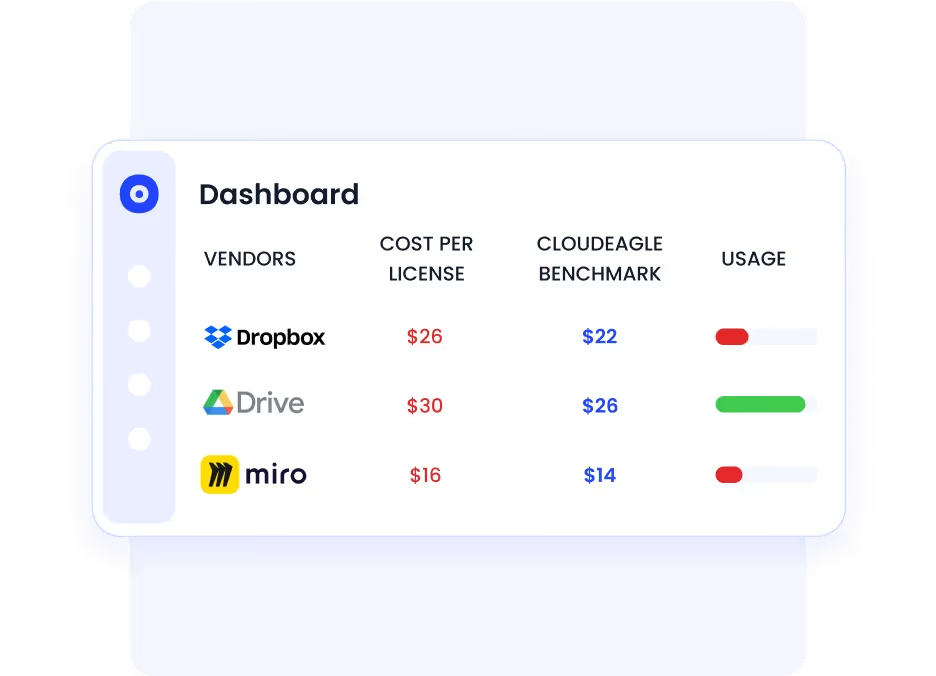
License and Usage Optimization

5. Policy Enforcement & Continuous Access Reviews: CloudEagle.ai automates regular access reviews and certifications, making sure permissions are up-to-date and compliant with regulatory standards like SOC 2, ISO 27001, GDPR, etc.
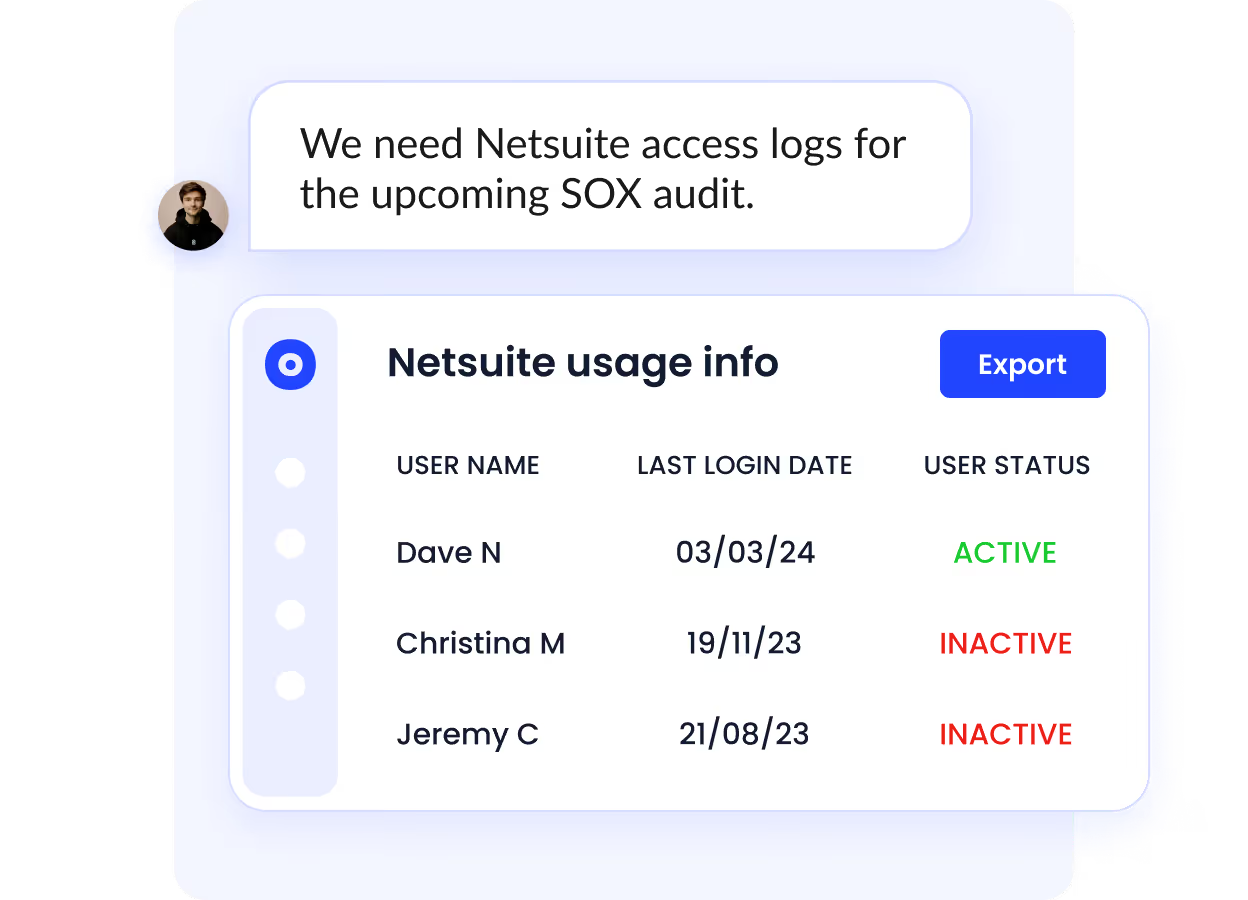
Continuous Access Reviews

6. Integration with Non-SCIM Apps: Many SaaS apps do not support SCIM (System for Cross-domain Identity Management). CloudEagle.ai connects to these through over 500 integrations, ensuring unified management even for apps without native SSO support.

7. Security Enhancements & Risk Reduction: CloudEagle.ai’s AI-driven insights proactively identify security gaps, unauthorized access, or risky behaviors. It supports ongoing monitoring and alerts, so your enterprise stays protected.

9. SSO Pricing: What Does Single Sign-On Cost in 2026?

SSO pricing follows a per-user, per-month model for most commercial tools. Here is the realistic range by segment:

  • SMBs (core SSO + MFA): $2-8 per user per month. JumpCloud and OneLogin are the most cost-efficient options at this tier.
  • Enterprise (adaptive security + lifecycle management): $6-15 per user per month. Okta, Entra ID P2, and Ping Identity fall in this range.
  • Developer / usage-based: Auth0 scales by monthly active users. The free tier covers up to 7,500 MAUs, viable for early-stage products.
  • Open-source: Keycloak has no licensing cost. Budget for engineering time (implementation and maintenance) and optionally Red Hat support.

Conclusion

Single Sign-On tools have become essential for modern businesses, streamlining access management while enhancing security. By implementing SSO, you reduce password fatigue, minimize security risks, and boost productivity across your organization.

When selecting an SSO tool, consider your specific needs, integration capabilities, and scalability.

For even more robust security, integrate your chosen SSO tool with SaaS management and access governance systems like CloudEagle.ai. This combination provides comprehensive control over user access and data protection.

Ready to transform your organization's security and efficiency? Book a demo with CloudEagle.ai today.

Frequently Asked Questions

1. What is the most common SSO?

The most common SSO is typically OAuth 2.0. This open standard for access delegation is widely used due to its flexibility and security. It allows you to grant third-party applications limited access to your resources without sharing your credentials.

2. What is the other name for single sign-on?

Single sign-on is often referred to as "SSO." Some also call it "enterprise SSO" or "SaaS SSO" when used in specific contexts.

3. Which protocol can perform SSO?

Several protocols can perform SSO, including SAML (Security Assertion Markup Language), OAuth 2.0, OpenID Connect, and Kerberos.

Each protocol has its own features, but SAML is the most popular for enterprise-level SSO due to its robust security and broad compatibility with different systems.

Advertisement for a SaaS Subscription Tracking Template with a call-to-action button to download and a partial graphic of a tablet showing charts.Banner promoting a SaaS Agreement Checklist to streamline SaaS management and avoid budget waste with a call-to-action button labeled Download checklist.Blue banner with text 'The Ultimate Employee Offboarding Checklist!' and a black button labeled 'Download checklist' alongside partial views of checklist documents from cloudeagle.ai.Digital ad for download checklist titled 'The Ultimate Checklist for IT Leaders to Optimize SaaS Operations' by cloudeagle.ai, showing checklist pages.Slack Buyer's Guide offer with text 'Unlock insider insights to get the best deal on Slack!' and a button labeled 'Get Your Copy', accompanied by a preview of the guide featuring Slack's logo.Monday Pricing Guide by cloudeagle.ai offering exclusive pricing secrets to maximize investment with a call-to-action button labeled Get Your Copy and an image of the guide's cover.Blue banner for Canva Pricing Guide by cloudeagle.ai offering a guide to Canva costs, features, and alternatives with a call-to-action button saying Get Your Copy.Blue banner with white text reading 'Little-Known Negotiation Hacks to Get the Best Deal on Slack' and a white button labeled 'Get Your Copy'.Blue banner with text 'Little-Known Negotiation Hacks to Get the Best Deal on Monday.com' and a white button labeled 'Get Your Copy'.Blue banner with text 'Little-Known Negotiation Hacks to Get the Best Deal on Canva' and a white button labeled 'Get Your Copy'.Banner with text 'Slack Buyer's Guide' and a 'Download Now' button next to images of a guide titled 'Slack Buyer’s Guide: Features, Pricing & Best Practices'.Digital cover of Monday Pricing Guide with a button labeled Get Your Copy on a blue background.Canva Pricing Guide cover with a button labeled Get Your Copy on a blue gradient background.

Enter your email to
unlock the report

Oops! Something went wrong while submitting the form.
License Count
Benchmark
Per User/Per Year

Enter your email to
unlock the report

Oops! Something went wrong while submitting the form.
License Count
Benchmark
Per User/Per Year

Enter your email to
unlock the report

Oops! Something went wrong while submitting the form.
Notion Plus
License Count
Benchmark
Per User/Per Year
100-500
$67.20 - $78.72
500-1000
$59.52 - $72.00
1000+
$51.84 - $57.60
Canva Pro
License Count
Benchmark
Per User/Per Year
100-500
$74.33-$88.71
500-1000
$64.74-$80.32
1000+
$55.14-$62.34

Enter your email to
unlock the report

Oops! Something went wrong while submitting the form.

Enter your email to
unlock the report

Oops! Something went wrong while submitting the form.
Zoom Business
License Count
Benchmark
Per User/Per Year
100-500
$216.00 - $264.00
500-1000
$180.00 - $216.00
1000+
$156.00 - $180.00

Enter your email to
unlock the report

Oops! Something went wrong while submitting the form.

Get the Right Security Platform To Secure Your Cloud Infrastructure

Please enter a business email
Thank you!
The 2023 SaaS report has been sent to your email. Check your promotional or spam folder.
Oops! Something went wrong while submitting the form.

Access full report

Please enter a business email
Thank you!
The 2023 SaaS report has been sent to your email. Check your promotional or spam folder.
Oops! Something went wrong while submitting the form.

Imagine logging into your CRM, then your project management tool, followed by your finance software, each with a different password. This daily ritual wastes lots of your time and increases security risks.

For instance, forgotten passwords lead to countless reset requests, bogging down IT support. When team members leave, removing their access from multiple systems becomes a logistical nightmare.

Fortunately, there is a solution for all these: Single Sign-On (SSO) tools. These platforms help streamline access, allowing employees to enter one set of credentials for all their applications.

SSO enhances security by enforcing strong authentication policies across the board. It also simplifies user management, enabling quick provisioning and deprovisioning of access rights.

This article will discuss the 8 best SSO tools available for SaaS-focused businesses in 2026. We aim to guide IT, finance, and procurement teams toward informed decisions.

TL;DR

Tool Best For Pricing From G2
Okta Enterprise security & lifecycle management $2/user/mo 4.5★
Microsoft Entra ID Microsoft 365 / Azure-stack orgs $6/user/mo 4.5★
OneLogin Mid-market, ERP integrations $4/user/mo 4.4★
Ping Identity Enterprise hybrid & regulated industries Custom 4.4★
Keeper Security SSO + enterprise password vault bundled Custom 4.7★
Citrix Virtual workspace & remote access orgs Custom 4.4★
SecureAuth Behavioral risk & continuous auth Custom 4.4★
Auth0 Developer / customer-facing apps Free / $35+ 4.3★

1. What Is Single Sign-On?

Single Sign-On allows users to authenticate once with a central Identity Provider (IdP) and gain access to all connected applications without re-entering credentials. 

The IdP, such as Okta, Google Workspace, or Microsoft Entra ID, verifies the user's identity and issues a secure token that connected apps accept as proof of authentication.

The result: one login, all apps, zero password sprawl.


How Single Sign-On Works: IdP, Tokens, and the Protocols Behind It (SAML, OIDC, SCIM)

Here is the authentication flow in plain terms:

1.    A user attempts to access an app (e.g., Salesforce, Slack, or Zoom).

2.    The app redirects the request to the Identity Provider (IdP).

3.    If the user already has an active session with the IdP, they get instant access. If not, they log in once with their credentials (plus MFA, if configured).

4.    The IdP issues a cryptographically signed authentication token back to the app.

5.    The app validates the token and grants access; no password entry required.

Three protocols power this flow:

•      SAML 2.0: The enterprise standard for web-based SSO. Used by most legacy and enterprise apps.

•      OpenID Connect (OIDC): A modern, lightweight protocol built on OAuth 2.0. Preferred for mobile and API-driven applications.

•      SCIM: Not an authentication protocol, but a provisioning standard. SCIM automates user account creation and removal across connected apps,  the backbone of automated onboarding and offboarding.

2. Why Single Sign-On Is No Longer Optional for Modern IT Teams?

‍The average organization uses over 130 SaaS applications. Expecting users to manage separate credentials for each is a security liability, and research confirms it. 

According to Security Boulevard, 59% of employees reuse the same password across multiple systems. A single credential breach can cascade across your entire stack.

Three forces are accelerating SSO adoption in 2026:

•      Zero Trust mandates: Identity is now the primary security perimeter. Zero Trust frameworks require every access request to be continuously verified. SSO is the enforcement layer.

•      Remote and hybrid work: Distributed teams accessing apps from multiple devices and locations make perimeter-based security obsolete. SSO centralizes control regardless of where users are.

•      Compliance pressure: HIPAA, SOC 2, ISO 27001, and GDPR all require demonstrable access controls. SSO creates the audit trail that proves who accessed what and when.

130 Apps. One Weak Password. That's All It Takes.

Here's how to shut down unauthorized access before it shuts you down.
Get the Shadow IT & AI Guide

3. Top 8 Single Sign-On Tools for 2026

1. Okta

‍Okta offers an SSO solution that streamlines access to your organization's applications. You can manage user authentication centrally, eliminating the need for multiple passwords.

Additionally, Okta automates user lifecycle management, adjusting access rights as employees join or leave your company.

Key Features

  • Access without passwords: Eliminate traditional passwords by using biometrics or one-time codes.
  • Multi-factor authentication: Implement multiple verification steps for user login. Combine passwords with push notifications or biometrics to strengthen your access security.
  • Adaptive security policies: Set dynamic access rules based on user context. Adjust permissions according to location, device, or behavior.

Pricing

  • SSO - $2/user/month.
  • Adaptive SSO - $5/user/month.

Rating

2. Azure Active Directory (Azure AD)

Microsoft Azure Active Directory provides comprehensive SSO capabilities, allowing your users to access multiple applications with a single set of credentials.

This solution simplifies access management and enhances security across your organization's SaaS portfolio.

Key Features

  • Enhanced authentication: Implement multi-factor authentication to add an extra layer of security, requiring users to verify their identity through secondary methods like mobile notifications or biometrics.
  • Self-service password management: Enable users to reset their passwords securely, reducing IT workload while maintaining robust security policies.
  • Centralized identity control: Manage user identities consistently across all applications and services from a single platform to ensure uniform security standards.

Pricing

  • Microsoft Entra ID P1 - $6.00 user/month.
  • Microsoft Entra ID P2 - $9.00 user/month.
  • Microsoft Entra Suite - $12.00 user/month.

Rating

3. OneLogin

‍OneLogin streamlines user authentication and access management, allowing your team to use a single set of credentials for multiple applications. This solution reduces your IT department's administrative burden and enhances overall security.

Key Features

  • Advanced authentication: Implement multi-factor authentication using biometrics, SMS verification, or tokens to ensure only authorized users access your systems.
  • Comprehensive logout function: Enable users to sign out of all connected applications simultaneously.
  • Access control: Manage user access to all applications from a single dashboard to ensure tight control over sensitive data and resources.

Pricing

  • Single Sign-On (SSO) - $4/user/month.

Rating

4. Ping Identity

‍Ping Identity's SSO enhances your organization's security while boosting productivity. It allows your employees to access multiple applications with a single set of credentials, simplifying authentication processes.

Key Features

  • Simplified compliance management: Enforce access policies and generate detailed audit logs, streamlining your compliance reporting process.
  • User-driven account management: Enable users to reset passwords and manage profiles independently, reducing IT workload and fostering employee autonomy.
  • Application integration: Seamlessly connect with various cloud-based and on-premises systems.

Pricing

Automated pricing.

Rating

5. Keeper Security

‍Keeper Security provides a robust password management and security platform, integrating seamlessly with SSO solutions. It helps you enforce strong password policies across your organization, enhancing overall security.

Key Features

  • Multi-factor authentication: Implement multi-factor authentication, requiring users to verify their identity through multiple means, significantly reducing unauthorized access risks.
  • Endpoint access: Control access to various endpoints, including computers and mobile devices, ensuring secure connections across all platforms.
  • Password policy enforcement: Set and enforce specific password policies to allow you to maintain stringent security standards throughout your organization.

Pricing

Automated pricing.

Rating

6. Citrix

‍Citrix offers SSO solutions as part of its Secure Workspace Access and Secure Internet Access platforms. This integration simplifies user access while enhancing your organization's overall security posture.

Key Features

  • Enhanced security verification: Implement multi-factor authentication quickly to add crucial layers of protection beyond traditional passwords.
  • Universal application access: Ensure consistent SSO experience across desktop, mobile, and cloud applications to streamline user access regardless of device or location.
  • Secure remote connectivity: Enable employees to access corporate resources securely from any location, supporting flexible work arrangements without compromising security.

Pricing

Automated pricing.

Rating

7. SecureAuth Identity Platform

SecureAuth Identity Platform offers a next-generation SSO solution that leverages adaptive risk analytics to create a unique digital DNA for each user. This approach enables continuous, passwordless authentication, enhancing security across your SaaS stack.

Key Features

  • Authentication user experience: Simplify the login process across multiple systems, providing your team with a seamless and user-friendly experience.
  • Multi-factor authentication: Implement multi-factor authentication, requiring users to verify their identity through something they know, have, or are.
  • Support for multiple operating systems: Control endpoint access across different operating systems to ensure consistent security measures regardless of device type.

Pricing

Automated pricing.

Rating

8. Auth0

‍Auth0 provides a modern, flexible SSO solution that secures access to all your applications for every user. It balances simplicity and customization, allowing you to tailor authentication processes to your specific needs.

Key Features

  • Supports required authentication systems: Integrate various authentication methods, including biometrics, passwords, and token-based systems.
  • Endpoint access: Control access across multiple endpoints, from computers to mobile devices, maintaining consistent security across all platforms.
  • Remote access: Enable safe connections to legacy applications, web resources, and network assets for employees working outside your local network.

Pricing

  • Free - $0/month.
  • Essentials - $35/month.
  • Professional - $240/month.
  • Enterprise - automated pricing.

Rating

4. Single Sign-On and Zero Trust: How SSO Becomes Your Identity Perimeter?

Zero Trust is a security model built on one principle: never trust, always verify. No user, device, or network connection is trusted by default; every access request must be authenticated and authorized, regardless of where it originates.

SSO makes Zero Trust practical at scale. Without centralized identity, you cannot enforce consistent access policies across dozens or hundreds of apps. With SSO, every access request passes through a single authentication layer where you can apply:

•      Adaptive MFA: Requires additional verification when risk signals are elevated, a new device, an unusual location, or off-hours access.

•      Conditional access policies: Block or restrict access based on device compliance status, IP range, or user role.

•      Session monitoring: Detect and terminate anomalous sessions in real time.

•      Continuous re-authentication: Require users to re-verify after a defined inactivity period or when risk context changes.

5. Single Sign-On vs LDAP: Which Is Right for Your Organization?

IT teams evaluating identity management often encounter both SSO and LDAP (Lightweight Directory Access Protocol). They solve adjacent problems and are often used together,  but they are not interchangeable.


Single Sign-On (SSO) LDAP
What it does Authenticates users across multiple apps with one login session Stores and retrieves identity data from a central directory
Primary use case App access management, one credential for many SaaS tools On-premise directory services, internal network authentication
Cloud compatibility Built for cloud and SaaS environments Primarily on-premise; cloud use requires wrappers like LDAPS
User experience Single login, seamless app switching App-by-app authentication, no session federation
Protocol SAML, OIDC, OAuth 2.0 LDAP protocol (TCP/IP, port 389 or 636 for LDAPS)
Best for SaaS-heavy organizations, remote teams, and compliance-driven environments Organizations with heavy on-premise infrastructure and directory needs

6. How SSO Reduces Shadow IT, and Why That Matters for SaaS Teams?

Shadow IT, the unauthorized apps employees adopt without IT approval, is a fast-growing security and cost risk. Employees often sign up for tools without IT visibility, bypassing security reviews.

SSO helps reduce shadow IT by making approved apps easy to access. But it only governs apps connected to your IdP, leaving others invisible.

CloudEagle.ai fills this gap by:

• Discovering shadow IT across your SaaS stack
• Flagging unauthorized or duplicate spend
• Giving IT a complete SaaS visibility dashboard

SSO Only Sees What's Connected to It. The Rest Is Invisible.

Find every app hiding outside your IdP before it becomes a breach.
Get the Hidden AI Detection Guide

7. How to Choose an SSO Provider: Key Considerations?

When choosing single sign-on (SSO) tools, start by checking support for key protocols like SAML 2.0, OpenID Connect, and OAuth 2.0, along with integrations for your directories and SaaS apps.

Ensure the platform offers a large app connector catalog, strong security controls such as adaptive MFA and risk-based authentication, and the ability to scale across cloud, hybrid, or on-premise environments.

Prioritize solutions that simplify user provisioning, provide granular access controls, and include audit reporting for compliance. Also, evaluate the total cost of ownership, including licenses, add-ons, implementation, and maintenance.

  • SMB: Affordable, cloud-first SSO with extensive app connectors and basic MFA.
  • Enterprise: Hybrid deployments, advanced role-based access control, automated user lifecycle management, and strict SLAs.
  • Developer-first: Flexible SDKs, custom rules, fine-grained policies, and excellent documentation.
  • Regulated industries: Comprehensive audit trails, FIPS-compliant encryption, and adherence to HIPAA, ISO, and SOC 2 standards.

8. How CloudEagle.ai Can Augment Your SSO?

Using CloudEagle.ai alongside your existing SSO infrastructure creates a robust, automated, and secure SaaS access management ecosystem, greatly enhancing your security posture and operational efficiency.​

Here is a detailed step-by-step on how CloudEagle.ai can augment your SSO:

1. Full Visibility into App Usage: CloudEagle.ai seamlessly integrates with your SSO system (like Okta, Azure AD, or Google Workspace). It provides a comprehensive view of all SaaS applications being accessed, including those outside your official SSO environment, such as shadow IT or unauthorized apps.

Full Visibility into App Usage

2. Automated User Provisioning and Deprovisioning: When integrated with your SSO, CloudEagle.ai automates the onboarding and offboarding processes. New employees automatically receive access to essential apps, while departing staff have their access revoked instantly, reducing manual work and security risks.

3. RBAC & JIT: CloudEagle.ai enhances traditional RBAC by applying context-aware policies such as just-in-time (JIT) access, location-based restrictions, and usage patterns. This ensures users access only what they need, when they need it, improving security and compliance.

4. License and Usage Optimization: The platform tracks app usage and licenses associated with your SSO. It detects inactive or underused licenses and automates license reclamation, helping you cut unnecessary SaaS spend and avoid overspending.

License and Usage Optimization

5. Policy Enforcement & Continuous Access Reviews: CloudEagle.ai automates regular access reviews and certifications, making sure permissions are up-to-date and compliant with regulatory standards like SOC 2, ISO 27001, GDPR, etc.

Continuous Access Reviews

6. Integration with Non-SCIM Apps: Many SaaS apps do not support SCIM (System for Cross-domain Identity Management). CloudEagle.ai connects to these through over 500 integrations, ensuring unified management even for apps without native SSO support.

7. Security Enhancements & Risk Reduction: CloudEagle.ai’s AI-driven insights proactively identify security gaps, unauthorized access, or risky behaviors. It supports ongoing monitoring and alerts, so your enterprise stays protected.

9. SSO Pricing: What Does Single Sign-On Cost in 2026?

SSO pricing follows a per-user, per-month model for most commercial tools. Here is the realistic range by segment:

  • SMBs (core SSO + MFA): $2-8 per user per month. JumpCloud and OneLogin are the most cost-efficient options at this tier.
  • Enterprise (adaptive security + lifecycle management): $6-15 per user per month. Okta, Entra ID P2, and Ping Identity fall in this range.
  • Developer / usage-based: Auth0 scales by monthly active users. The free tier covers up to 7,500 MAUs, viable for early-stage products.
  • Open-source: Keycloak has no licensing cost. Budget for engineering time (implementation and maintenance) and optionally Red Hat support.

Conclusion

Single Sign-On tools have become essential for modern businesses, streamlining access management while enhancing security. By implementing SSO, you reduce password fatigue, minimize security risks, and boost productivity across your organization.

When selecting an SSO tool, consider your specific needs, integration capabilities, and scalability.

For even more robust security, integrate your chosen SSO tool with SaaS management and access governance systems like CloudEagle.ai. This combination provides comprehensive control over user access and data protection.

Ready to transform your organization's security and efficiency? Book a demo with CloudEagle.ai today.

Frequently Asked Questions

1. What is the most common SSO?

The most common SSO is typically OAuth 2.0. This open standard for access delegation is widely used due to its flexibility and security. It allows you to grant third-party applications limited access to your resources without sharing your credentials.

2. What is the other name for single sign-on?

Single sign-on is often referred to as "SSO." Some also call it "enterprise SSO" or "SaaS SSO" when used in specific contexts.

3. Which protocol can perform SSO?

Several protocols can perform SSO, including SAML (Security Assertion Markup Language), OAuth 2.0, OpenID Connect, and Kerberos.

Each protocol has its own features, but SAML is the most popular for enterprise-level SSO due to its robust security and broad compatibility with different systems.

Recognized as an Industry leader for our AI

CloudEagle.ai is Recognized in the 2024 Gartner® Magic Quadrant™ for SaaS Management Platforms

Recognition highlights CloudEagle’s innovation and leadership in the rapidly evolving SaaS management and procurement space.
Read More
Gartner Magic Quadrant for SaaS Management Platforms showing a chart divided into Challengers and Leaders quadrants with various companies plotted as dots.

CloudEagle.ai Recognized in the GigaOm Radar for SaaS Management Platforms

CloudEagle named a Leader and Outperformer in GigaOm Radar Report, validating its impact in the SaaS management platform landscape.
Read More
gigaom

Everest Group Positions CloudEagle.ai as a Trailblazer in SaaS Management Platforms

CloudEagle recognized as a Trailblazer by Everest Group, showcasing its rapid growth and innovation in SaaS spend and operations management.
Read More
qks

CloudEagle.ai is Recognized in the 2024 Gartner® Magic Quadrant™ for SaaS Management Platforms

Recognition highlights CloudEagle’s innovation and leadership in the rapidly evolving SaaS management and procurement space.
Read More
gartner
CloudEagle.ai recognized in the 2025 Gartner® Magic Quadrant™ for SaaS Management Platforms
Download now
gartner chart
5x
Faster employee
onboarding
80%
Reduction in time for
user access reviews
30k
Workflows
automated
$15Bn
Analyzed in
contract spend
$2Bn
Saved in
SaaS spend

Streamline SaaS governance and save 10-30%

Book a Demo with Expert
CTA image
One platform to Manage
all SaaS Products
Learn More