HIPAA Compliance Checklist for 2025

Overlooking SaaS license management will lead to poor license usage and resource wastage. For instance, if you have purchased 200 SaaS app licenses, of which only 120 are optimally used, you are wasting almost 40% of the resources.
To avoid incurring additional costs, you must identify the unused licenses, reclaim them, and harvest them to assign to new employees.
Manually visiting each application and requesting app admins to deprovision users can be counter-productive. You should opt for a SaaS management platform like CloudEagle to streamline the process.
CloudEagle will save time and enable your IT teams to focus on their core tasks rather than chasing stakeholders or app admins to deactivate licenses.
So, let’s find out how CloudEagle helps with license harvesting.
What Low-Usage License Harvesting Involves and Where Manual Reclamation Breaks
Low-usage license harvesting, also called SaaS license reclamation, is the part of software license harvesting that recovers seats that are assigned but barely used. The seat goes back to an available pool, or the user moves to a cheaper tier.
Every harvesting cycle runs through four steps:
- Detect: compare assigned licenses with real activity, including logins and feature usage, over 30, 60, or 90 days.
- Notify: tell the user their seat is flagged and give them a window to respond.
- Reclaim or downgrade: remove the seat from users who don't respond, or move light users to a lower tier.
- Reassign: return the license to the pool for the next hire or access request.
Running those steps manually breaks in two places beyond the workload. Login data misleads, because a user who opens an app once a month to read a report still counts as active on a premium tier. And licenses stay assigned after people leave or change roles, which turns idle seats into orphaned accounts with live access.
Left alone, both become SaaS license waste that compounds at every renewal and widens the access surface IT has to review.

How to Automate License Harvesting with CloudEagle.ai
CloudEagle.ai is an AI-powered SaaS Management, AI Governance, and SaaS Security platform that runs automated license harvesting and reclamation workflows across your SaaS and AI stack. It connects to the systems that already know who holds a license and how they use it, then automates the alerts and deprovisioning IT used to handle manually.
The workflow below follows one low-usage license from discovery to reassignment.
A. Connect Your Apps to See Every License and Who Holds It
Harvesting starts with an accurate seat count, and most teams don't have one because licenses are bought by different departments and tracked in different consoles. CloudEagle.ai pulls license and user data from your SSO, HRIS, finance systems, and direct app connectors through 500+ integrations, then syncs it nightly into one inventory.
IT gets one list of every app, assigned seat, and cost, including apps bought on a card outside SSO, with onboarding in about 30 minutes. Next comes finding which of those seats people actually use.
B. Find Low-Usage Licenses Using Real Usage, Beyond Logins
A login count tells you someone opened the app. It can't tell you whether they need the paid tier.
CloudEagle.ai tracks feature activity alongside logins and compares active users with assigned users for each app, so you can see who hasn't signed in for 30, 60 or 90 days and who uses only basic features on a premium plan, such as M365 E5 holders with no E5 activity.
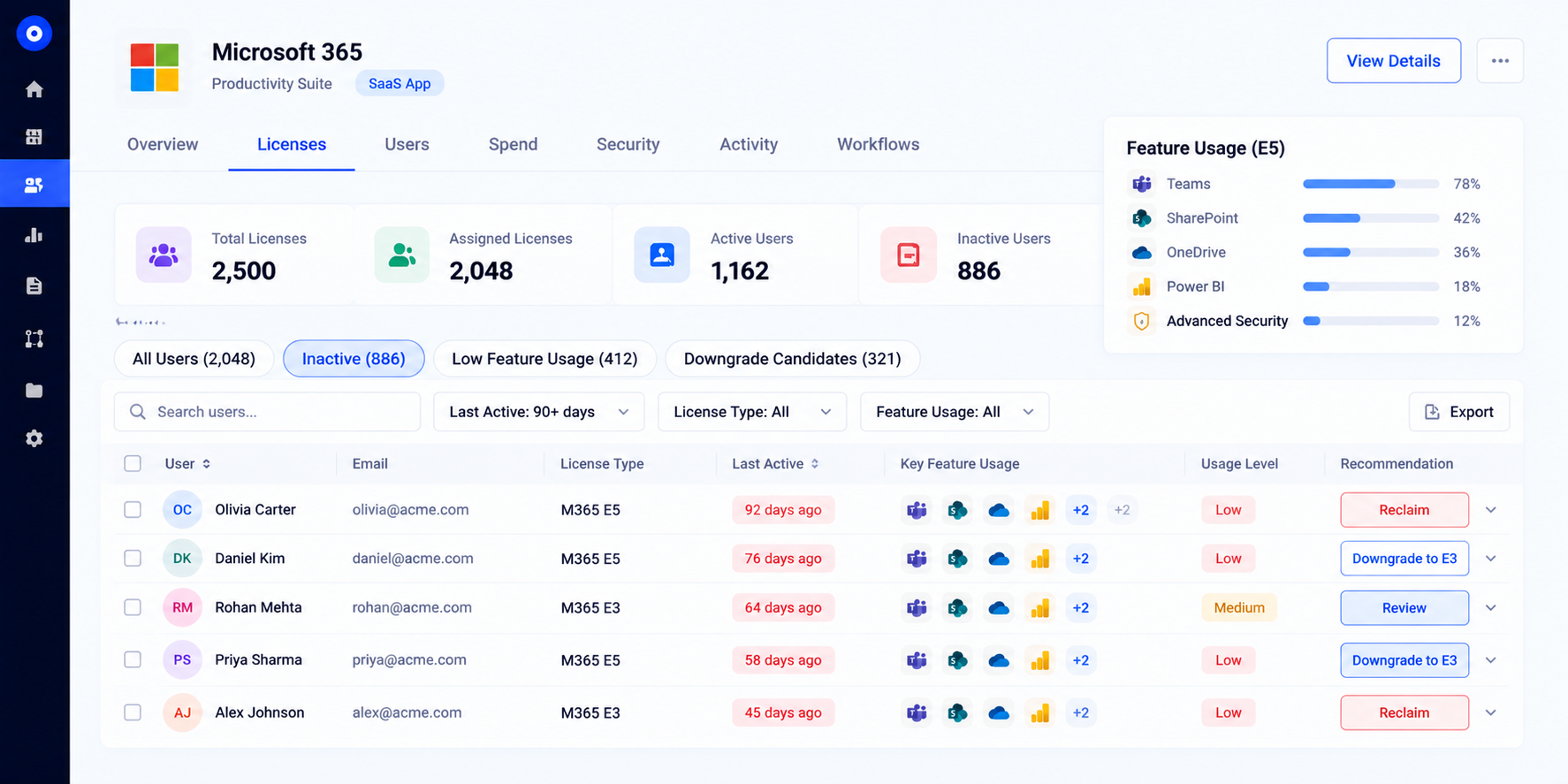
Low-usage licenses surface automatically in reports, with the cost of each idle seat attached. Once the idle seats are visible, you decide which ones the rules should act on.
C. Set Harvesting Rules by Inactivity and User Attributes
One blanket rule rarely fits every app. A sales tool used daily needs a shorter threshold than a design tool used for quarterly campaigns, and executives or employees on leave may need exclusions.
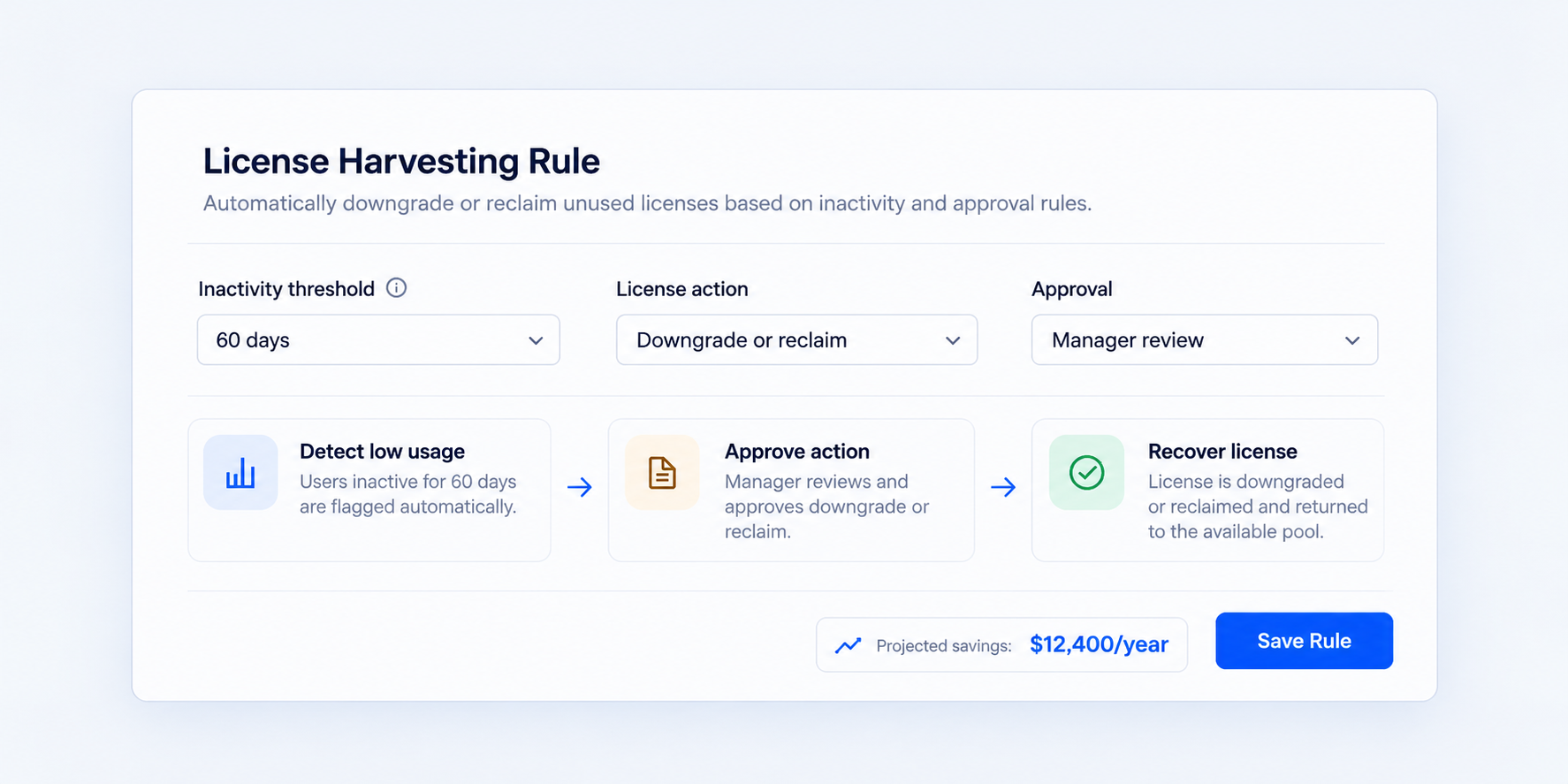
In CloudEagle.ai, IT builds harvesting rules per app using last-activity thresholds and user attributes such as role, department, and location, and a projected savings view shows what each rule would recover before it goes live.
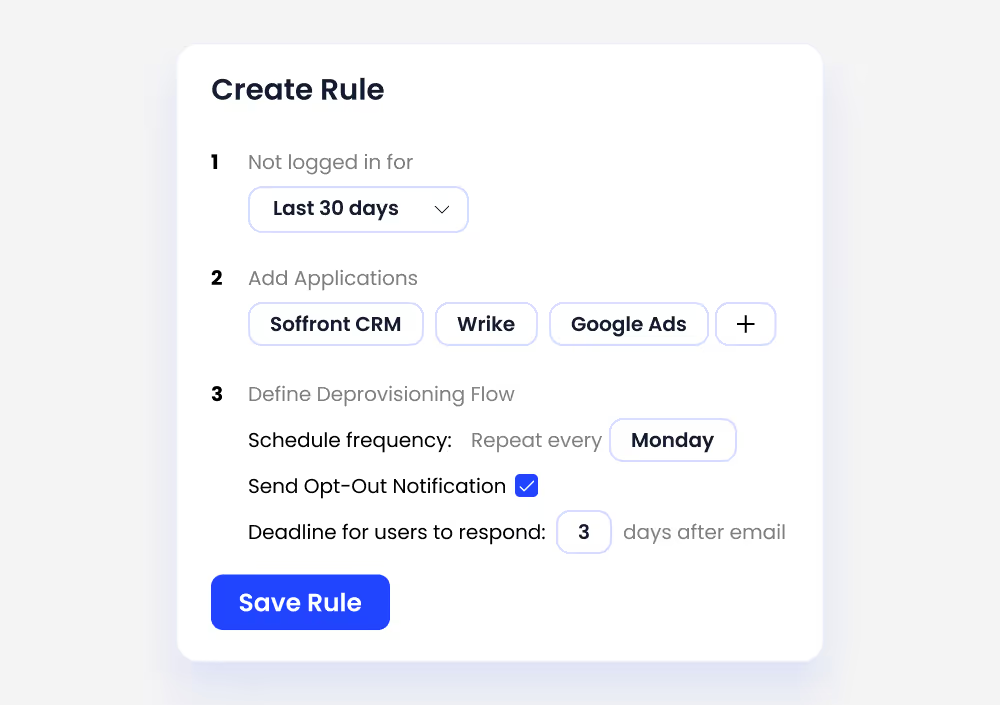
Rules match how each team works, so reclamation doesn't pull seats people rely on. When a rule flags a user, they get a chance to respond.
D. Notify Users and Give Them a Window to Respond
Removing a seat without warning creates tickets and escalations, and emailing users manually is the step most teams abandon.
CloudEagle.ai sends each flagged user an automated email explaining that the seat will be reclaimed, waits for the response window you set, and tracks who replied. Users who still need the license keep it, and IT can review the list of non-responders before anything is removed.
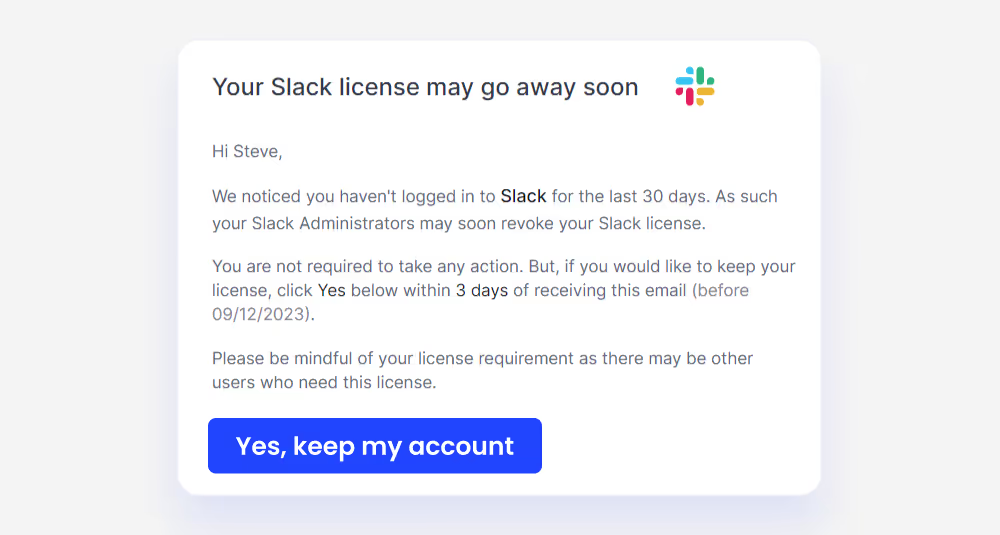
IT stops tracking replies in a spreadsheet, and anyone who doesn't respond moves to reclamation.
E. Reclaim, Downgrade or Reassign the License Automatically
This is where manual harvesting usually stops: the seat is flagged, but someone still has to log into the app and remove it.
CloudEagle.ai deprovisions non-responders automatically through the app's connector and returns the seat to the available pool for new hires and access requests. Where a user needs the app but not the tier, it moves them to a lower license, for example by adding or removing them from an Okta group mapped to that tier.
Seats also come back without a ticket when employees leave or change roles, through offboarding workflows synced with your HRIS. New requests are filled from reclaimed inventory before anyone buys more seats. The last step keeps this running after the first cleanup.
F. Run Harvesting on a Schedule and Keep Every Reclaim on Record
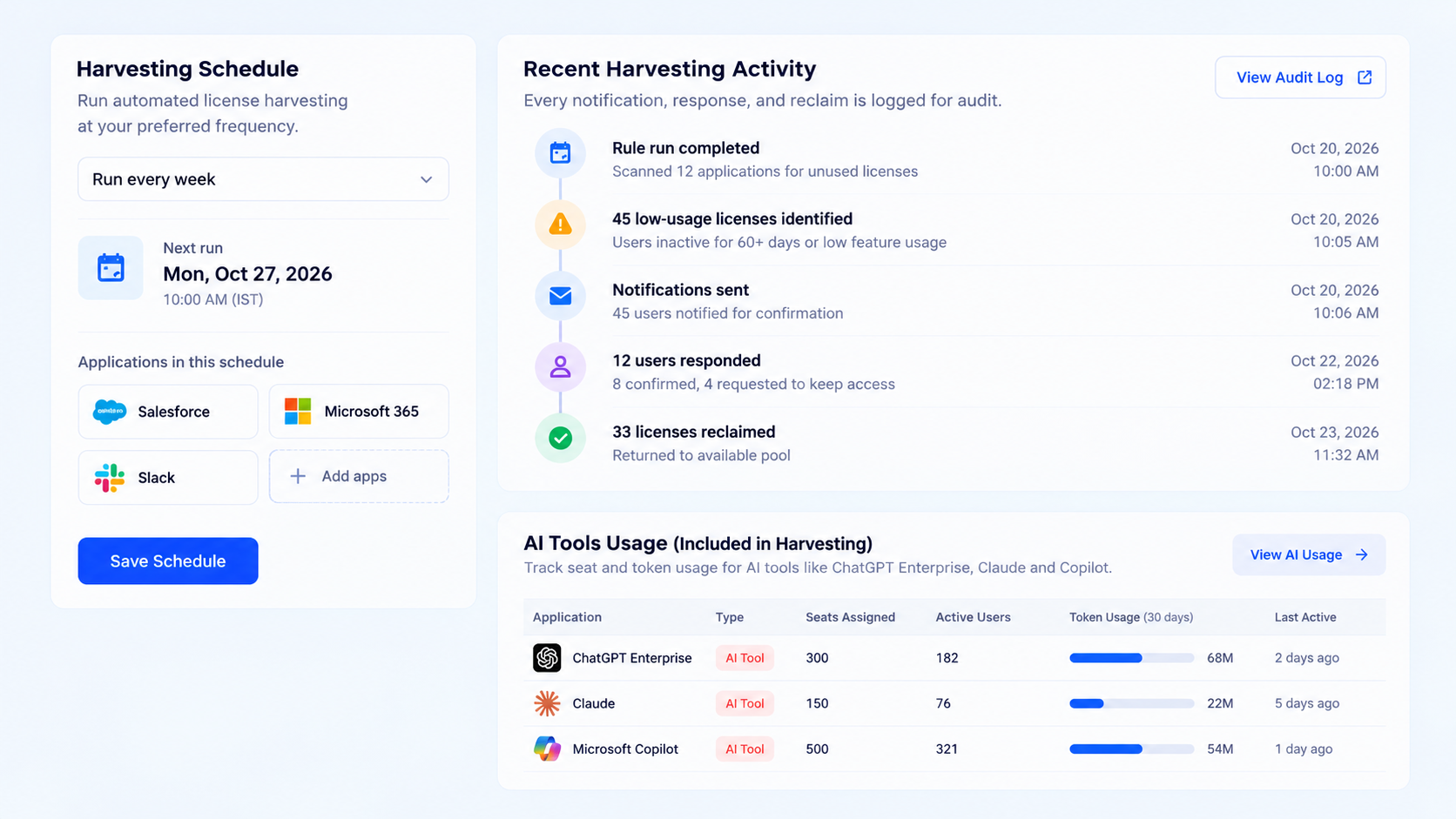
A one-time cleanup decays as new hires join and usage shifts. CloudEagle.ai runs harvesting weekly or monthly, alerts IT when usage on an app drops, and logs every notification, response, and reclaim for audit.
The same controls extend to AI tools such as ChatGPT Enterprise, Claude, and Copilot, where AI usage control tracks seat and token use by user.
Usage data stays current going into each renewal, so you renew at the tier and quantity people actually use. RingCentral used this workflow to reclaim 932 unused Salesforce licenses, saving $2.5M and 1,562 hours a year of manual license tracking.
How to Compare Platforms That Automatically Detect Unused Apps and Reclaim Licenses
Compare license harvesting platforms on data sources, usage depth, rule flexibility, user notification, what happens to the seat, cadence, and AI coverage. Each row below is a question to put to the vendor.
SaaS spend management tools that flag unused licenses automatically will show you the waste. A license harvesting platform should also notify the user, remove or downgrade the seat and hand it to someone else.
Before you buy, run a short pilot on two or three high-cost apps. Count how many seats each platform flags, how many it actually reclaims, and how much manual work IT still does between the two.
Conclusion
Low-usage licenses come from routine events: a new hire who needed a tool for one project, a team that switched apps, an employee who left.
Those events never stop, so a once-a-year cleanup can't keep up, and most organizations end up paying again for seats they reclaimed the year before.
Automated license harvesting runs that cycle continuously. Usage is measured on logins and feature activity; users get a window to keep their seat, and licenses are reclaimed, downgraded, or reassigned without IT touching each app.
Every action is logged, so the process that cuts cost also gives auditors a record of who had access and when it ended.
Start with your next renewal. Pick the two or three apps with the most seats, check how many show no activity in the last 90 days, and harvest them before the notice period opens. CloudEagle.ai shows that number across your SaaS and AI stack about 30 minutes after you connect your SSO and apps.
FAQs
1. Which SaaS management tool helps reduce license waste using usage-based recommendations and automated deprovisioning?
CloudEagle.ai flags low-usage licenses from login and feature data, recommends reclaim or downgrade, and deprovisions non-responders automatically. It also logs every action for audit.
2. Can licenses adjust automatically with usage?
Yes. Harvesting rules can move light users to a lower tier and reclaim seats after a set inactivity period, so license counts follow real usage between renewals.
3. What platform provides alerts for unused or underutilized SaaS apps?
A SaaS management platform that tracks usage per app can alert IT when activity drops. CloudEagle.ai sends these alerts and can trigger harvesting rules from them.
4. Is SCIM enough for license reclamation?
SCIM removes accounts when the IdP tells it to, but it doesn't decide which seats are idle. Reclamation also needs usage data and rules to choose which licenses to pull.
5. How do I identify and reclaim unused SaaS licenses to cut costs?
Compare assigned licenses with logins and feature activity over 30 to 90 days, notify inactive users, then reclaim or downgrade the seats nobody defends. Automating the cycle keeps it running after the first cleanup.
6. How do you identify unused AI coding tool licenses?
Track seat assignments against activity and token use per user in the AI tool's admin data. CloudEagle.ai shows this for AI tools alongside your SaaS apps, so idle AI seats go through the same harvesting rules.
See Every Idle Seat Across Your Stack in 30 Minutes