You need to enable JavaScript in order to use the AI chatbot tool powered by ChatBot

ChatGPT Pricing Guide: Plans and How Enterprises Can Negotiate

Share via:
blog-cms-banner-bg
Little-Known Negotiation Hacks to Get the Best Deal on Slack
cta-bg-blogDownload Your Copy

HIPAA Compliance Checklist for 2025

Download PDF

ChatGPT has evolved from a curiosity into an essential tool across industries, from writing and coding to customer support and strategy. 

But with multiple plans available, Free, Plus, Pro, Team, and Enterprise, navigating ChatGPT’s pricing can be confusing.

That’s where a reliable ChatGPT pricing guide becomes essential. And at the same time for the enterprises, ChatGPT pricing is no longer just a budgeting decision. 

For CIOs and CISOs, it’s a governance, security, and identity challenge. With employees purchasing Plus plans on corporate cards and teams experimenting with AI tools outside IT oversight, understanding ChatGPT pricing is critical for cost control, compliance, and data protection.

This ChatGPT pricing guide breaks down each plan in plain terms, its risks and opportunities to optimize at an enterprise scale. You'll learn how the different models stack up, how to reduce shadow AI, and ensuring access aligns with security and compliance policies.

TL;DR 

  • This ChatGPT pricing guide breaks down every plan, from Free to Enterprise, to help you choose the right tier.
  • ChatGPT pricing varies by features, with Pro and Team plans offering advanced tools and model access.
  • Pro users enjoy unlimited GPT-4o access, faster responses, and priority features like o1 Pro mode.
  • Beyond subscription costs, enterprises must account for shadow AI, duplicate licenses, and unmanaged API usage that can silently inflate spend.
  • Optimizing ChatGPT pricing requires centralized visibility, license harvesting, and identity-based governance to eliminate waste before renewal cycles.

1. ChatGPT Pricing Plans in 2026

ChatGPT pricing in 2026 spans five distinct tiers, each designed for different user needs and budgets. Understanding how much is ChatGPT across these plans helps you select the right fit, from free experimentation to enterprise-scale deployment. The core difference lies in model access, usage limits, speed, and collaborative features.

ChatGPT pricing in 2026 spans five distinct tiers, each designed for different user needs and budgets. Understanding about ChatGPT pricing guide across these plans helps you select the right fit, from free experimentation to enterprise-scale deployment. The core difference lies in model access, usage limits, speed, and collaborative features.

Most Teams Overpay for ChatGPT

Get the Buyer’s Guide to uncover hidden pricing levers, negotiation tactics, and optimize ChatGPT spend.
Get the Free Guide

2. What is ChatGPT?

ChatGPT is a conversational AI chatbot built by OpenAI. It uses advanced natural language processing to generate human-like responses and create content such as articles, code, and more. 

Designed for easy interaction, it lets users ask questions or make requests in plain language and receive informative, helpful replies in return. ChatGPT also holds an 80% share of the AI search market as of now. 

At its core, ChatGPT is powered by Generative Pre-trained Transformer models, GPT for short. It started with GPT-3.5 in the free tier and has since advanced to GPT-4 and GPT-4o in paid tiers. ChatGPT is accessible through multiple formats:

  • Web app and desktop app
  • Mobile apps (iOS and Android)
  • API for integration into custom applications

Whether you're exploring chatgpt plans or integrating the model into a product, OpenAI’s flexible access points ensure that ChatGPT pricing guide can fit into diverse workflows.

3. Is ChatGPT Worth Paying For?

Whether ChatGPT Plus is worth the $20 monthly price largely depends on your needs and how often you use the platform. 

It’s ideal for users who need faster responses, priority access during peak hours, and advanced tools like DALL·E 3 and GPT-4o for complex tasks and creative projects.

Paid tiers unlock GPT-4o, and advanced features are not available in the free version. This ChatGPT pricing guide helps you understand the value behind each upgrade.

Here’s where paid plans shine:

  • ChatGPT subscription cost pays for speed, longer prompts, and more accurate outputs.
  • ChatGPT pro pricing gives developers and researchers better access to technical workloads.
  • Upgrading from free often results in better ROI and time savings, especially when scaling.

If you rely on ChatGPT for content, support, or development tasks, the ChatGPT paid tiers are a strategic investment.

SaaS and AI Spend Calculator

CloudEagle.ai customers typically recover 10–30% of annual SaaS and AI spend. Answer 12 questions to benchmark your maturity, see your recoverable spend estimate, and get a personalized 3-page savings report.

12 questions · ~4 min 10–30% typical savings $2B+ saved across customers

No signup required to start · Instant results

Select “Save as PDF” in the print dialog to download your report.
SaaS & AI Spend Optimization Report  · 
Recoverable Spend Estimate

Maturity Score Breakdown
Overall Maturity
SaaS Maturity
AI Maturity
Optimization Areas Identified

Executive Summary
cloudeagle.ai Confidential 1 / 3
Your Optimization Gaps
Identified Optimization Gaps

The areas below scored 1 or 2 in your assessment. Each represents a specific gap where spend is leaking or optimization is being left on the table, with a clear first action to address it.

cloudeagle.ai Confidential 2 / 3
How CloudEagle.ai Can Help
Closing the Gap

CloudEagle.ai is the AI-powered command center for SaaS, AI, and identity governance. Trusted by RingCentral, Automation Anywhere, Shiji, and Rec Room, the platform has processed $20B+ in spend and delivered $2B+ in savings — typically 10–30% of annual SaaS and AI spend. The gaps surfaced in this report are exactly what CloudEagle was built to close.

Discover Every Tool — Including Shadow AI

Most organizations are governing a fraction of their actual SaaS and AI footprint. CloudEagle.ai builds a real-time inventory through 500+ direct integrations across SSO, finance, HRIS, browser, firewall, and contract data — surfacing every sanctioned tool, every shadow purchase, and every AI tool employees adopted without IT approval. Onboarding takes 30 minutes, with usable visibility from day one.


Eliminate Waste with Automated Optimization

Unused licenses, duplicate tools, and over-tiered subscriptions accumulate silently between renewal cycles. CloudEagle.ai runs continuous license harvesting, flags overlapping tools across departments, and arms renewals with peer pricing benchmarks and usage data — turning insights into action through no-code Slack-enabled workflows. Customers typically recover 10–30% of annual SaaS spend within the first 90 days.


Govern AI Spend Before It Becomes Ungovernable

AI tool costs are usage-based, token-driven, and largely invisible until invoices arrive. CloudEagle.ai tracks AI tool adoption across the organization, monitors usage against budget thresholds, enforces approval workflows for new AI tools, and detects sensitive content shared with public AI services — giving finance, IT, and security a shared real-time view before overruns hit the P&L.

Book a 30-Min Optimization Review

In a focused session with a CloudEagle.ai specialist, we map your specific spend profile against our optimization framework and show you exactly where your savings are — across unused licenses, duplicate tools, renewal negotiation leverage, and AI spend governance.

cloudeagle.ai/book-a-demo
cloudeagle.ai Confidential 3 / 3

4. The Real Cost of ChatGPT for Enterprises

Beyond subscription pricing, the true cost of ChatGPT pricing guide often lies in governance gaps and decentralized adoption.

  • Shadow AI subscriptions on personal or corporate cards: Employees frequently purchase individual plans without IT approval, creating blind spots in spend tracking and increasing security exposure.
  • Duplicate Team licenses across departments: Separate teams may create their own workspaces, leading to fragmented oversight, overlapping seats, and unnecessary license duplication.
  • API usage without centralized monitoring: Engineering teams experimenting with GPT APIs can generate unpredictable consumption costs if usage isn’t tracked, attributed, and capped. Effective AI usage control helps organizations prevent budget overruns while maintaining security and compliance standards.
  • Sensitive data uploaded into public AI models: Without clear policies and controls, employees may input confidential, customer, or regulated data into AI tools, increasing compliance and data leakage risk.
  • No access lifecycle management: Accounts often remain active after role changes or employee exits, resulting in both security exposure and wasted licenses.
  • No renewal oversight: Auto-renewals without usage analysis can lock organizations into inflated seat counts and missed optimization opportunities.

For CIOs and CISOs, the challenge isn’t just choosing the right plan, it’s ensuring ChatGPT usage is visible, governed, and aligned with both financial and security controls.

As CEO of digital agency Chromatix Sydney best put it, “the real cost of ChatGPT in enterprise isn’t just the monthly subscription - it’s the hidden risk of unmanaged usage, duplicated licences, exposed data and AI spend that no one is properly tracking

Do you know why ChatGPT pricing gets complex to manage for Enterprises. Read more -->

5. How Much Does ChatGPT Cost? (And Security and Governance Implications of Each Plan)

ChatGPT offers a free plan with basic access and a premium subscription called ChatGPT Plus for $20/month, which includes faster responses and priority feature access. For teams, there’s a ChatGPT Team plan at $30/user/month or $25/user/month if billed annually.

For teams comparing the cost of ChatGPT, this ChatGPT pricing guide breakdown clarifies the trade-offs.

A. ChatGPT Free

  • Cost: $0 (Free Forever)
  • Best For: Individuals exploring AI with basic usage needs
  • Features: Access to GPT-3.5 and GPT-4o mini, limited speed, and message caps
  • Drawbacks: No access to full GPT-4o, slower responses, no advanced tools or memory

Enterprise risk breakdown:

  • No centralized visibility
  • No admin controls
  • Employees may upload sensitive data
  • No audit trail

B. ChatGPT Plus

  • Cost: $20 per month
  • Best For: Power users wanting faster performance and better model access
  • Features: Full GPT-4o access, priority response times, memory capabilities
  • Drawbacks: Single-user only, no admin tools, not ideal for teams

Enterprise risk breakdown:

  • Individual subscriptions create shadow AI across departments
  • No centralized user management or SSO enforcement
  • No role-based access or automated offboarding
  • Spend fragmentation across corporate cards and cost centers

C. ChatGPT Pro

  • Cost: $200 per month
  • Best For: Developers and professionals requiring higher limits and premium tools
  • Features: Access to GPT-4o and o1-pro, extended token limits, advanced model settings, file uploads, API enhancements
  • Drawbacks: High price point, overkill for casual users

Enterprise risk breakdown:

  • High-cost licenses may remain underutilized without monitoring
  • Advanced model access increases potential data exposure risk
  • No built-in enterprise-grade identity governance
  • API enhancements can expand usage without centralized budget control

D. ChatGPT Team Plan

  • Cost: $25/user/month (annual billing) or $30/user/month (monthly billing)
  • Best For: Small to mid-sized teams seeking collaborative workflows
  • Features: Shared workspace, admin controls, team memory, priority access
  • Drawbacks: Limited enterprise-grade security, not suited for highly regulated industries

Enterprise risk breakdown:

  • Multiple team workspaces can lead to duplicate licenses
  • Admin controls limited compared to full enterprise governance
  • Access may not automatically align with HR lifecycle changes
  • Usage insights may not integrate with broader IT risk monitoring

E. ChatGPT Enterprise

  • Cost: Custom pricing (based on seat count, usage, and security needs)
  • Best For: Large organizations needing compliance, security, and scalability
  • Features: GPT-4o access, SOC 2 compliance, enterprise-level security, SLA guarantees, analytics, volume licensing.
  • Drawbacks: Requires sales engagement, onboarding time may vary

Enterprise risk breakdown:

  • Requires internal governance to prevent license sprawl
  • Dormant accounts can persist without lifecycle automation
  • API consumption still needs centralized monitoring
  • Overprovisioned seats can inflate renewal costs without usage review

Every tier includes different capabilities, so this ChatGPT pricing guide ensures you select the one that matches your goals and budget. The ChatGPT enterprise subscription cost is tailored based on seat count, usage, and required security measures. 

6. ChatGPT vs. ChatGPT Plus - Is ChatGPT Plus Worth It?

ChatGPT Free offers GPT-3.5 and GPT-4o mini with limited message caps and slower response times during peak hours, making it suitable for light, occasional use. ChatGPT Plus at $20/month unlocks full GPT-4o access, faster response speeds, reliable availability even during high-traffic periods, higher message limits, and multimodal capabilities including image generation with DALL·E 3 and advanced voice mode.

Plus subscribers also gain priority access to new features and tools as they roll out. For students and casual users exploring AI occasionally, the free tier suffices.

However, creators, freelancers, and anyone using ChatGPT daily for content, coding, or research will find the ChatGPT pricing guide cost justified through Plus. At $20/month, this ChatGPT pricing tier delivers clear ROI through time savings and consistent performance. Bottom line: if you use ChatGPT more than a few times per week or rely on it for work, Plus is worth the investment.

7. What is the Difference Between GPT-4 and GPT-4o?

GPT-4 was OpenAI’s premium model throughout 2023, offering impressive reasoning, long-form understanding, and advanced capabilities. GPT-4o, launched in 2024, is faster, cheaper, and supports multimodal input.

GPT-4o Upgrades Include:

  • Real-time response speed
  • Audio, visual, and text input support
  • Lower chatgpt api cost per token

GPT-4o is now the default in all paid ChatGPT plans, delivering optimal performance across productivity, coding, and creative workflows. This ChatGPT pricing guide recommends GPT-4o as the best model for nearly all use cases.

8. How Is Chat GPT 4 Pricing Structured Across Plans?

GPT-4o is a more advanced version of GPT-4, built for faster performance, better efficiency, and enhanced multimodal capabilities. Like GPT-4, it can handle text, images, and audio, but GPT-4o does it more smoothly and is optimized for real-time use. It’s also more affordable, offering lower API costs compared to GPT-4.

Here’s the breakdown:

  • Free: Limited access to GPT-4o-mini. Best for basic use and experimentation.
  • Plus ($20/month): Includes GPT-4o and access to multiple reasoning models, like OpenAI o3, o4-mini, and o4-mini-high. Also includes research previews of GPT-4.5 (OpenAI’s largest model yet) and GPT-4.1 (optimized for code).
  • Pro ($200/month): Unlocks unlimited access to all reasoning models and GPT-4o, ideal for power users who rely on speed, memory, and accuracy.
  • Team ($25–$30/user/month): Offers unlimited access to GPT-4o and 4.1-mini, plus generous usage limits for advanced models. Great for collaborative teams needing more scale.
  • Enterprise (Custom Pricing): Everything in Team, plus an expanded context window for GPT-4o. Supports longer inputs and larger file uploads, perfect for large-scale deployments with security and performance in mind.

As this ChatGPT pricing guide shows, the cost of ChatGPT reflects not just access to better models but also enhancements in scale, memory, file processing, and control. Whether you're an individual creator or a large enterprise, there’s a plan designed to match your use case.

If your entire organization is using ChatGPT, here's how you manage the subscription effectively. Read more -->

9. ChatGPT Pricing Comparison: Plus vs. Pro

Understanding ChatGPT pricing guide between Plus and Pro is essential for budget planning. Plus costs $20/month while Pro runs $200/month—a 10x difference that reflects significantly expanded capabilities. Chat GPT premium price variations stem from model access, usage limits, and priority features.

Decision by Role:

  • Creators: Plus handles content generation efficiently without hitting limits
  • Developers: Pro justifies cost with unlimited GPT-4o for extensive coding sessions
  • Analysts: o1 Pro mode's enhanced reasoning powers complex data work

When Pro Makes Sense: Upgrade to Pro if you consistently max out Plus limits, require o1 Pro's advanced compute for technical problems, or need guaranteed speed for client-facing work. Most users find Plus offers optimal value for how much ChatGPT costs relative to everyday needs.

Most Teams Overpay for ChatGPT

Get the Buyer’s Guide to uncover hidden pricing levers, negotiation tactics, and optimize ChatGPT spend.
Get the Free Guide

10. What Features Are Included in the ChatGPT Pro Pricing?

ChatGPT Pro, priced at $200/month, is designed for power users, researchers, and developers who need advanced model access and enhanced capabilities. It includes unlimited access to GPT-4o, as well as priority access to research previews like Operator, the Codex agent, and tools such as Deep Research and Sora for video generation.

Key Features of ChatGPT Pro:

  • Unlimited access to GPT-4o: Get unrestricted usage of OpenAI’s most advanced model for high-performance tasks across text, voice, and vision.
  • Full access to the o1 model family: Includes o1 base, o1-mini, and the exclusive o1 Pro mode, which delivers enhanced reasoning using more compute, ideal for complex technical queries.
  • Advanced Voice Mode: Enjoy unlimited, high-fidelity voice conversations with support for screen sharing and real-time interaction.
  • Priority access to new features: Be among the first to test new tools, models, and capabilities as they roll out.
  • Faster response times: Benefit from priority queuing, ensuring quicker outputs even during peak usage periods.
  • Enhanced research capabilities: Includes access to advanced research tools like Operator (for web browsing) and Sora (for video generation), with higher monthly limits.
  • Higher limits on video generation and screen sharing: Ideal for demo creation, live support, and interactive content.
  • Deep Research access: Get significantly more Deep Research queries per month for extensive knowledge exploration.
  • Unlimited interactions: No rate limits or usage caps, perfect for frequent or large-scale usage needs.

11. Which ChatGPT Plans Are Best for Your Needs?

With multiple tiers available, choosing the right ChatGPT plan through our ChatGPT pricing guide depends on how often you use the tool and what you use it for. For teams and enterprises already using subscription management tools, aligning ChatGPT plans with usage insights can help optimize both cost and performance.

A. Students or Light Users

If your usage is minimal, the Free plan is the best value. It offers GPT-3.5 and GPT-4o-mini with zero ChatGPT pricing involved. This tier works well for students testing AI tools or anyone new to the platform who doesn't want a paid ChatGPT subscription yet.

B. Creators or Freelancers

Freelancers and creators often find the Plus plan ideal. At $20/month, this ChatGPT paid plan gives access to GPT-4o with faster and more reliable outputs. If you're creating content or doing light dev work, the ChatGPT 4 pricing in Plus delivers strong ROI for daily productivity.

Content creators often pair ChatGPT with writing tools. See our Grammarly pricing guide and HubSpot pricing guide to understand how these platforms complement AI-powered workflows.

C. Engineers or Analysts

The Pro plan, priced at $200/month, is built for deep work. It includes o1 Pro and GPT-4o, making it the most powerful of all current ChatGPT plans. This is the best subscription option for ChatGPT users handling code, data, or technical projects at scale.

For engineering teams also evaluating AI coding assistants, our GitHub Copilot pricing guide covers plans, per-seat costs, and enterprise negotiation tips

D. Small Teams or Startups

Team plans ($25–$30/user/month) support group collaboration and are ideal if you're managing 3–50 seats. The ChatGPT pricing guide fee includes GPT-4o and admin features. This plan offers the right mix of performance and manageability for startups, balancing tools and ChatGPT pricing. Teams evaluating collaboration and productivity software may also benefit from reviewing our Monday pricing guide alongside AI tool investments.

E. Enterprises or IT Departments

For companies needing security and SaaS governance, the ChatGPT enterprise subscription cost is customized per need and usage scale. Enterprise plans are the top-tier ChatGPT subscription options, ideal for IT teams managing access, usage data, and internal compliance.

12. How CIOs and CISOs Can Optimize ChatGPT Pricing and Risk with CloudEagle.ai

Negotiating ChatGPT pricing is only one part of cost control. For enterprise leaders, true optimization comes from visibility, governance, and disciplined license management.

Here’s how leading CIOs and CISOs approach ChatGPT cost control strategically.

A. Eliminate Shadow AI Before You Negotiate

Many organizations discover they already have dozens, sometimes hundreds of ChatGPT Plus subscriptions purchased independently across departments.
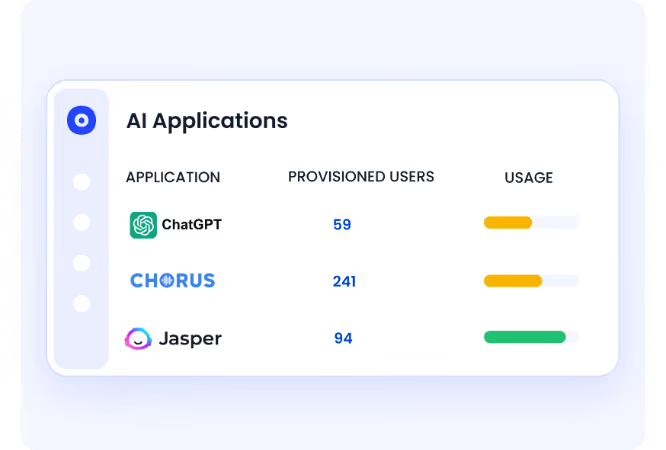
Before discussing enterprise pricing:

  • Identify all individual Plus and Pro accounts in your stack by integrating with your SSO, finance system and browser plugins
  • Consolidate fragmented Team workspaces, get all the data under one centralized location
  • Shut down dormant or duplicate accounts

Negotiating without this visibility often leads to overcommitting on seats you don’t actually need, ending up increasing your spend. Organizations that implement a shadow AI discovery approach before renewal discussions can uncover unmanaged AI tools, duplicate licenses, and hidden spend before committing to new contracts.

B. Harvest and Right-Size Licenses Based on Usage

ChatGPT licenses are frequently overprovisioned. Power-user plans are assigned broadly, even when usage doesn’t justify the cost.
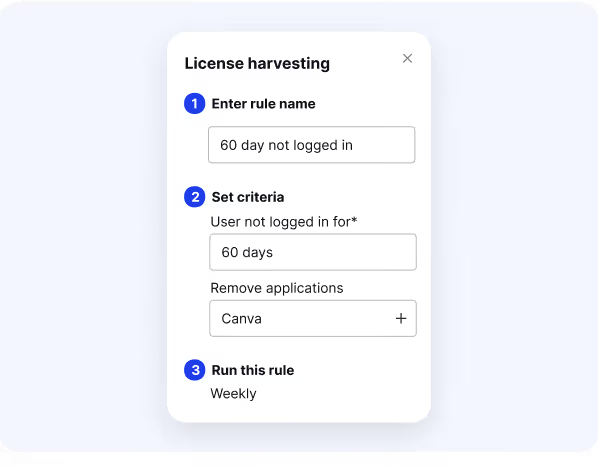
CIOs use CloudEagle to optimize these by:

  • Monitoring active vs. inactive users
  • Downgrading underutilized Pro or Team seats
  • Reclaiming licenses that are idle or unused over a period of time. You can either reassign them or downgrade
  • Aligning access tiers with job function to prevent overprivileges.

License governance with CloudEagle alone can reduce ChatGPT spend before any vendor renewal negotiation begins.

C. Control API Usage Before It Becomes Budget Drift

Engineering teams may experiment with GPT APIs without centralized tracking, leading to unpredictable monthly bills.

Enterprise optimization includes:

  • Central API usage monitoring
  • Budget thresholds and alerts
  • Department-level usage attribution
  • Renewal reviews tied to actual consumption

D. Negotiate Strategically With Data
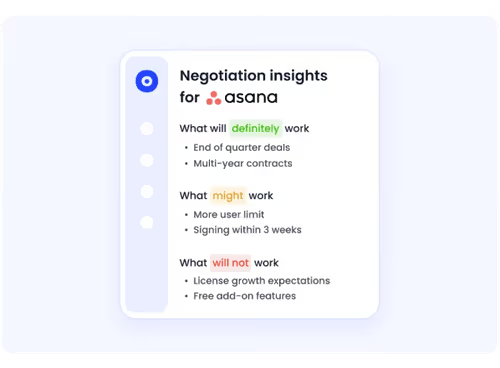
Once governance is in place, negotiation becomes far more powerful.

Focus on value, not just list price:

  • Request usage credits or flexible seat adjustments
  • Align contract terms with hiring plans
  • Secure trial extensions for broader rollouts
  • Use renewal timing to restructure seat counts

CloudEagle.ai benchmarks ChatGPT pricing across billions in SaaS transactions, helping you validate whether your rate is competitive or inflated.

Without this, even a well-negotiated contract can exceed expectations.

E. Tips to Negotiate ChatGPT Pricing 

Here are some proven negotiation strategies to help ensure you’re securing the most value-driven cost for ChatGPT:

  • Focus on Value, Not Just Price:
    It’s not always about slashing the ChatGPT subscription cost; think bigger. Prioritize total value across access to premium models, feature sets, and enterprise-level support.
  • Ask for Strategic Add-Ons:
    Instead of pushing for lower ChatGPT Pro pricing, request high-impact additions like longer trial access, more flexible billing schedules, or bundled features.
  • Frame the Business Case Clearly:
    Make it about mutual gain. Explain how a scalable ChatGPT deployment benefits your team while driving OpenAI’s adoption goals or research feedback.
  • Leverage Timing and Market Options:
    Use renewal periods or budget cycles to your advantage. Benchmark against ChatGPT alternatives like Claude or Gemini to request tailored offers or flexible terms.

13. How Much Do Companies Actually Pay for ChatGPT?

ChatGPT pricing guide varies depending on the plan and usage volume. Most companies pay between $25–$60 per user/month, but with price benchmarking tools from CloudEagle.ai, you can compare what similar companies are actually paying, so you’re not stuck relying on list prices alone.

A. Breaking Down the Data

CloudEagle.ai shows how many ChatGPT licenses you have, which departments use them, and who isn’t using them at all. This visibility helps you cut unused or duplicate licenses before renewal.

It also tracks renewal timelines and flags upcoming deadlines so you can re-negotiate instead of auto-renewing at full price, an essential step to avoid overspending.

B. Importance of This Benchmarking Data

Without market benchmarks, you’re negotiating blindly. CloudEagle.ai pulls in SaaS spend data from over $3 billion in transactions to help you validate whether your current ChatGPT rate is fair.

By knowing if you’re paying above or below average, you can confidently negotiate better terms or focus on optimizing usage if your pricing is already competitive. Similar benchmarking strategies can be applied when evaluating enterprise software costs through our NetSuite pricing guide.

C. Premium Negotiation Insights

CloudEagle.ai doesn’t just show price, it reveals insights. You get recommendations on how others negotiated ChatGPT contracts, such as asking for free trials, voice feature access, or GPT-4 usage credits.

Most Teams Overpay for ChatGPT

Get the Buyer’s Guide to uncover hidden pricing levers, negotiation tactics, and optimize ChatGPT spend.
Get the Free Guide

14. ChatGPT Pricing Models: Which Companies Should Use Which Plans?

Let’s map the ChatGPT pricing guide plans to company types:

  • Startups: Small teams benefit from affordable access to GPT-4o while scaling use cases gradually. The ChatGPT pricing for these tiers balances cost and capability for early growth stages.
  • Agencies: Agencies handling content, code, or automation work need unlimited usage and advanced reasoning. Agencies managing a full design-to-delivery stack should also explore our Figma pricing guide to optimize their creative toolset spend alongside AI.
  • Mid-size companies: These companies require shared access, user management, and visibility. The Team plan under the ChatGPT pricing structure provides collaborative tools without the complexity of Enterprise.
  • Enterprises: Large-scale deployments need SLAs, security, audit logs, and volume-based pricing. Enterprise plans are custom-tailored to fit regulatory, technical, and operational requirements.

15. What are the ChatGPT Alternatives?

Organizations evaluating multiple AI solutions should also review the best AI governance platforms to ensure visibility, security, and policy enforcement across AI applications. Claude, Gemini, Microsoft Copilot, LLaMA, and Mistral stand out for features like ethical AI responses, seamless integration with Google and Microsoft tools, and powerful open-source capabilities.

A. Claude (Anthropic)

Claude offers safe, structured responses ideal for compliance-focused teams. However, it lacks the flexible ChatGPT plans and broader integration options that make ChatGPT appealing to enterprise users.

B. Gemini (Google)

Gemini supports multimodal AI and integrates well with Google Workspace. Yet, if you're evaluating alternatives, our Google Gemini pricing guide breaks down costs and compares enterprise tiers in detail.

C. Microsoft Copilot

Before deployment, it's worth understanding the Microsoft Copilot hidden costs associated with licensing, adoption, and governance. While powerful, it doesn’t offer the same versatility or tiered ChatGPT subscription cost options available through OpenAI.

D. LLaMA & Mistral

These open-source models give developers full control, but require hosting and setup. Compared to the managed experience and predictable ChatGPT paid tiers, they demand more technical resources.

16. The Real Cost of ChatGPT Integration

The real cost of ChatGPT integration extends well beyond subscription fees.

1. For API users, pricing is token-based: GPT-4o costs approximately $2.50 per million input tokens and $10 per million output tokens, while GPT-4o-mini runs at $0.15/$0.60 per million tokens.

Expected usage volumes vary dramatically, a simple chatbot might process 10-50 million tokens monthly, while enterprise-scale integrations can exceed 500 million tokens, making understanding ChatGPT pricing structures essential for budget planning.

Infrastructure and developer time add significant expenses beyond direct API costs. Small apps typically require 40-80 hours of initial development ($4,000-$12,000) plus hosting costs of $50-$200 monthly.

2. Enterprise integrations demand dedicated engineering teams, custom security implementations, and comprehensive compliance frameworks (SOC 2, GDPR), which can cost $50,000-$200,000+ in setup alone.

Data security considerations include encryption layers, audit logging, access controls, and user data handling policies, all requiring continuous maintenance and monitoring.

Plan selection directly impacts integration budgets when considering how much does ChatGPT cost at scale.

While ChatGPT Plus ($20/month) serves simple use cases, API-heavy applications benefit from Team or Enterprise plans with negotiated volume rates, priority support, and SLA guarantees that reduce downtime risks.

Ongoing maintenance, including model updates, prompt optimization, error handling, and usage monitoring, typically costs 15-25% of initial development annually. Understanding these layered expenses helps teams accurately forecast total ownership costs and avoid budget overruns during deployment.

17. Final Words

By mid‑2025, ChatGPT had become essential across industries, with different plans offering varied features, from GPT‑3.5 in Free to advanced tools in Pro and Enterprise. This ChatGPT pricing guide breaks down each tier for better clarity.

We covered what you get at each level, how much Chat GPT 4 pricing varies, and shared tips to optimize your subscription cost. Choosing the right plan comes down to aligning usage with business goals.

That’s where CloudEagle.ai will help, by tracking usage, benchmarking pricing, and supporting smarter negotiations for ChatGPT subscriptions.

Book a free demo with CloudEagle.ai  to make your ChatGPT investment count.

18. Frequently Asked Questions 

1. How does CloudEagle.ai surface ChatGPT Plus subscriptions employees bought on personal or corporate cards without IT approval?

CloudEagle.ai cross-references finance system transactions, SSO login data, and browser activity to identify individually purchased ChatGPT subscriptions that bypassed procurement. Once surfaced, IT can consolidate them under a centrally governed plan or deprovision them through an automated workflow.

2. Can CloudEagle.ai detect when multiple ChatGPT Team workspaces have been created across different departments?

CloudEagle.ai maps all ChatGPT instances across the organization, flagging duplicate Team workspaces that create fragmented oversight and overlapping seat costs. Procurement teams can then consolidate into a single workspace before the next renewal cycle.

3. How does CloudEagle.ai help right-size ChatGPT Pro licenses assigned to users who don't justify the $200/month cost?

CloudEagle.ai tracks active versus inactive usage at the user level, identifying Pro seats where actual usage patterns align with Plus rather than Pro. License harvesting workflows then downgrade or reassign those seats before renewal without requiring manual audits.

4. Can CloudEagle.ai set department-level budget caps on ChatGPT API spend before bills become unpredictable?

CloudEagle.ai monitors API token consumption by department and user, triggering Slack or email alerts when spend approaches a configured threshold. This gives finance and engineering teams an early warning before usage-based costs accumulate into a surprise invoice.

5 How does CloudEagle.ai benchmark what peer companies actually pay for ChatGPT Enterprise?

CloudEagle.ai draws on $3B+ in analyzed SaaS transactions to show real contract rates for ChatGPT Enterprise across different seat bands and industries. Procurement teams use this data to validate their rate and negotiate from an informed position at renewal.

Advertisement for a SaaS Subscription Tracking Template with a call-to-action button to download and a partial graphic of a tablet showing charts.Banner promoting a SaaS Agreement Checklist to streamline SaaS management and avoid budget waste with a call-to-action button labeled Download checklist.Blue banner with text 'The Ultimate Employee Offboarding Checklist!' and a black button labeled 'Download checklist' alongside partial views of checklist documents from cloudeagle.ai.Digital ad for download checklist titled 'The Ultimate Checklist for IT Leaders to Optimize SaaS Operations' by cloudeagle.ai, showing checklist pages.Slack Buyer's Guide offer with text 'Unlock insider insights to get the best deal on Slack!' and a button labeled 'Get Your Copy', accompanied by a preview of the guide featuring Slack's logo.Monday Pricing Guide by cloudeagle.ai offering exclusive pricing secrets to maximize investment with a call-to-action button labeled Get Your Copy and an image of the guide's cover.Blue banner for Canva Pricing Guide by cloudeagle.ai offering a guide to Canva costs, features, and alternatives with a call-to-action button saying Get Your Copy.Blue banner with white text reading 'Little-Known Negotiation Hacks to Get the Best Deal on Slack' and a white button labeled 'Get Your Copy'.Blue banner with text 'Little-Known Negotiation Hacks to Get the Best Deal on Monday.com' and a white button labeled 'Get Your Copy'.Blue banner with text 'Little-Known Negotiation Hacks to Get the Best Deal on Canva' and a white button labeled 'Get Your Copy'.Banner with text 'Slack Buyer's Guide' and a 'Download Now' button next to images of a guide titled 'Slack Buyer’s Guide: Features, Pricing & Best Practices'.Digital cover of Monday Pricing Guide with a button labeled Get Your Copy on a blue background.Canva Pricing Guide cover with a button labeled Get Your Copy on a blue gradient background.

Enter your email to
unlock the report

Oops! Something went wrong while submitting the form.
License Count
Benchmark
Per User/Per Year

Enter your email to
unlock the report

Oops! Something went wrong while submitting the form.
License Count
Benchmark
Per User/Per Year

Enter your email to
unlock the report

Oops! Something went wrong while submitting the form.
Notion Plus
License Count
Benchmark
Per User/Per Year
100-500
$67.20 - $78.72
500-1000
$59.52 - $72.00
1000+
$51.84 - $57.60
Canva Pro
License Count
Benchmark
Per User/Per Year
100-500
$74.33-$88.71
500-1000
$64.74-$80.32
1000+
$55.14-$62.34

Enter your email to
unlock the report

Oops! Something went wrong while submitting the form.

Enter your email to
unlock the report

Oops! Something went wrong while submitting the form.
Zoom Business
License Count
Benchmark
Per User/Per Year
100-500
$216.00 - $264.00
500-1000
$180.00 - $216.00
1000+
$156.00 - $180.00

Enter your email to
unlock the report

Oops! Something went wrong while submitting the form.

Get the Right Security Platform To Secure Your Cloud Infrastructure

Please enter a business email
Thank you!
The 2023 SaaS report has been sent to your email. Check your promotional or spam folder.
Oops! Something went wrong while submitting the form.

Access full report

Please enter a business email
Thank you!
The 2023 SaaS report has been sent to your email. Check your promotional or spam folder.
Oops! Something went wrong while submitting the form.

ChatGPT has evolved from a curiosity into an essential tool across industries, from writing and coding to customer support and strategy. 

But with multiple plans available, Free, Plus, Pro, Team, and Enterprise, navigating ChatGPT’s pricing can be confusing.

That’s where a reliable ChatGPT pricing guide becomes essential. And at the same time for the enterprises, ChatGPT pricing is no longer just a budgeting decision. 

For CIOs and CISOs, it’s a governance, security, and identity challenge. With employees purchasing Plus plans on corporate cards and teams experimenting with AI tools outside IT oversight, understanding ChatGPT pricing is critical for cost control, compliance, and data protection.

This ChatGPT pricing guide breaks down each plan in plain terms, its risks and opportunities to optimize at an enterprise scale. You'll learn how the different models stack up, how to reduce shadow AI, and ensuring access aligns with security and compliance policies.

TL;DR 

  • This ChatGPT pricing guide breaks down every plan, from Free to Enterprise, to help you choose the right tier.
  • ChatGPT pricing varies by features, with Pro and Team plans offering advanced tools and model access.
  • Pro users enjoy unlimited GPT-4o access, faster responses, and priority features like o1 Pro mode.
  • Beyond subscription costs, enterprises must account for shadow AI, duplicate licenses, and unmanaged API usage that can silently inflate spend.
  • Optimizing ChatGPT pricing requires centralized visibility, license harvesting, and identity-based governance to eliminate waste before renewal cycles.

1. ChatGPT Pricing Plans in 2026

ChatGPT pricing in 2026 spans five distinct tiers, each designed for different user needs and budgets. Understanding how much is ChatGPT across these plans helps you select the right fit, from free experimentation to enterprise-scale deployment. The core difference lies in model access, usage limits, speed, and collaborative features.

ChatGPT pricing in 2026 spans five distinct tiers, each designed for different user needs and budgets. Understanding about ChatGPT pricing guide across these plans helps you select the right fit, from free experimentation to enterprise-scale deployment. The core difference lies in model access, usage limits, speed, and collaborative features.

Most Teams Overpay for ChatGPT

Get the Buyer’s Guide to uncover hidden pricing levers, negotiation tactics, and optimize ChatGPT spend.
Get the Free Guide

2. What is ChatGPT?

ChatGPT is a conversational AI chatbot built by OpenAI. It uses advanced natural language processing to generate human-like responses and create content such as articles, code, and more. 

Designed for easy interaction, it lets users ask questions or make requests in plain language and receive informative, helpful replies in return. ChatGPT also holds an 80% share of the AI search market as of now. 

At its core, ChatGPT is powered by Generative Pre-trained Transformer models, GPT for short. It started with GPT-3.5 in the free tier and has since advanced to GPT-4 and GPT-4o in paid tiers. ChatGPT is accessible through multiple formats:

  • Web app and desktop app
  • Mobile apps (iOS and Android)
  • API for integration into custom applications

Whether you're exploring chatgpt plans or integrating the model into a product, OpenAI’s flexible access points ensure that ChatGPT pricing guide can fit into diverse workflows.

3. Is ChatGPT Worth Paying For?

Whether ChatGPT Plus is worth the $20 monthly price largely depends on your needs and how often you use the platform. 

It’s ideal for users who need faster responses, priority access during peak hours, and advanced tools like DALL·E 3 and GPT-4o for complex tasks and creative projects.

Paid tiers unlock GPT-4o, and advanced features are not available in the free version. This ChatGPT pricing guide helps you understand the value behind each upgrade.

Here’s where paid plans shine:

  • ChatGPT subscription cost pays for speed, longer prompts, and more accurate outputs.
  • ChatGPT pro pricing gives developers and researchers better access to technical workloads.
  • Upgrading from free often results in better ROI and time savings, especially when scaling.

If you rely on ChatGPT for content, support, or development tasks, the ChatGPT paid tiers are a strategic investment.

SaaS and AI Spend Calculator

CloudEagle.ai customers typically recover 10–30% of annual SaaS and AI spend. Answer 12 questions to benchmark your maturity, see your recoverable spend estimate, and get a personalized 3-page savings report.

12 questions · ~4 min 10–30% typical savings $2B+ saved across customers

No signup required to start · Instant results

Select “Save as PDF” in the print dialog to download your report.
SaaS & AI Spend Optimization Report  · 
Recoverable Spend Estimate

Maturity Score Breakdown
Overall Maturity
SaaS Maturity
AI Maturity
Optimization Areas Identified

Executive Summary
cloudeagle.ai Confidential 1 / 3
Your Optimization Gaps
Identified Optimization Gaps

The areas below scored 1 or 2 in your assessment. Each represents a specific gap where spend is leaking or optimization is being left on the table, with a clear first action to address it.

cloudeagle.ai Confidential 2 / 3
How CloudEagle.ai Can Help
Closing the Gap

CloudEagle.ai is the AI-powered command center for SaaS, AI, and identity governance. Trusted by RingCentral, Automation Anywhere, Shiji, and Rec Room, the platform has processed $20B+ in spend and delivered $2B+ in savings — typically 10–30% of annual SaaS and AI spend. The gaps surfaced in this report are exactly what CloudEagle was built to close.

Discover Every Tool — Including Shadow AI

Most organizations are governing a fraction of their actual SaaS and AI footprint. CloudEagle.ai builds a real-time inventory through 500+ direct integrations across SSO, finance, HRIS, browser, firewall, and contract data — surfacing every sanctioned tool, every shadow purchase, and every AI tool employees adopted without IT approval. Onboarding takes 30 minutes, with usable visibility from day one.


Eliminate Waste with Automated Optimization

Unused licenses, duplicate tools, and over-tiered subscriptions accumulate silently between renewal cycles. CloudEagle.ai runs continuous license harvesting, flags overlapping tools across departments, and arms renewals with peer pricing benchmarks and usage data — turning insights into action through no-code Slack-enabled workflows. Customers typically recover 10–30% of annual SaaS spend within the first 90 days.


Govern AI Spend Before It Becomes Ungovernable

AI tool costs are usage-based, token-driven, and largely invisible until invoices arrive. CloudEagle.ai tracks AI tool adoption across the organization, monitors usage against budget thresholds, enforces approval workflows for new AI tools, and detects sensitive content shared with public AI services — giving finance, IT, and security a shared real-time view before overruns hit the P&L.

Book a 30-Min Optimization Review

In a focused session with a CloudEagle.ai specialist, we map your specific spend profile against our optimization framework and show you exactly where your savings are — across unused licenses, duplicate tools, renewal negotiation leverage, and AI spend governance.

cloudeagle.ai/book-a-demo
cloudeagle.ai Confidential 3 / 3

4. The Real Cost of ChatGPT for Enterprises

Beyond subscription pricing, the true cost of ChatGPT pricing guide often lies in governance gaps and decentralized adoption.

  • Shadow AI subscriptions on personal or corporate cards: Employees frequently purchase individual plans without IT approval, creating blind spots in spend tracking and increasing security exposure.
  • Duplicate Team licenses across departments: Separate teams may create their own workspaces, leading to fragmented oversight, overlapping seats, and unnecessary license duplication.
  • API usage without centralized monitoring: Engineering teams experimenting with GPT APIs can generate unpredictable consumption costs if usage isn’t tracked, attributed, and capped. Effective AI usage control helps organizations prevent budget overruns while maintaining security and compliance standards.
  • Sensitive data uploaded into public AI models: Without clear policies and controls, employees may input confidential, customer, or regulated data into AI tools, increasing compliance and data leakage risk.
  • No access lifecycle management: Accounts often remain active after role changes or employee exits, resulting in both security exposure and wasted licenses.
  • No renewal oversight: Auto-renewals without usage analysis can lock organizations into inflated seat counts and missed optimization opportunities.

For CIOs and CISOs, the challenge isn’t just choosing the right plan, it’s ensuring ChatGPT usage is visible, governed, and aligned with both financial and security controls.

As CEO of digital agency Chromatix Sydney best put it, “the real cost of ChatGPT in enterprise isn’t just the monthly subscription - it’s the hidden risk of unmanaged usage, duplicated licences, exposed data and AI spend that no one is properly tracking

Do you know why ChatGPT pricing gets complex to manage for Enterprises. Read more -->

5. How Much Does ChatGPT Cost? (And Security and Governance Implications of Each Plan)

ChatGPT offers a free plan with basic access and a premium subscription called ChatGPT Plus for $20/month, which includes faster responses and priority feature access. For teams, there’s a ChatGPT Team plan at $30/user/month or $25/user/month if billed annually.

For teams comparing the cost of ChatGPT, this ChatGPT pricing guide breakdown clarifies the trade-offs.

A. ChatGPT Free

  • Cost: $0 (Free Forever)
  • Best For: Individuals exploring AI with basic usage needs
  • Features: Access to GPT-3.5 and GPT-4o mini, limited speed, and message caps
  • Drawbacks: No access to full GPT-4o, slower responses, no advanced tools or memory

Enterprise risk breakdown:

  • No centralized visibility
  • No admin controls
  • Employees may upload sensitive data
  • No audit trail

B. ChatGPT Plus

  • Cost: $20 per month
  • Best For: Power users wanting faster performance and better model access
  • Features: Full GPT-4o access, priority response times, memory capabilities
  • Drawbacks: Single-user only, no admin tools, not ideal for teams

Enterprise risk breakdown:

  • Individual subscriptions create shadow AI across departments
  • No centralized user management or SSO enforcement
  • No role-based access or automated offboarding
  • Spend fragmentation across corporate cards and cost centers

C. ChatGPT Pro

  • Cost: $200 per month
  • Best For: Developers and professionals requiring higher limits and premium tools
  • Features: Access to GPT-4o and o1-pro, extended token limits, advanced model settings, file uploads, API enhancements
  • Drawbacks: High price point, overkill for casual users

Enterprise risk breakdown:

  • High-cost licenses may remain underutilized without monitoring
  • Advanced model access increases potential data exposure risk
  • No built-in enterprise-grade identity governance
  • API enhancements can expand usage without centralized budget control

D. ChatGPT Team Plan

  • Cost: $25/user/month (annual billing) or $30/user/month (monthly billing)
  • Best For: Small to mid-sized teams seeking collaborative workflows
  • Features: Shared workspace, admin controls, team memory, priority access
  • Drawbacks: Limited enterprise-grade security, not suited for highly regulated industries

Enterprise risk breakdown:

  • Multiple team workspaces can lead to duplicate licenses
  • Admin controls limited compared to full enterprise governance
  • Access may not automatically align with HR lifecycle changes
  • Usage insights may not integrate with broader IT risk monitoring

E. ChatGPT Enterprise

  • Cost: Custom pricing (based on seat count, usage, and security needs)
  • Best For: Large organizations needing compliance, security, and scalability
  • Features: GPT-4o access, SOC 2 compliance, enterprise-level security, SLA guarantees, analytics, volume licensing.
  • Drawbacks: Requires sales engagement, onboarding time may vary

Enterprise risk breakdown:

  • Requires internal governance to prevent license sprawl
  • Dormant accounts can persist without lifecycle automation
  • API consumption still needs centralized monitoring
  • Overprovisioned seats can inflate renewal costs without usage review

Every tier includes different capabilities, so this ChatGPT pricing guide ensures you select the one that matches your goals and budget. The ChatGPT enterprise subscription cost is tailored based on seat count, usage, and required security measures. 

6. ChatGPT vs. ChatGPT Plus - Is ChatGPT Plus Worth It?

ChatGPT Free offers GPT-3.5 and GPT-4o mini with limited message caps and slower response times during peak hours, making it suitable for light, occasional use. ChatGPT Plus at $20/month unlocks full GPT-4o access, faster response speeds, reliable availability even during high-traffic periods, higher message limits, and multimodal capabilities including image generation with DALL·E 3 and advanced voice mode.

Plus subscribers also gain priority access to new features and tools as they roll out. For students and casual users exploring AI occasionally, the free tier suffices.

However, creators, freelancers, and anyone using ChatGPT daily for content, coding, or research will find the ChatGPT pricing guide cost justified through Plus. At $20/month, this ChatGPT pricing tier delivers clear ROI through time savings and consistent performance. Bottom line: if you use ChatGPT more than a few times per week or rely on it for work, Plus is worth the investment.

7. What is the Difference Between GPT-4 and GPT-4o?

GPT-4 was OpenAI’s premium model throughout 2023, offering impressive reasoning, long-form understanding, and advanced capabilities. GPT-4o, launched in 2024, is faster, cheaper, and supports multimodal input.

GPT-4o Upgrades Include:

  • Real-time response speed
  • Audio, visual, and text input support
  • Lower chatgpt api cost per token

GPT-4o is now the default in all paid ChatGPT plans, delivering optimal performance across productivity, coding, and creative workflows. This ChatGPT pricing guide recommends GPT-4o as the best model for nearly all use cases.

8. How Is Chat GPT 4 Pricing Structured Across Plans?

GPT-4o is a more advanced version of GPT-4, built for faster performance, better efficiency, and enhanced multimodal capabilities. Like GPT-4, it can handle text, images, and audio, but GPT-4o does it more smoothly and is optimized for real-time use. It’s also more affordable, offering lower API costs compared to GPT-4.

Here’s the breakdown:

  • Free: Limited access to GPT-4o-mini. Best for basic use and experimentation.
  • Plus ($20/month): Includes GPT-4o and access to multiple reasoning models, like OpenAI o3, o4-mini, and o4-mini-high. Also includes research previews of GPT-4.5 (OpenAI’s largest model yet) and GPT-4.1 (optimized for code).
  • Pro ($200/month): Unlocks unlimited access to all reasoning models and GPT-4o, ideal for power users who rely on speed, memory, and accuracy.
  • Team ($25–$30/user/month): Offers unlimited access to GPT-4o and 4.1-mini, plus generous usage limits for advanced models. Great for collaborative teams needing more scale.
  • Enterprise (Custom Pricing): Everything in Team, plus an expanded context window for GPT-4o. Supports longer inputs and larger file uploads, perfect for large-scale deployments with security and performance in mind.

As this ChatGPT pricing guide shows, the cost of ChatGPT reflects not just access to better models but also enhancements in scale, memory, file processing, and control. Whether you're an individual creator or a large enterprise, there’s a plan designed to match your use case.

If your entire organization is using ChatGPT, here's how you manage the subscription effectively. Read more -->

9. ChatGPT Pricing Comparison: Plus vs. Pro

Understanding ChatGPT pricing guide between Plus and Pro is essential for budget planning. Plus costs $20/month while Pro runs $200/month—a 10x difference that reflects significantly expanded capabilities. Chat GPT premium price variations stem from model access, usage limits, and priority features.

Decision by Role:

  • Creators: Plus handles content generation efficiently without hitting limits
  • Developers: Pro justifies cost with unlimited GPT-4o for extensive coding sessions
  • Analysts: o1 Pro mode's enhanced reasoning powers complex data work

When Pro Makes Sense: Upgrade to Pro if you consistently max out Plus limits, require o1 Pro's advanced compute for technical problems, or need guaranteed speed for client-facing work. Most users find Plus offers optimal value for how much ChatGPT costs relative to everyday needs.

Most Teams Overpay for ChatGPT

Get the Buyer’s Guide to uncover hidden pricing levers, negotiation tactics, and optimize ChatGPT spend.
Get the Free Guide

10. What Features Are Included in the ChatGPT Pro Pricing?

ChatGPT Pro, priced at $200/month, is designed for power users, researchers, and developers who need advanced model access and enhanced capabilities. It includes unlimited access to GPT-4o, as well as priority access to research previews like Operator, the Codex agent, and tools such as Deep Research and Sora for video generation.

Key Features of ChatGPT Pro:

  • Unlimited access to GPT-4o: Get unrestricted usage of OpenAI’s most advanced model for high-performance tasks across text, voice, and vision.
  • Full access to the o1 model family: Includes o1 base, o1-mini, and the exclusive o1 Pro mode, which delivers enhanced reasoning using more compute, ideal for complex technical queries.
  • Advanced Voice Mode: Enjoy unlimited, high-fidelity voice conversations with support for screen sharing and real-time interaction.
  • Priority access to new features: Be among the first to test new tools, models, and capabilities as they roll out.
  • Faster response times: Benefit from priority queuing, ensuring quicker outputs even during peak usage periods.
  • Enhanced research capabilities: Includes access to advanced research tools like Operator (for web browsing) and Sora (for video generation), with higher monthly limits.
  • Higher limits on video generation and screen sharing: Ideal for demo creation, live support, and interactive content.
  • Deep Research access: Get significantly more Deep Research queries per month for extensive knowledge exploration.
  • Unlimited interactions: No rate limits or usage caps, perfect for frequent or large-scale usage needs.

11. Which ChatGPT Plans Are Best for Your Needs?

With multiple tiers available, choosing the right ChatGPT plan through our ChatGPT pricing guide depends on how often you use the tool and what you use it for. For teams and enterprises already using subscription management tools, aligning ChatGPT plans with usage insights can help optimize both cost and performance.

A. Students or Light Users

If your usage is minimal, the Free plan is the best value. It offers GPT-3.5 and GPT-4o-mini with zero ChatGPT pricing involved. This tier works well for students testing AI tools or anyone new to the platform who doesn't want a paid ChatGPT subscription yet.

B. Creators or Freelancers

Freelancers and creators often find the Plus plan ideal. At $20/month, this ChatGPT paid plan gives access to GPT-4o with faster and more reliable outputs. If you're creating content or doing light dev work, the ChatGPT 4 pricing in Plus delivers strong ROI for daily productivity.

Content creators often pair ChatGPT with writing tools. See our Grammarly pricing guide and HubSpot pricing guide to understand how these platforms complement AI-powered workflows.

C. Engineers or Analysts

The Pro plan, priced at $200/month, is built for deep work. It includes o1 Pro and GPT-4o, making it the most powerful of all current ChatGPT plans. This is the best subscription option for ChatGPT users handling code, data, or technical projects at scale.

For engineering teams also evaluating AI coding assistants, our GitHub Copilot pricing guide covers plans, per-seat costs, and enterprise negotiation tips

D. Small Teams or Startups

Team plans ($25–$30/user/month) support group collaboration and are ideal if you're managing 3–50 seats. The ChatGPT pricing guide fee includes GPT-4o and admin features. This plan offers the right mix of performance and manageability for startups, balancing tools and ChatGPT pricing. Teams evaluating collaboration and productivity software may also benefit from reviewing our Monday pricing guide alongside AI tool investments.

E. Enterprises or IT Departments

For companies needing security and SaaS governance, the ChatGPT enterprise subscription cost is customized per need and usage scale. Enterprise plans are the top-tier ChatGPT subscription options, ideal for IT teams managing access, usage data, and internal compliance.

12. How CIOs and CISOs Can Optimize ChatGPT Pricing and Risk with CloudEagle.ai

Negotiating ChatGPT pricing is only one part of cost control. For enterprise leaders, true optimization comes from visibility, governance, and disciplined license management.

Here’s how leading CIOs and CISOs approach ChatGPT cost control strategically.

A. Eliminate Shadow AI Before You Negotiate

Many organizations discover they already have dozens, sometimes hundreds of ChatGPT Plus subscriptions purchased independently across departments.

Before discussing enterprise pricing:

  • Identify all individual Plus and Pro accounts in your stack by integrating with your SSO, finance system and browser plugins
  • Consolidate fragmented Team workspaces, get all the data under one centralized location
  • Shut down dormant or duplicate accounts

Negotiating without this visibility often leads to overcommitting on seats you don’t actually need, ending up increasing your spend. Organizations that implement a shadow AI discovery approach before renewal discussions can uncover unmanaged AI tools, duplicate licenses, and hidden spend before committing to new contracts.

B. Harvest and Right-Size Licenses Based on Usage

ChatGPT licenses are frequently overprovisioned. Power-user plans are assigned broadly, even when usage doesn’t justify the cost.

CIOs use CloudEagle to optimize these by:

  • Monitoring active vs. inactive users
  • Downgrading underutilized Pro or Team seats
  • Reclaiming licenses that are idle or unused over a period of time. You can either reassign them or downgrade
  • Aligning access tiers with job function to prevent overprivileges.

License governance with CloudEagle alone can reduce ChatGPT spend before any vendor renewal negotiation begins.

C. Control API Usage Before It Becomes Budget Drift

Engineering teams may experiment with GPT APIs without centralized tracking, leading to unpredictable monthly bills.

Enterprise optimization includes:

  • Central API usage monitoring
  • Budget thresholds and alerts
  • Department-level usage attribution
  • Renewal reviews tied to actual consumption

D. Negotiate Strategically With Data

Once governance is in place, negotiation becomes far more powerful.

Focus on value, not just list price:

  • Request usage credits or flexible seat adjustments
  • Align contract terms with hiring plans
  • Secure trial extensions for broader rollouts
  • Use renewal timing to restructure seat counts

CloudEagle.ai benchmarks ChatGPT pricing across billions in SaaS transactions, helping you validate whether your rate is competitive or inflated.

Without this, even a well-negotiated contract can exceed expectations.

E. Tips to Negotiate ChatGPT Pricing 

Here are some proven negotiation strategies to help ensure you’re securing the most value-driven cost for ChatGPT:

  • Focus on Value, Not Just Price:
    It’s not always about slashing the ChatGPT subscription cost; think bigger. Prioritize total value across access to premium models, feature sets, and enterprise-level support.
  • Ask for Strategic Add-Ons:
    Instead of pushing for lower ChatGPT Pro pricing, request high-impact additions like longer trial access, more flexible billing schedules, or bundled features.
  • Frame the Business Case Clearly:
    Make it about mutual gain. Explain how a scalable ChatGPT deployment benefits your team while driving OpenAI’s adoption goals or research feedback.
  • Leverage Timing and Market Options:
    Use renewal periods or budget cycles to your advantage. Benchmark against ChatGPT alternatives like Claude or Gemini to request tailored offers or flexible terms.

13. How Much Do Companies Actually Pay for ChatGPT?

ChatGPT pricing guide varies depending on the plan and usage volume. Most companies pay between $25–$60 per user/month, but with price benchmarking tools from CloudEagle.ai, you can compare what similar companies are actually paying, so you’re not stuck relying on list prices alone.

A. Breaking Down the Data

CloudEagle.ai shows how many ChatGPT licenses you have, which departments use them, and who isn’t using them at all. This visibility helps you cut unused or duplicate licenses before renewal.

It also tracks renewal timelines and flags upcoming deadlines so you can re-negotiate instead of auto-renewing at full price, an essential step to avoid overspending.

B. Importance of This Benchmarking Data

Without market benchmarks, you’re negotiating blindly. CloudEagle.ai pulls in SaaS spend data from over $3 billion in transactions to help you validate whether your current ChatGPT rate is fair.

By knowing if you’re paying above or below average, you can confidently negotiate better terms or focus on optimizing usage if your pricing is already competitive. Similar benchmarking strategies can be applied when evaluating enterprise software costs through our NetSuite pricing guide.

C. Premium Negotiation Insights

CloudEagle.ai doesn’t just show price, it reveals insights. You get recommendations on how others negotiated ChatGPT contracts, such as asking for free trials, voice feature access, or GPT-4 usage credits.

Most Teams Overpay for ChatGPT

Get the Buyer’s Guide to uncover hidden pricing levers, negotiation tactics, and optimize ChatGPT spend.
Get the Free Guide

14. ChatGPT Pricing Models: Which Companies Should Use Which Plans?

Let’s map the ChatGPT pricing guide plans to company types:

  • Startups: Small teams benefit from affordable access to GPT-4o while scaling use cases gradually. The ChatGPT pricing for these tiers balances cost and capability for early growth stages.
  • Agencies: Agencies handling content, code, or automation work need unlimited usage and advanced reasoning. Agencies managing a full design-to-delivery stack should also explore our Figma pricing guide to optimize their creative toolset spend alongside AI.
  • Mid-size companies: These companies require shared access, user management, and visibility. The Team plan under the ChatGPT pricing structure provides collaborative tools without the complexity of Enterprise.
  • Enterprises: Large-scale deployments need SLAs, security, audit logs, and volume-based pricing. Enterprise plans are custom-tailored to fit regulatory, technical, and operational requirements.

15. What are the ChatGPT Alternatives?

Organizations evaluating multiple AI solutions should also review the best AI governance platforms to ensure visibility, security, and policy enforcement across AI applications. Claude, Gemini, Microsoft Copilot, LLaMA, and Mistral stand out for features like ethical AI responses, seamless integration with Google and Microsoft tools, and powerful open-source capabilities.

A. Claude (Anthropic)

Claude offers safe, structured responses ideal for compliance-focused teams. However, it lacks the flexible ChatGPT plans and broader integration options that make ChatGPT appealing to enterprise users.

B. Gemini (Google)

Gemini supports multimodal AI and integrates well with Google Workspace. Yet, if you're evaluating alternatives, our Google Gemini pricing guide breaks down costs and compares enterprise tiers in detail.

C. Microsoft Copilot

Before deployment, it's worth understanding the Microsoft Copilot hidden costs associated with licensing, adoption, and governance. While powerful, it doesn’t offer the same versatility or tiered ChatGPT subscription cost options available through OpenAI.

D. LLaMA & Mistral

These open-source models give developers full control, but require hosting and setup. Compared to the managed experience and predictable ChatGPT paid tiers, they demand more technical resources.

16. The Real Cost of ChatGPT Integration

The real cost of ChatGPT integration extends well beyond subscription fees.

1. For API users, pricing is token-based: GPT-4o costs approximately $2.50 per million input tokens and $10 per million output tokens, while GPT-4o-mini runs at $0.15/$0.60 per million tokens.

Expected usage volumes vary dramatically, a simple chatbot might process 10-50 million tokens monthly, while enterprise-scale integrations can exceed 500 million tokens, making understanding ChatGPT pricing structures essential for budget planning.

Infrastructure and developer time add significant expenses beyond direct API costs. Small apps typically require 40-80 hours of initial development ($4,000-$12,000) plus hosting costs of $50-$200 monthly.

2. Enterprise integrations demand dedicated engineering teams, custom security implementations, and comprehensive compliance frameworks (SOC 2, GDPR), which can cost $50,000-$200,000+ in setup alone.

Data security considerations include encryption layers, audit logging, access controls, and user data handling policies, all requiring continuous maintenance and monitoring.

Plan selection directly impacts integration budgets when considering how much does ChatGPT cost at scale.

While ChatGPT Plus ($20/month) serves simple use cases, API-heavy applications benefit from Team or Enterprise plans with negotiated volume rates, priority support, and SLA guarantees that reduce downtime risks.

Ongoing maintenance, including model updates, prompt optimization, error handling, and usage monitoring, typically costs 15-25% of initial development annually. Understanding these layered expenses helps teams accurately forecast total ownership costs and avoid budget overruns during deployment.

17. Final Words

By mid‑2025, ChatGPT had become essential across industries, with different plans offering varied features, from GPT‑3.5 in Free to advanced tools in Pro and Enterprise. This ChatGPT pricing guide breaks down each tier for better clarity.

We covered what you get at each level, how much Chat GPT 4 pricing varies, and shared tips to optimize your subscription cost. Choosing the right plan comes down to aligning usage with business goals.

That’s where CloudEagle.ai will help, by tracking usage, benchmarking pricing, and supporting smarter negotiations for ChatGPT subscriptions.

Book a free demo with CloudEagle.ai  to make your ChatGPT investment count.

18. Frequently Asked Questions 

1. How does CloudEagle.ai surface ChatGPT Plus subscriptions employees bought on personal or corporate cards without IT approval?

CloudEagle.ai cross-references finance system transactions, SSO login data, and browser activity to identify individually purchased ChatGPT subscriptions that bypassed procurement. Once surfaced, IT can consolidate them under a centrally governed plan or deprovision them through an automated workflow.

2. Can CloudEagle.ai detect when multiple ChatGPT Team workspaces have been created across different departments?

CloudEagle.ai maps all ChatGPT instances across the organization, flagging duplicate Team workspaces that create fragmented oversight and overlapping seat costs. Procurement teams can then consolidate into a single workspace before the next renewal cycle.

3. How does CloudEagle.ai help right-size ChatGPT Pro licenses assigned to users who don't justify the $200/month cost?

CloudEagle.ai tracks active versus inactive usage at the user level, identifying Pro seats where actual usage patterns align with Plus rather than Pro. License harvesting workflows then downgrade or reassign those seats before renewal without requiring manual audits.

4. Can CloudEagle.ai set department-level budget caps on ChatGPT API spend before bills become unpredictable?

CloudEagle.ai monitors API token consumption by department and user, triggering Slack or email alerts when spend approaches a configured threshold. This gives finance and engineering teams an early warning before usage-based costs accumulate into a surprise invoice.

5 How does CloudEagle.ai benchmark what peer companies actually pay for ChatGPT Enterprise?

CloudEagle.ai draws on $3B+ in analyzed SaaS transactions to show real contract rates for ChatGPT Enterprise across different seat bands and industries. Procurement teams use this data to validate their rate and negotiate from an informed position at renewal.

CloudEagle.ai recognized in the 2025 Gartner® Magic Quadrant™ for SaaS Management Platforms
Download now
gartner chart
5x
Faster employee
onboarding
80%
Reduction in time for
user access reviews
30k
Workflows
automated
$15Bn
Analyzed in
contract spend
$2Bn
Saved in
SaaS spend

Streamline SaaS governance and save 10-30%

Book a Demo with Expert
CTA image