You need to enable JavaScript in order to use the AI chatbot tool powered by ChatBot

Data Loss Prevention Solutions: 10 Tools for 2026

Share via:
blog-cms-banner-bg
Little-Known Negotiation Hacks to Get the Best Deal on Slack
cta-bg-blogDownload Your Copy

HIPAA Compliance Checklist for 2025

Download PDF

Worried about protecting your sensitive business data from accidental leaks or cyber threats?

Around 67.7% of businesses experienced significant data loss incidents. Data moves fast today and is stored everywhere, including the cloud and employee devices. Internal and external factors can both lead to serious security breaches.

That is why data loss prevention solutions are essential. They monitor and control how data is used and shared, whether stored on a server, transmitted over a network, or accessed internally.

Let us explore the top 10 data loss prevention solutions to protect your business, reduce insider threats, and tackle modern security challenges.

TL;DR

  • DLP tools help protect your important data by tracking how it is used and shared on computers, networks, and the cloud.
  • DLP tools check data across emails, cloud apps, networks, and devices. They automatically apply rules, classify data, monitor user behavior, and send instant alerts if something suspicious occurs to prevent data loss.
  • There are three types: Network DLP protects data on networks, Endpoint DLP protects devices, and Cloud DLP protects cloud data. Using all three is best.
  • Look for tools that offer strong features, easy use, scalability, integration with your existing systems, and reliable vendor support. The right choice helps secure data efficiently without slowing down work.
  • Enterprises should select DLP solutions based on their features, scalability, integration capabilities, ease of use, and vendor support. Implementing strong DLP reduces insider threats, enforces regulations, and secures business-critical information efficiently.

1. What Is Data Loss Prevention?

Data Loss Prevention (DLP) is a security strategy that helps enterprises identify, monitor, and prevent unauthorized sharing, transfer, or use of sensitive information.

Data loss prevention solutions stop sensitive business data from being lost, leaked, or accessed by unauthorized users, whether stored on premises, in SaaS environments, or on endpoint devices.

Core functions:

  • Content inspection and contextual analysis
  • User activity monitoring and alerting
  • Encryption and access policy enforcement
  • Compliance support for GDPR, HIPAA, and SOX

According to reports, the global data loss prevention solutions market is expected to reach $3.7 billion in 2026, growing rapidly as enterprises face increasing regulatory and threat pressure.

2. Why Data Loss Prevention Solutions Are No Longer Optional in 2026?

The threat landscape has changed. It is not just external attackers anymore. Employees, contractors, and third-party vendors all move data constantly, and traditional perimeter security cannot keep up.

Driver Why It Matters
SaaS sprawl An average enterprise runs 130+ SaaS apps with data flowing across all of them
Insider threats Contractors and privileged users regularly access sensitive data
Stricter regulations GDPR, HIPAA, DORA, EU AI Act all require continuous evidence of data protection
Remote work Data moves across home networks, personal devices, and unmanaged cloud apps

The global cost of cybercrime is predicted to hit $10.5 trillion annually. The average cost of a data breach sits at $4.88 million. The cost of not having data loss prevention software in place is now measurably higher than deploying one.

$4.88M Is the Average Breach Cost. Is Your Stack Ready?

10 controls that stop data loss before it starts.
Get the SaaS Security Checklist

3. Top 10 Data Loss Prevention Solutions in 2026

1. CloudEagle.ai

CloudEagle.ai is an advanced SaaS management and governance platform that protects sensitive data across SaaS applications by managing access and continuously monitoring user activity in real time.

Designed for IT, procurement, and security teams, CloudEagle.ai enables enterprises to gain complete visibility into SaaS usage, detect risks early, and automate critical processes to enhance operational efficiency, security, and compliance.

Real-Time Monitoring and AI-Driven Alerts

CloudEagle.ai provides real-time monitoring and AI-driven alerts, keeping your security team informed about suspicious activities such as unauthorized data downloads or abnormal login attempts.

By leveraging AI to analyze user behavior data, CloudEagle.ai reduces false positives and focuses your team's attention on genuine risks before incidents escalate.

Automated User Provisioning and Deprovisioning

When employees join, change roles, or leave, their access rights are automatically granted, adjusted, or revoked based on their current job responsibilities.
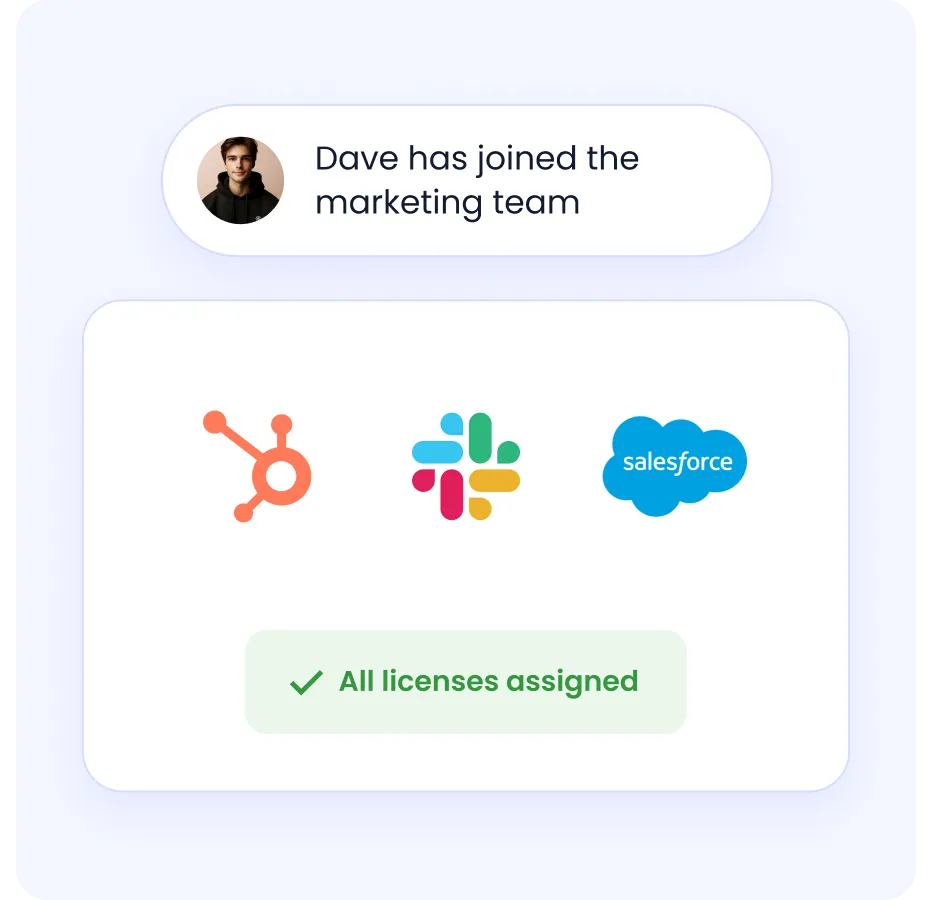
This removes the risk of human error and eliminates delays common in manual access management, reducing the chance of former employees or role-changed staff retaining inappropriate access to sensitive data.

Role-Based Access Controls (RBAC)

CloudEagle.ai implements RBAC, ensuring users are only given the permissions necessary for their specific job functions.

By tightly restricting access based on roles, enterprises minimize the risk of accidental or malicious data exposure caused by unnecessary or excessive permissions.

Just-In-Time (JIT) Access Controls

CloudEagle.ai offers just-in-time access controls, allowing users to gain temporary elevated privileges for specific tasks that expire automatically after a set timeframe.
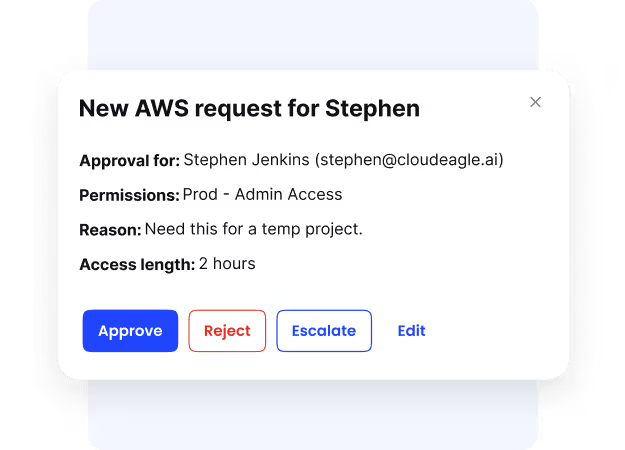
This reduces the window of vulnerability by limiting how long sensitive access is granted, supporting a secure, time-bound approach to sensitive systems.

Privileged Access Management

CloudEagle.ai carefully monitors privileged accounts, ensuring only authorized individuals can use them and that all privileged sessions are logged in detail for auditing purposes.
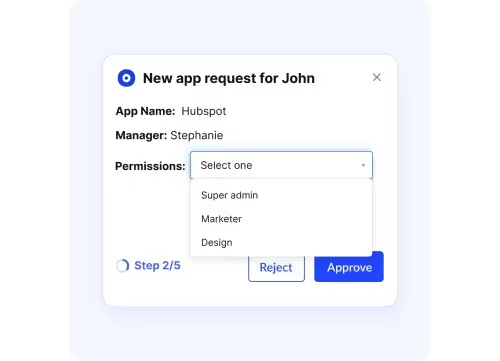
This tight supervision helps prevent abuse of access and insider threats by making privileged account usage transparent and accountable.

Pricing: Available on request

2. Symantec DLP

A comprehensive data loss prevention solution covering endpoints, networks, cloud apps, email, and storage.

Key Features

  • Multi-channel data protection across email, web, endpoints, and cloud
  • Customizable policy engine with pre-built templates for GDPR, HIPAA, PCI-DSS

Pros

  • Flexible deployment for on-premises and hybrid cloud
  • Advanced data fingerprinting reduces false positives

Cons

  • Complex implementation requiring dedicated planning
  • Less modern interface compared to newer AI-driven tools

Pricing: Custom quotes via Broadcom or authorized resellers.

3. Endpoint Protector by CoSoSys

A strong data loss prevention tool focused on protecting sensitive data on laptops, desktops, and mobile devices across operating systems.

Key Features

  • Device control for USBs and peripheral devices
  • Content-aware protection that blocks sensitive transfers based on content and context

Pros

  • Real-time alerts and detailed reporting
  • Supports GDPR, HIPAA, and PCI-DSS compliance

Cons

  • Limited SIEM and EDR integration
  • Some classification features are less automated than newer tools

Pricing: Enterprise licensing. Contact CoSoSys for pricing.

4. McAfee

McAfee data loss prevention software monitors and enforces policies across endpoints, networks, email, cloud, and removable devices.

Key Features

  • Data coverage across use, motion, and rest
  • Advanced discovery and classification with fingerprinting and tagging

Pros

  • Wide-ranging protection across all major data loss vectors
  • Flexible deployment with physical and virtual appliances

Cons

  • Complex to configure for smaller teams
  • Some advanced features require additional licensing

Pricing: Enterprise licensing with tailored quotes. Contact McAfee directly.

5. Forcepoint

Forcepoint uses behavioral analytics and adaptive policies to monitor and control data across endpoints, networks, cloud, email, and web channels.

Key Features

  • Adaptive risk-based protection using behavioral analytics and risk scoring
  • Broad coverage across Windows, Mac, Office 365, Salesforce, email, and web

Pros

  • Strong cloud and on-premises integration
  • AI-powered analytics for insider threat detection

Cons

  • Complex initial setup
  • Pricing requires direct vendor engagement

Pricing: Enterprise licensing. Contact Forcepoint directly.

6. Digital Guardian

A powerful data loss prevention tool monitoring and controls data use across endpoints, networks, and cloud environments.

Key Features

  • Content and context-aware protection based on user actions and data context
  • Real-time alerts and detailed user activity monitoring

Pros

  • Strong endpoint protection on and off the corporate network
  • Pre-built compliance policies for GDPR, HIPAA, and PCI

Cons

  • Time and expertise needed for initial setup
  • Complex licensing requires direct vendor consultation

Pricing: Enterprise agreements. Contact Digital Guardian for pricing.

7. SecureTrust

SecureTrust helps businesses find and protect sensitive data across networks, devices, and the cloud with ready-made, customizable policies.

Key Features

  • Advanced content control that blocks, encrypts, or quarantines policy violations
  • Real-time identity matching for quick detection of risky actions

Pros

  • User-friendly interface with strong visibility and control
  • Extensive predefined compliance policies for fast deployment

Cons

  • Initial configuration requires expertise
  • Limited integration options compared to competitors

Pricing: Custom quoted. Contact SecureTrust directly.

8. Sophos

Sophos DLP is embedded into Sophos Endpoint and Email Protection, making it easy to deploy for organizations already in the Sophos ecosystem.

Key Features

  • Content monitoring across files, emails, and device transfers for PII and sensitive data
  • Seamless endpoint and email integration with alerts, blocking, and reporting

Pros

  • Easy to deploy within the existing Sophos environment
  • No additional software needed

Cons

  • Limited to the Sophos ecosystem
  • Less extensive than standalone DLP solutions

Pricing: Bundled with endpoint or email protection licenses. Free trial available.

9. Trend Micro IDLP

A data loss prevention tool integrated into Trend Micro's security suite, protecting data across endpoints, email, web, and cloud.

Key Features

  • Automatic identification and classification of sensitive data across endpoints, networks, and storage
  • Granular policy enforcement based on user, location, data type, and context

Pros

  • Seamless integration with Trend Micro products
  • Built-in compliance templates and customizable policies

Cons

  • Full functionality requires other Trend Micro products
  • Reporting needs enhancement for deeper cloud analysis

Pricing: Per-user annual licensing starting around $24/user.

10. Check Point

Check Point DLP combines advanced classification and user education to provide accurate, real-time data loss prevention across networks and endpoints.

Key Features

  • MultiSpect Data Classification combines user, content, and process data for accurate detection
  • Network-based protection inline on existing Check Point gateways

Pros

Cons

  • Complex initial setup and customization
  • Interface feels outdated compared to newer solutions

Pricing: Contact Check Point directly for customized pricing.

4. What Makes a Data Loss Prevention Solution Enterprise-Grade?

Not all data loss prevention solutions are built the same. Here is what separates enterprise-grade platforms from basic tools:

Capability Why It Matters
AI and ML Detection Reduces false positives and adapts policies as behavior evolves
UEBA Flags anomalous behavior like bulk downloads or unusual login times
CASB and Zero Trust Integration Enforces least privilege across every channel
Coverage Across All Three Data States Protects data in use, in motion, and at rest
Audit-Ready Compliance Reporting Maps directly to GDPR, HIPAA, SOC 2, and ISO 27001
Scalability Across Hybrid Environments Covers on premises, cloud apps, and remote endpoints without gaps

Enterprise-Grade DLP Starts With Knowing Who Has Access to What.

8 practices that keep your SaaS stack audit-ready.
Get the Compliance Best Practices Guide

5. How Data Loss Prevention Solutions Actually Work?

Data loss prevention solutions protect sensitive business information by following a structured process across every environment.

Step 1- 

Data Discovery and Classification: Locates sensitive data such as PII, financial records, or intellectual property and tags it by sensitivity level.

Step 2- 

Policy Creation and Enforcement: Security teams set granular policies determining who can access or share specific data types and under what conditions.

Step 3- 

Automated Response: When a policy violation is detected, data loss prevention solutions can:

  • Block data transfers
  • Quarantine files
  • Encrypt content
  • Send alerts to users and security teams
  • Log all actions for audit and compliance

Step 4-

Identity and Governance Integration Modern data loss prevention software integrates with identity providers and SSO to enforce role-based access. It also connects with CASB, SSPM, and governance tools to enable automated access reviews and least-privilege policies.

6. Network, Endpoint, or Cloud: Which DLP Type Does Your Business Actually Need?

Type Protects Best For
Network DLP Data in motion across email, web, and file sharing Preventing data from leaving via network channels
Endpoint DLP Devices like laptops, desktops, and mobile Preventing leaks via USB, printing, and screen capture
Cloud DLP SaaS apps and cloud storage Controlling sharing, downloads, and uploads in the cloud

For most enterprises, using all three types together provides the most complete coverage. Each type covers blind spots that the others cannot.

7. Don't Just Buy a DLP Tool: Here's How to Choose the Right One

Use this checklist when evaluating data loss prevention solutions:

Features and Capabilities

  • AI and ML-driven detection to reduce false positives
  • User Behavior Analytics for Insider Threat Detection
  • Real-time alerts with automated remediation
  • Integration with Digital Rights Management

Data Visibility and Classification

  • Comprehensive visibility across data at rest, in use, and in transit
  • Dynamic and context-aware classification based on content, user, and context

Deployment and Integration

  • Fits with existing infrastructure, including endpoints, cloud apps, and networks
  • Integrates well with identity management and security platforms

Policy Management

  • Flexible and granular policy engine
  • Customizable workflows that adapt by risk level, user role, or location

Compliance and Reporting

  • Audit trails and compliance-ready templates
  • Covers GDPR, HIPAA, PCI-DSS, SOC 2, and ISO 27001

Scalability

  • Covers your current size and supports growth
  • Works across endpoints, cloud, networks, email, and removable devices

Vendor Support and Cost

  • Transparent licensing aligned with your budget
  • Strong customer support and training options

8. Is Your Current Stack Missing a Data Loss Prevention Solution?

Most enterprises have firewalls, SSO, and endpoint protection in place. But none of that tells you what is happening to your data inside your SaaS applications, where 87% of modern work actually happens.

If your team cannot confidently answer these questions, you likely have a gap:

  • Which employees have access to sensitive data they no longer need?
  • Are any SaaS apps in use that IT has never reviewed or approved?
  • What happens to data access the moment an employee resigns?
  • Can you generate a compliance report for SOC 2 or HIPAA without a manual audit?

A modern data loss prevention solution like CloudEagle.ai answers all of these automatically. It gives you real-time visibility into every SaaS app in use, automates access reviews, enforces least privilege, and generates audit-ready compliance documentation.

Conclusion

The global cost of cybercrime is predicted to hit $10.5 trillion by 2025, while the average cost of a data breach is about $4.88 million in 2024. Thus, Data Loss Prevention (DLP) solutions become vital for protecting sensitive information from leaks, insider threats, and cyberattacks. 

The best DLP tools offer smart data discovery, accurate classification, real-time monitoring, and automated protections to stop unauthorized data use while helping businesses meet compliance requirements.

Top solutions like Symantec, Endpoint Protector, McAfee, Forcepoint, Digital Guardian, and CloudEagle.ai each have strengths that suit different business needs. Enterprises should choose based on features, ease of use, scalability, and support to find the right balance of security and cost.

Having a strong DLP strategy with the right tools helps enterprises lower risks, keep valuable data safe, follow regulations, and build trust with customers and partners in today’s digital world.

Are you ready to protect your sensitive data with confidence?

Schedule a demo with CloudEagle.ai to learn how you can strengthen your enterprise's security.

FAQs

1. What are DLP and SIEM?

Data Loss Prevention (DLP) protects sensitive data by monitoring and controlling how it is used. Security Information and Event Management (SIEM) collects and analyzes security data to detect and respond to threats. DLP stops data loss, while SIEM helps find and manage attacks.

2. How to keep customer data secure?

A firewall blocks unauthorized traffic at the network edge to protect the system. DLP monitors and controls sensitive data inside the enterprise to prevent leaks and misuse.

3. What is the difference between DLP and a firewall?

A Web Application Firewall (WAF) protects websites by blocking attacks on web apps. DLP prevents sensitive data from leaving the company accidentally or intentionally.

4. What are the three steps of DLP?

Data Loss Prevention involves three steps: first, discover and identify sensitive data; second, monitor its use and movement; third, protect it by blocking, encrypting, or alerting on unauthorized actions.

5. What types of data does DLP protect?

Data loss prevention software protects sensitive business information including personally identifiable information (PII), financial records, intellectual property, healthcare data (PHI), payment card information (PCI), and confidential documents across endpoints, networks, email, and cloud applications.

6. What are the main deployment models?

DLP tools typically deploy across three areas: endpoint DLP (protects devices), network DLP (monitors data in transit), and cloud/SaaS DLP (secures cloud applications and storage). Comprehensive protection requires coverage across all three environments.

Advertisement for a SaaS Subscription Tracking Template with a call-to-action button to download and a partial graphic of a tablet showing charts.Banner promoting a SaaS Agreement Checklist to streamline SaaS management and avoid budget waste with a call-to-action button labeled Download checklist.Blue banner with text 'The Ultimate Employee Offboarding Checklist!' and a black button labeled 'Download checklist' alongside partial views of checklist documents from cloudeagle.ai.Digital ad for download checklist titled 'The Ultimate Checklist for IT Leaders to Optimize SaaS Operations' by cloudeagle.ai, showing checklist pages.Slack Buyer's Guide offer with text 'Unlock insider insights to get the best deal on Slack!' and a button labeled 'Get Your Copy', accompanied by a preview of the guide featuring Slack's logo.Monday Pricing Guide by cloudeagle.ai offering exclusive pricing secrets to maximize investment with a call-to-action button labeled Get Your Copy and an image of the guide's cover.Blue banner for Canva Pricing Guide by cloudeagle.ai offering a guide to Canva costs, features, and alternatives with a call-to-action button saying Get Your Copy.Blue banner with white text reading 'Little-Known Negotiation Hacks to Get the Best Deal on Slack' and a white button labeled 'Get Your Copy'.Blue banner with text 'Little-Known Negotiation Hacks to Get the Best Deal on Monday.com' and a white button labeled 'Get Your Copy'.Blue banner with text 'Little-Known Negotiation Hacks to Get the Best Deal on Canva' and a white button labeled 'Get Your Copy'.Banner with text 'Slack Buyer's Guide' and a 'Download Now' button next to images of a guide titled 'Slack Buyer’s Guide: Features, Pricing & Best Practices'.Digital cover of Monday Pricing Guide with a button labeled Get Your Copy on a blue background.Canva Pricing Guide cover with a button labeled Get Your Copy on a blue gradient background.

Enter your email to
unlock the report

Oops! Something went wrong while submitting the form.
License Count
Benchmark
Per User/Per Year

Enter your email to
unlock the report

Oops! Something went wrong while submitting the form.
License Count
Benchmark
Per User/Per Year

Enter your email to
unlock the report

Oops! Something went wrong while submitting the form.
Notion Plus
License Count
Benchmark
Per User/Per Year
100-500
$67.20 - $78.72
500-1000
$59.52 - $72.00
1000+
$51.84 - $57.60
Canva Pro
License Count
Benchmark
Per User/Per Year
100-500
$74.33-$88.71
500-1000
$64.74-$80.32
1000+
$55.14-$62.34

Enter your email to
unlock the report

Oops! Something went wrong while submitting the form.

Enter your email to
unlock the report

Oops! Something went wrong while submitting the form.
Zoom Business
License Count
Benchmark
Per User/Per Year
100-500
$216.00 - $264.00
500-1000
$180.00 - $216.00
1000+
$156.00 - $180.00

Enter your email to
unlock the report

Oops! Something went wrong while submitting the form.

Get the Right Security Platform To Secure Your Cloud Infrastructure

Please enter a business email
Thank you!
The 2023 SaaS report has been sent to your email. Check your promotional or spam folder.
Oops! Something went wrong while submitting the form.

Access full report

Please enter a business email
Thank you!
The 2023 SaaS report has been sent to your email. Check your promotional or spam folder.
Oops! Something went wrong while submitting the form.

Worried about protecting your sensitive business data from accidental leaks or cyber threats?

Around 67.7% of businesses experienced significant data loss incidents. Data moves fast today and is stored everywhere, including the cloud and employee devices. Internal and external factors can both lead to serious security breaches.

That is why data loss prevention solutions are essential. They monitor and control how data is used and shared, whether stored on a server, transmitted over a network, or accessed internally.

Let us explore the top 10 data loss prevention solutions to protect your business, reduce insider threats, and tackle modern security challenges.

TL;DR

  • DLP tools help protect your important data by tracking how it is used and shared on computers, networks, and the cloud.
  • DLP tools check data across emails, cloud apps, networks, and devices. They automatically apply rules, classify data, monitor user behavior, and send instant alerts if something suspicious occurs to prevent data loss.
  • There are three types: Network DLP protects data on networks, Endpoint DLP protects devices, and Cloud DLP protects cloud data. Using all three is best.
  • Look for tools that offer strong features, easy use, scalability, integration with your existing systems, and reliable vendor support. The right choice helps secure data efficiently without slowing down work.
  • Enterprises should select DLP solutions based on their features, scalability, integration capabilities, ease of use, and vendor support. Implementing strong DLP reduces insider threats, enforces regulations, and secures business-critical information efficiently.

1. What Is Data Loss Prevention?

Data Loss Prevention (DLP) is a security strategy that helps enterprises identify, monitor, and prevent unauthorized sharing, transfer, or use of sensitive information.

Data loss prevention solutions stop sensitive business data from being lost, leaked, or accessed by unauthorized users, whether stored on premises, in SaaS environments, or on endpoint devices.

Core functions:

  • Content inspection and contextual analysis
  • User activity monitoring and alerting
  • Encryption and access policy enforcement
  • Compliance support for GDPR, HIPAA, and SOX

According to reports, the global data loss prevention solutions market is expected to reach $3.7 billion in 2026, growing rapidly as enterprises face increasing regulatory and threat pressure.

2. Why Data Loss Prevention Solutions Are No Longer Optional in 2026?

The threat landscape has changed. It is not just external attackers anymore. Employees, contractors, and third-party vendors all move data constantly, and traditional perimeter security cannot keep up.

Driver Why It Matters
SaaS sprawl An average enterprise runs 130+ SaaS apps with data flowing across all of them
Insider threats Contractors and privileged users regularly access sensitive data
Stricter regulations GDPR, HIPAA, DORA, EU AI Act all require continuous evidence of data protection
Remote work Data moves across home networks, personal devices, and unmanaged cloud apps

The global cost of cybercrime is predicted to hit $10.5 trillion annually. The average cost of a data breach sits at $4.88 million. The cost of not having data loss prevention software in place is now measurably higher than deploying one.

$4.88M Is the Average Breach Cost. Is Your Stack Ready?

10 controls that stop data loss before it starts.
Get the SaaS Security Checklist

3. Top 10 Data Loss Prevention Solutions in 2026

1. CloudEagle.ai

CloudEagle.ai is an advanced SaaS management and governance platform that protects sensitive data across SaaS applications by managing access and continuously monitoring user activity in real time.

Designed for IT, procurement, and security teams, CloudEagle.ai enables enterprises to gain complete visibility into SaaS usage, detect risks early, and automate critical processes to enhance operational efficiency, security, and compliance.

Real-Time Monitoring and AI-Driven Alerts

CloudEagle.ai provides real-time monitoring and AI-driven alerts, keeping your security team informed about suspicious activities such as unauthorized data downloads or abnormal login attempts.

By leveraging AI to analyze user behavior data, CloudEagle.ai reduces false positives and focuses your team's attention on genuine risks before incidents escalate.

Automated User Provisioning and Deprovisioning

When employees join, change roles, or leave, their access rights are automatically granted, adjusted, or revoked based on their current job responsibilities.

This removes the risk of human error and eliminates delays common in manual access management, reducing the chance of former employees or role-changed staff retaining inappropriate access to sensitive data.

Role-Based Access Controls (RBAC)

CloudEagle.ai implements RBAC, ensuring users are only given the permissions necessary for their specific job functions.

By tightly restricting access based on roles, enterprises minimize the risk of accidental or malicious data exposure caused by unnecessary or excessive permissions.

Just-In-Time (JIT) Access Controls

CloudEagle.ai offers just-in-time access controls, allowing users to gain temporary elevated privileges for specific tasks that expire automatically after a set timeframe.

This reduces the window of vulnerability by limiting how long sensitive access is granted, supporting a secure, time-bound approach to sensitive systems.

Privileged Access Management

CloudEagle.ai carefully monitors privileged accounts, ensuring only authorized individuals can use them and that all privileged sessions are logged in detail for auditing purposes.

This tight supervision helps prevent abuse of access and insider threats by making privileged account usage transparent and accountable.

Pricing: Available on request

2. Symantec DLP

A comprehensive data loss prevention solution covering endpoints, networks, cloud apps, email, and storage.

Key Features

  • Multi-channel data protection across email, web, endpoints, and cloud
  • Customizable policy engine with pre-built templates for GDPR, HIPAA, PCI-DSS

Pros

  • Flexible deployment for on-premises and hybrid cloud
  • Advanced data fingerprinting reduces false positives

Cons

  • Complex implementation requiring dedicated planning
  • Less modern interface compared to newer AI-driven tools

Pricing: Custom quotes via Broadcom or authorized resellers.

3. Endpoint Protector by CoSoSys

A strong data loss prevention tool focused on protecting sensitive data on laptops, desktops, and mobile devices across operating systems.

Key Features

  • Device control for USBs and peripheral devices
  • Content-aware protection that blocks sensitive transfers based on content and context

Pros

  • Real-time alerts and detailed reporting
  • Supports GDPR, HIPAA, and PCI-DSS compliance

Cons

  • Limited SIEM and EDR integration
  • Some classification features are less automated than newer tools

Pricing: Enterprise licensing. Contact CoSoSys for pricing.

4. McAfee

McAfee data loss prevention software monitors and enforces policies across endpoints, networks, email, cloud, and removable devices.

Key Features

  • Data coverage across use, motion, and rest
  • Advanced discovery and classification with fingerprinting and tagging

Pros

  • Wide-ranging protection across all major data loss vectors
  • Flexible deployment with physical and virtual appliances

Cons

  • Complex to configure for smaller teams
  • Some advanced features require additional licensing

Pricing: Enterprise licensing with tailored quotes. Contact McAfee directly.

5. Forcepoint

Forcepoint uses behavioral analytics and adaptive policies to monitor and control data across endpoints, networks, cloud, email, and web channels.

Key Features

  • Adaptive risk-based protection using behavioral analytics and risk scoring
  • Broad coverage across Windows, Mac, Office 365, Salesforce, email, and web

Pros

  • Strong cloud and on-premises integration
  • AI-powered analytics for insider threat detection

Cons

  • Complex initial setup
  • Pricing requires direct vendor engagement

Pricing: Enterprise licensing. Contact Forcepoint directly.

6. Digital Guardian

A powerful data loss prevention tool monitoring and controls data use across endpoints, networks, and cloud environments.

Key Features

  • Content and context-aware protection based on user actions and data context
  • Real-time alerts and detailed user activity monitoring

Pros

  • Strong endpoint protection on and off the corporate network
  • Pre-built compliance policies for GDPR, HIPAA, and PCI

Cons

  • Time and expertise needed for initial setup
  • Complex licensing requires direct vendor consultation

Pricing: Enterprise agreements. Contact Digital Guardian for pricing.

7. SecureTrust

SecureTrust helps businesses find and protect sensitive data across networks, devices, and the cloud with ready-made, customizable policies.

Key Features

  • Advanced content control that blocks, encrypts, or quarantines policy violations
  • Real-time identity matching for quick detection of risky actions

Pros

  • User-friendly interface with strong visibility and control
  • Extensive predefined compliance policies for fast deployment

Cons

  • Initial configuration requires expertise
  • Limited integration options compared to competitors

Pricing: Custom quoted. Contact SecureTrust directly.

8. Sophos

Sophos DLP is embedded into Sophos Endpoint and Email Protection, making it easy to deploy for organizations already in the Sophos ecosystem.

Key Features

  • Content monitoring across files, emails, and device transfers for PII and sensitive data
  • Seamless endpoint and email integration with alerts, blocking, and reporting

Pros

  • Easy to deploy within the existing Sophos environment
  • No additional software needed

Cons

  • Limited to the Sophos ecosystem
  • Less extensive than standalone DLP solutions

Pricing: Bundled with endpoint or email protection licenses. Free trial available.

9. Trend Micro IDLP

A data loss prevention tool integrated into Trend Micro's security suite, protecting data across endpoints, email, web, and cloud.

Key Features

  • Automatic identification and classification of sensitive data across endpoints, networks, and storage
  • Granular policy enforcement based on user, location, data type, and context

Pros

  • Seamless integration with Trend Micro products
  • Built-in compliance templates and customizable policies

Cons

  • Full functionality requires other Trend Micro products
  • Reporting needs enhancement for deeper cloud analysis

Pricing: Per-user annual licensing starting around $24/user.

10. Check Point

Check Point DLP combines advanced classification and user education to provide accurate, real-time data loss prevention across networks and endpoints.

Key Features

  • MultiSpect Data Classification combines user, content, and process data for accurate detection
  • Network-based protection inline on existing Check Point gateways

Pros

Cons

  • Complex initial setup and customization
  • Interface feels outdated compared to newer solutions

Pricing: Contact Check Point directly for customized pricing.

4. What Makes a Data Loss Prevention Solution Enterprise-Grade?

Not all data loss prevention solutions are built the same. Here is what separates enterprise-grade platforms from basic tools:

Capability Why It Matters
AI and ML Detection Reduces false positives and adapts policies as behavior evolves
UEBA Flags anomalous behavior like bulk downloads or unusual login times
CASB and Zero Trust Integration Enforces least privilege across every channel
Coverage Across All Three Data States Protects data in use, in motion, and at rest
Audit-Ready Compliance Reporting Maps directly to GDPR, HIPAA, SOC 2, and ISO 27001
Scalability Across Hybrid Environments Covers on premises, cloud apps, and remote endpoints without gaps

Enterprise-Grade DLP Starts With Knowing Who Has Access to What.

8 practices that keep your SaaS stack audit-ready.
Get the Compliance Best Practices Guide

5. How Data Loss Prevention Solutions Actually Work?

Data loss prevention solutions protect sensitive business information by following a structured process across every environment.

Step 1- 

Data Discovery and Classification: Locates sensitive data such as PII, financial records, or intellectual property and tags it by sensitivity level.

Step 2- 

Policy Creation and Enforcement: Security teams set granular policies determining who can access or share specific data types and under what conditions.

Step 3- 

Automated Response: When a policy violation is detected, data loss prevention solutions can:

  • Block data transfers
  • Quarantine files
  • Encrypt content
  • Send alerts to users and security teams
  • Log all actions for audit and compliance

Step 4-

Identity and Governance Integration Modern data loss prevention software integrates with identity providers and SSO to enforce role-based access. It also connects with CASB, SSPM, and governance tools to enable automated access reviews and least-privilege policies.

6. Network, Endpoint, or Cloud: Which DLP Type Does Your Business Actually Need?

Type Protects Best For
Network DLP Data in motion across email, web, and file sharing Preventing data from leaving via network channels
Endpoint DLP Devices like laptops, desktops, and mobile Preventing leaks via USB, printing, and screen capture
Cloud DLP SaaS apps and cloud storage Controlling sharing, downloads, and uploads in the cloud

For most enterprises, using all three types together provides the most complete coverage. Each type covers blind spots that the others cannot.

7. Don't Just Buy a DLP Tool: Here's How to Choose the Right One

Use this checklist when evaluating data loss prevention solutions:

Features and Capabilities

  • AI and ML-driven detection to reduce false positives
  • User Behavior Analytics for Insider Threat Detection
  • Real-time alerts with automated remediation
  • Integration with Digital Rights Management

Data Visibility and Classification

  • Comprehensive visibility across data at rest, in use, and in transit
  • Dynamic and context-aware classification based on content, user, and context

Deployment and Integration

  • Fits with existing infrastructure, including endpoints, cloud apps, and networks
  • Integrates well with identity management and security platforms

Policy Management

  • Flexible and granular policy engine
  • Customizable workflows that adapt by risk level, user role, or location

Compliance and Reporting

  • Audit trails and compliance-ready templates
  • Covers GDPR, HIPAA, PCI-DSS, SOC 2, and ISO 27001

Scalability

  • Covers your current size and supports growth
  • Works across endpoints, cloud, networks, email, and removable devices

Vendor Support and Cost

  • Transparent licensing aligned with your budget
  • Strong customer support and training options

8. Is Your Current Stack Missing a Data Loss Prevention Solution?

Most enterprises have firewalls, SSO, and endpoint protection in place. But none of that tells you what is happening to your data inside your SaaS applications, where 87% of modern work actually happens.

If your team cannot confidently answer these questions, you likely have a gap:

  • Which employees have access to sensitive data they no longer need?
  • Are any SaaS apps in use that IT has never reviewed or approved?
  • What happens to data access the moment an employee resigns?
  • Can you generate a compliance report for SOC 2 or HIPAA without a manual audit?

A modern data loss prevention solution like CloudEagle.ai answers all of these automatically. It gives you real-time visibility into every SaaS app in use, automates access reviews, enforces least privilege, and generates audit-ready compliance documentation.

Conclusion

The global cost of cybercrime is predicted to hit $10.5 trillion by 2025, while the average cost of a data breach is about $4.88 million in 2024. Thus, Data Loss Prevention (DLP) solutions become vital for protecting sensitive information from leaks, insider threats, and cyberattacks. 

The best DLP tools offer smart data discovery, accurate classification, real-time monitoring, and automated protections to stop unauthorized data use while helping businesses meet compliance requirements.

Top solutions like Symantec, Endpoint Protector, McAfee, Forcepoint, Digital Guardian, and CloudEagle.ai each have strengths that suit different business needs. Enterprises should choose based on features, ease of use, scalability, and support to find the right balance of security and cost.

Having a strong DLP strategy with the right tools helps enterprises lower risks, keep valuable data safe, follow regulations, and build trust with customers and partners in today’s digital world.

Are you ready to protect your sensitive data with confidence?

Schedule a demo with CloudEagle.ai to learn how you can strengthen your enterprise's security.

FAQs

1. What are DLP and SIEM?

Data Loss Prevention (DLP) protects sensitive data by monitoring and controlling how it is used. Security Information and Event Management (SIEM) collects and analyzes security data to detect and respond to threats. DLP stops data loss, while SIEM helps find and manage attacks.

2. How to keep customer data secure?

A firewall blocks unauthorized traffic at the network edge to protect the system. DLP monitors and controls sensitive data inside the enterprise to prevent leaks and misuse.

3. What is the difference between DLP and a firewall?

A Web Application Firewall (WAF) protects websites by blocking attacks on web apps. DLP prevents sensitive data from leaving the company accidentally or intentionally.

4. What are the three steps of DLP?

Data Loss Prevention involves three steps: first, discover and identify sensitive data; second, monitor its use and movement; third, protect it by blocking, encrypting, or alerting on unauthorized actions.

5. What types of data does DLP protect?

Data loss prevention software protects sensitive business information including personally identifiable information (PII), financial records, intellectual property, healthcare data (PHI), payment card information (PCI), and confidential documents across endpoints, networks, email, and cloud applications.

6. What are the main deployment models?

DLP tools typically deploy across three areas: endpoint DLP (protects devices), network DLP (monitors data in transit), and cloud/SaaS DLP (secures cloud applications and storage). Comprehensive protection requires coverage across all three environments.

CloudEagle.ai recognized in the 2025 Gartner® Magic Quadrant™ for SaaS Management Platforms
Download now
gartner chart
5x
Faster employee
onboarding
80%
Reduction in time for
user access reviews
30k
Workflows
automated
$15Bn
Analyzed in
contract spend
$2Bn
Saved in
SaaS spend

Streamline SaaS governance and save 10-30%

Book a Demo with Expert
CTA image
One platform to Manage
all SaaS Products
Learn More