Spend Optimization

10 Best SaaS Spend Management Software

Share via:
Written by:
CloudEagle.ai Team
Reviewed by
Nidhi Jain
Last Updated:
March 13, 2024
blog-cms-banner-bg
Little-Known Negotiation Hacks to Get the Best Deal on Slack
cta-bg-blogDownload Your Copy

HIPAA Compliance Checklist for 2025

Download PDF

Today, almost all companies are SaaS-powered. In fact, 80% of companies use at least one SaaS app and spend an average of $2,623 per employee per year on SaaS.

Software spending has become the third biggest expense in an organization, after employee and office spending. So, how do I keep my spending optimized?

Well, the answer is to use a SaaS spend management software.

These solutions help transform how your business manages spending, from simplifying SaaS cost tracking to optimizing procurement processes. However, with so many SaaS spend management platforms available, choosing the best among them might be tricky.

So, to assist you in making an informed decision, we've created a list of the best SaaS spend management tools to save you time and effort.

‍

TL;DR

  • SaaS spend management helps enterprises optimize their software costs by reducing waste, eliminating underutilized apps, and streamlining renewals.
  • Effective tools provide centralized visibility of all SaaS subscriptions, allowing businesses to make data-driven decisions, prevent shadow IT, and avoid unnecessary expenses.
  • Key features like contract optimization, license right-sizing, and automated renewal alerts help businesses control spending and ensure they're only paying for what they use.
  • Implementing SaaS spend management software leads to better procurement practices, improved vendor negotiations, and increased cost savings.
  • The best SaaS spend management platforms, like CloudEagle.ai, Vendr, and Sastrify, offer comprehensive tools for discovery, cost analysis, and workflow automation, making SaaS spending more efficient and manageable.

‍

What is SaaS Spend Management?

SaaS spend management is the ongoing process of tracking, controlling and optimizing everything a company spends on software subscriptions, including AI tools. It covers licenses, contracts, renewals, and, increasingly, usage-based AI billing such as tokens and API calls.

Software spend management helps teams see where the money goes, spot unused or duplicate tools, and right-size contracts to real usage. It also keeps purchases visible and approved, which closes the gaps that shadow SaaS and shadow AI open up.

For a full breakdown of the process, see this guide to SaaS spend management. Spend management applications built for SaaS turn that process into a running system.

Key goals of SaaS spend management:

  • Eliminate unused licenses and duplicate subscriptions.
  • See every SaaS and AI expense next to its actual usage.
  • Right-size licenses and vendor contracts before renewal.
  • Track token consumption and usage-based AI costs.
  • Align spend with what each team actually needs.

‍

Tracking Spend Without Usage Is Just Accounting

Build the visibility that connects invoices to what teams actually use.
Download Checklist

‍

10 Best SaaS Spend Management Software

The 10 best SaaS spend management software options for 2026 are CloudEagle.ai, Vendr, Sastrify, Torii, Tropic, Zylo, Spendflo, Zluri, Snow (now Flexera One) and Certero. Each fits a different buying motion, so the table below shows where each one is strongest.

Tool Best for Standout capability
CloudEagle.ai Enterprises managing SaaS and AI spend together Discovery, license harvesting, AI token tracking and renewals in one platform
Vendr Teams that want negotiation handled for them Transaction-based price data and buying support
Sastrify Mid-market procurement teams Pricing benchmarks with an expert negotiation team
Torii IT teams automating SaaS operations Usage insights and license reclamation workflows
Tropic Finance teams without a procurement function Outsourced negotiation with renewal monitoring
Zylo Large SaaS portfolios SaaS inventory plus AI consumption cost tracking
Spendflo Fast-growing companies Procurement intake and approval workflows
Zluri IT-led SaaS management Discovery with access and lifecycle automation
Snow (now Flexera One) Hybrid on-prem and SaaS estates Software asset management across both
Certero IT asset management teams Multi-SaaS license control and reporting

‍

1. CloudEagle.ai

CloudEagle.ai is an AI-powered SaaS Management, AI Governance, and SaaS Security platform. As a SaaS spend management platform, it finds every SaaS and AI app company pays for and ties each one to its real usage, then turns that data into reclamation, consolidation and renewal decisions.

‍

‍

Enterprises like RingCentral, Automation Anywhere and Shiji use it across IT, finance and procurement. CloudEagle.ai has processed $50B+ in SaaS spend and delivered $3B+ in savings, with customers typically cutting SaaS and AI spend by 10 to 30%. Onboarding takes about 30 minutes, and here is how the workflow runs from there.

A. Find Every SaaS and AI App on the Books

Spend control starts with a complete list, and most companies don't have one. Apps bought on cards, free trials that converted, and AI tools signed up for by individual teams rarely show up in the SSO directory.

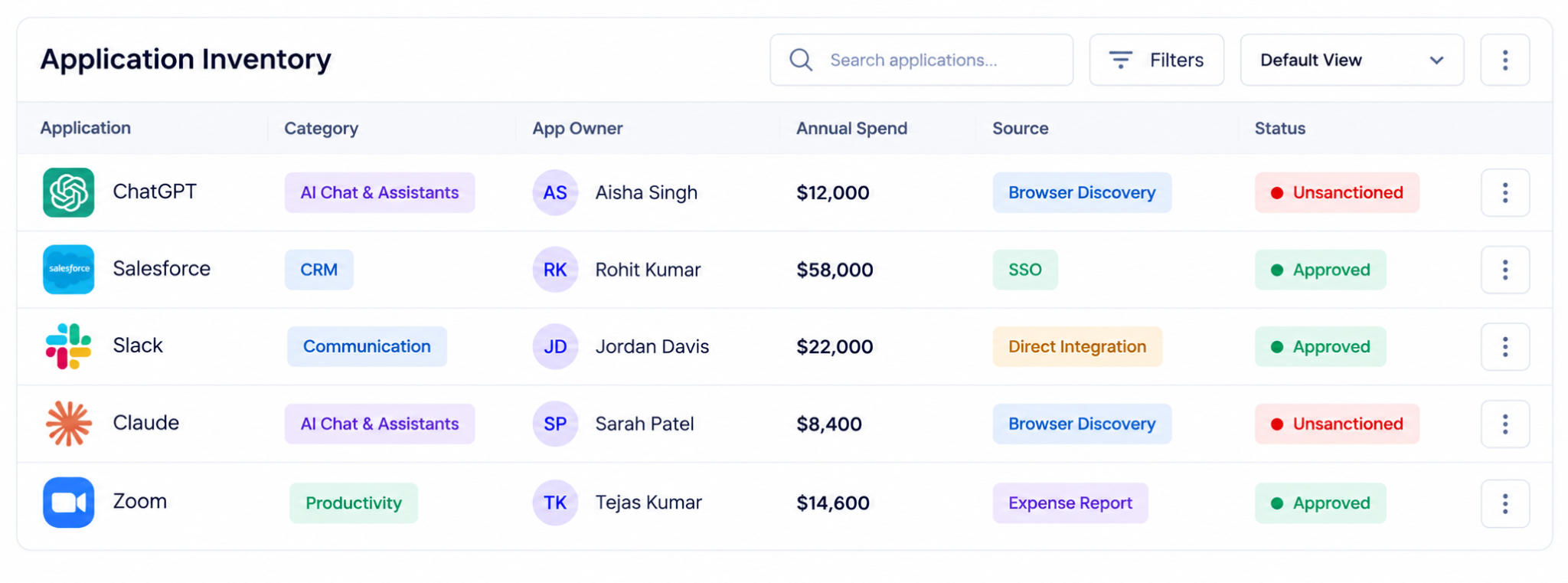
CloudEagle.ai builds the inventory from several sources at once: SSO, finance and expense data, browser activity, and direct integrations. Its context graph, EagleIQ, classifies each app, including AI apps and agents, and 500+ direct integrations pull usage straight from the source.
‍

Application inventory dashboard showing ChatGPT, Salesforce, Slack, Claude, and Zoom, with application categories, owners, annual spend, discovery sources, and sanctioned or unsanctioned status.

‍

The result is one inventory with owner, cost, and usage for every app. With the full list in place, the next step is seeing which of those licenses people actually use.

B. See Which Licenses Are Actually Used

A license count tells you what you bought. It doesn't tell you what people use, and login data alone overstates activity.

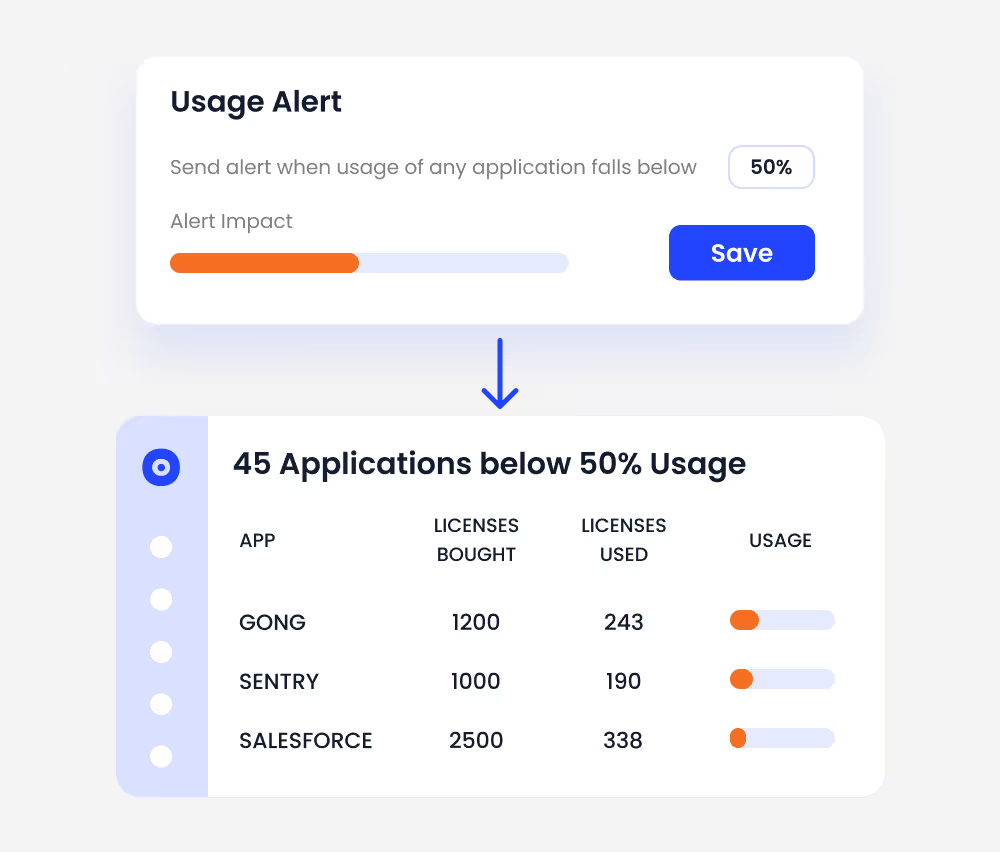
CloudEagle.ai compares purchased licenses with active usage for each app, down to features, roles and permissions. It flags low-usage apps and inactive users so the team knows where the waste sits before anyone touches a contract.
‍

SaaS usage alert dashboard highlighting 45 applications with less than 50% license utilization, showing licenses purchased, licenses used, and usage levels for applications such as Gong, Sentry, and Salesforce.

‍

Teams get a clear split between licenses that earn their cost and licenses that sit idle. That idle list feeds directly into reclamation.

C. Reclaim Idle Licenses With an Approval Step

Finding an unused seat saves nothing until someone removes it, and manual follow-up is where most reclamation stalls.

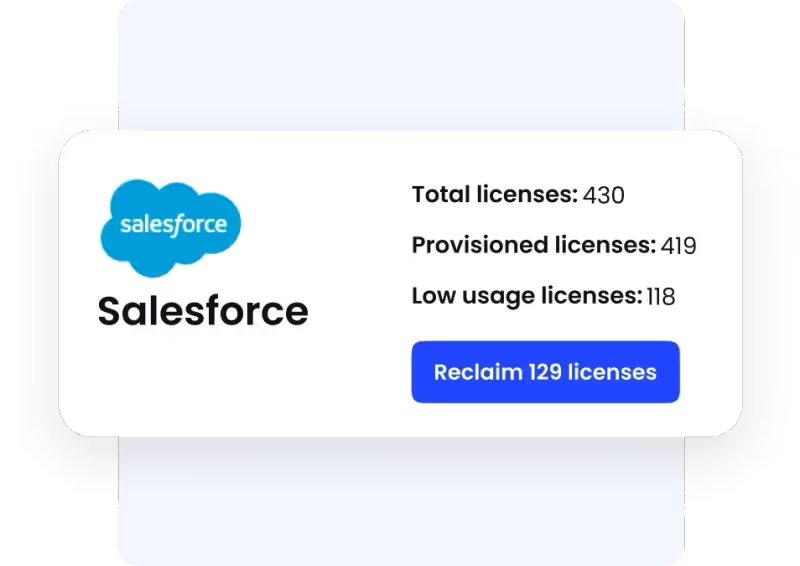
CloudEagle.ai runs license harvesting through approval workflows. A team sets an inactivity rule, the app owner or user confirms in Slack or email, and the license is reclaimed, downgraded or reassigned to someone waiting for access.
‍

Salesforce license optimization summary displaying total, provisioned, and low-usage licenses, with an option to reclaim 129 unused licenses.

‍

Licenses stay matched to real demand without IT chasing every owner by hand. Once single seats are cleaned up, the bigger savings come from whole apps that overlap.

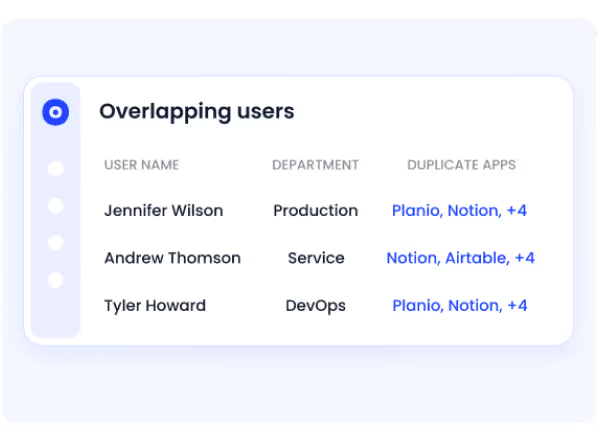
D. Cut Duplicate Apps and Overlapping Copilots

Different departments often buy different tools for the same job. The same pattern now shows up with AI, where teams pay for two or three copilots that do similar work.

CloudEagle.ai groups apps by function and shows where tools overlap across departments. Application rationalization then helps the team standardize on one tool and consolidate licenses, which also gives more volume to negotiate with.
‍

Overlapping users report identifying employees using duplicate SaaS applications across departments, with details of user names, departments, and overlapping applications.

‍

Fewer vendors, fewer contracts, and better pricing on the tools that stay. The AI tools that survive consolidation still need their own spend control, because they bill differently.

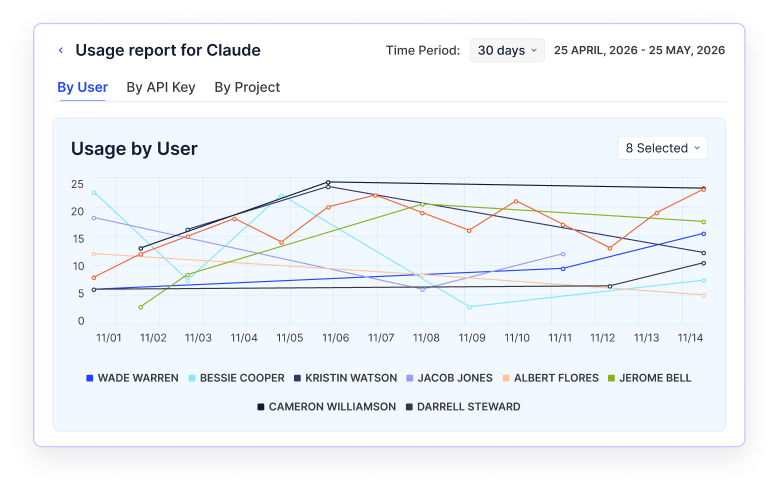
E. Track AI Token Spend by User, API Key and Project

Seat-based reports miss most AI cost. Tools like ChatGPT Enterprise, Claude and Cursor bill partly by token consumption, and that spend surfaces as one large line on the invoice.

CloudEagle.ai's AI usage control shows token usage and cost by user, API key and project over any time window. Teams can set spend limits per user or project, and seats heading past their limit are flagged before the invoice arrives.
‍

Claude usage analytics dashboard showing 30-day user-level activity trends through a multi-user line chart, with options to analyze usage by API key or project.

‍

Usage-based billing surprises get caught while there is still time to act. With SaaS and AI spend both visible, finance can split the bill.

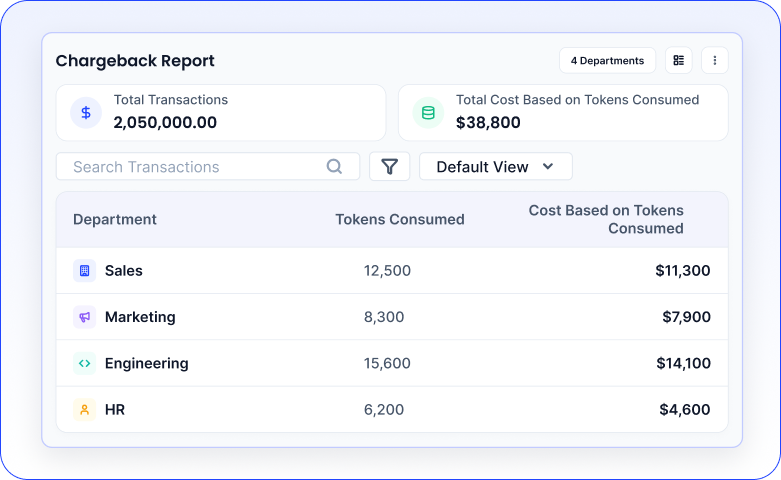
F. Give Finance a Bill It Can Allocate

A single monthly total is hard to budget against or charge back. Finance needs to know which department drove which cost.

CloudEagle.ai produces chargeback reports that break SaaS and AI spend down by department, with token counts and cost on each line. Budgets can be set per department, manager, or application and tracked as spend comes in.
‍

AI chargeback report summarizing total transactions, token consumption, and associated costs across Sales, Marketing, Engineering, and HR departments.

‍

Each team owns its share of the spend, which makes budget conversations and renewals easier to justify. The last step is making sure the next renewal is priced right.

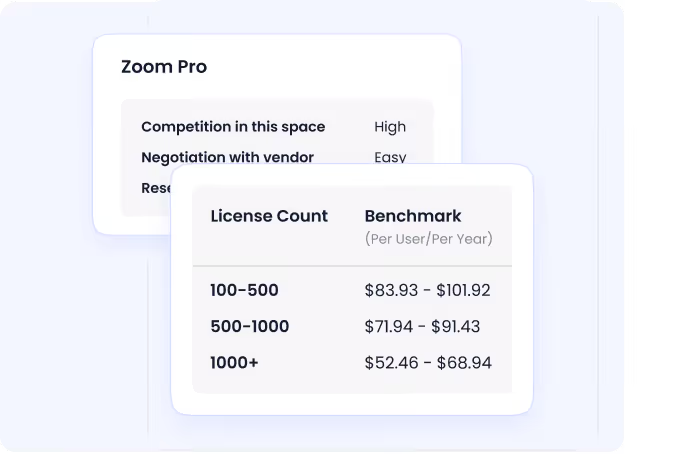
G. Benchmark Prices and Prepare Renewals Early

Most overpaying happens at renewal: a contract auto-renews at list price because nobody had usage or pricing data ready before the notice period.

CloudEagle.ai offers price benchmarking and buying guides drawn from one of the largest SaaS pricing datasets, with no contract upload needed. The renewal calendar sends alerts 30, 60, or 90 days out, so the owner walks into each negotiation with usage, price benchmarks, and a decision already prepared.
‍

Zoom Pro pricing benchmark displaying vendor negotiation difficulty and per-user annual license pricing across different license volume ranges.

‍

Renewals become a planned negotiation instead of a deadline scramble. Taken together, the workflow turns SaaS and AI spend management into a repeatable savings and negotiation engine rather than an annual fire drill.

Pricing: Custom pricing. Book a demo to request quote.

‍

‍

2. Vendr

Best for: teams that want software negotiations run for them.

‍

SaaS spend management dashboard displaying monthly spending trends, fiscal year-to-date spend of $345,657, vendor bill and expense breakdowns, and insights highlighting a 6% overspend against contracted values.

‍

Vendr is a software pricing and negotiation platform that positions itself as an authority on software pricing transparency. Its benchmarks come from real software transactions, so buyers can see what comparable companies pay before they sign or renew.

The platform now leans on AI agents. A Pricing Agent checks quotes, and a Negotiation Agent runs supplier outreach by email once the buyer approves the strategy. In June 2026, Vertice announced it is acquiring Vendr and combining Vendr's pricing insights with its own data, with Vendr customers getting access to Vertice's intake-to-procure platform.

Key Features

  • Pricing intelligence showing what comparable companies pay for the same software.
  • AI pricing and negotiation agents that run supplier outreach once the buyer approves the strategy.
  • Contract reviews that flag overcharges, renewal traps and negotiable terms.
  • Quote checks and renewal routing for smaller contracts.

Pros

  • Negotiation runs largely hands-off, by email, with human oversight.
  • Pricing and negotiation data is available through an API for procurement systems.

Cons

  • Focused on buying and negotiation rather than license-level usage or reclamation.
  • Product direction is tied to the ongoing integration with Vertice.

3. Sastrify

Best for: companies that want software spend managed alongside HR and IT on Deel.

‍

Sastrify dashboard displaying open tasks, recent activity, upcoming alerts, unassigned subscriptions, and potential savings from SaaS application management.

‍

‍

Sastrify describes itself as an AI co-pilot for software management, built for IT, procurement and finance teams. It covers two sides of spend: visibility into which apps are in use, and support with buying and renewing them.

On the visibility side, it detects shadow IT, tracks usage and runs third-party risk and compliance checks. On the buying side, it pairs intake-to-procure workflows with expert support and benchmarks contracts against more than $6B in pricing data. Deel acquired Sastrify in May 2026, and it now sits inside Deel's IT offering.

Key Features

  • Shadow IT detection, usage analytics and compliance monitoring.
  • Intake-to-procure workflows with expert-supported purchasing and renewals.
  • Contract benchmarking against live pricing data, plus renewal alerts.
  • A software marketplace with discounted rates.

Pros

  • Combines software visibility with hands-on procurement support.
  • A natural fit for companies already running HR and IT on Deel.

Cons

  • AI token spend tracking is not a named capability.
  • Roadmap now follows Deel's wider IT product plans.

4. Torii

Best for: IT teams running SaaS and AI operations from one place.

‍

Torii expense dashboard showing monthly SaaS spend, application category breakdowns, annual spending trends, and individual application costs for vendors such as AWS, Salesforce, and Dropbox.

‍

Torii is a SaaS management platform built to control every app, license and AI tool in a company. It discovers SaaS, AI and desktop apps continuously, maps the accounts and entitlements behind them, and flags unsanctioned tools through browser and OAuth signals.

Its AI management features, released in May 2026, track AI spend by user, model and time window, and forecast costs before the invoice arrives. Alongside spend, Torii runs access requests, access reviews and onboarding and offboarding as workflows, with an audit trail for each change.

Key Features

  • AI management that tracks AI spend by user, model and time, monitors keys, tokens and agents, and forecasts AI costs.
  • Continuous discovery of SaaS, AI and desktop apps through browser and OAuth signals.
  • License reclamation based on live usage, with contract ingestion and renewal alerts.
  • Access request, access review and onboarding and offboarding workflows.

Pros

  • AI spend and SaaS licenses sit in the same view.
  • Strong workflow automation for IT operations.

Cons

  • Built around IT operations, so procurement-led teams may need a separate intake or negotiation process.
  • Workflow depth takes time to configure well.

5. Tropic

Best for: finance teams that need procurement support without a dedicated procurement team.
‍

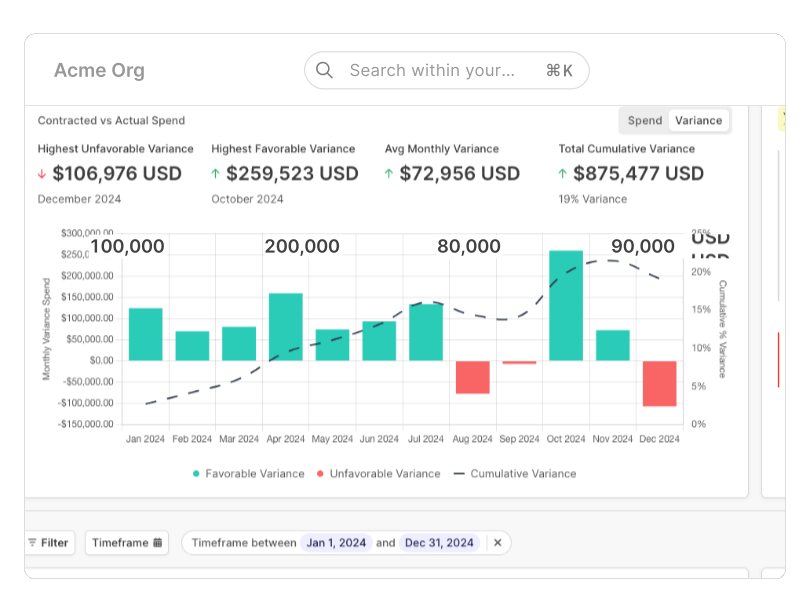
SaaS spend variance dashboard comparing contracted and actual spending, highlighting favorable and unfavorable monthly variances and cumulative spending trends throughout 2024.

‍

Tropic is a procurement platform for software buyers, and for many finance teams it works as an outsourced procurement function. It pairs software with expert negotiators who handle software and AI purchases.

Requests come in through intake and orchestration workflows, and suppliers are benchmarked against Tropic's pricing data. Three AI agents carry the work forward: an Intake Agent, a Proposal Agent for negotiation support and a Renewal Agent that manages upcoming contracts. Usage and overlap analysis, including AI cost optimization, helps decide what to renew and what to cut.

Key Features

  • Intake and orchestration workflows with spend compliance.
  • Supplier pricing benchmarks and negotiation strategies, with a Proposal Agent.
  • A Renewal Agent that manages upcoming contract renewals.
  • Usage and overlap analysis, including AI cost optimization.

Pros

  • Negotiation expertise is built into the buying process.
  • Works well where finance owns software buying.

Cons

  • Aimed mainly at small and midsize companies.
  • License-level usage data is lighter than in platforms that connect directly to each app.

6. Zylo

Best for: large enterprises with big SaaS portfolios and growing usage-based AI spend.
‍

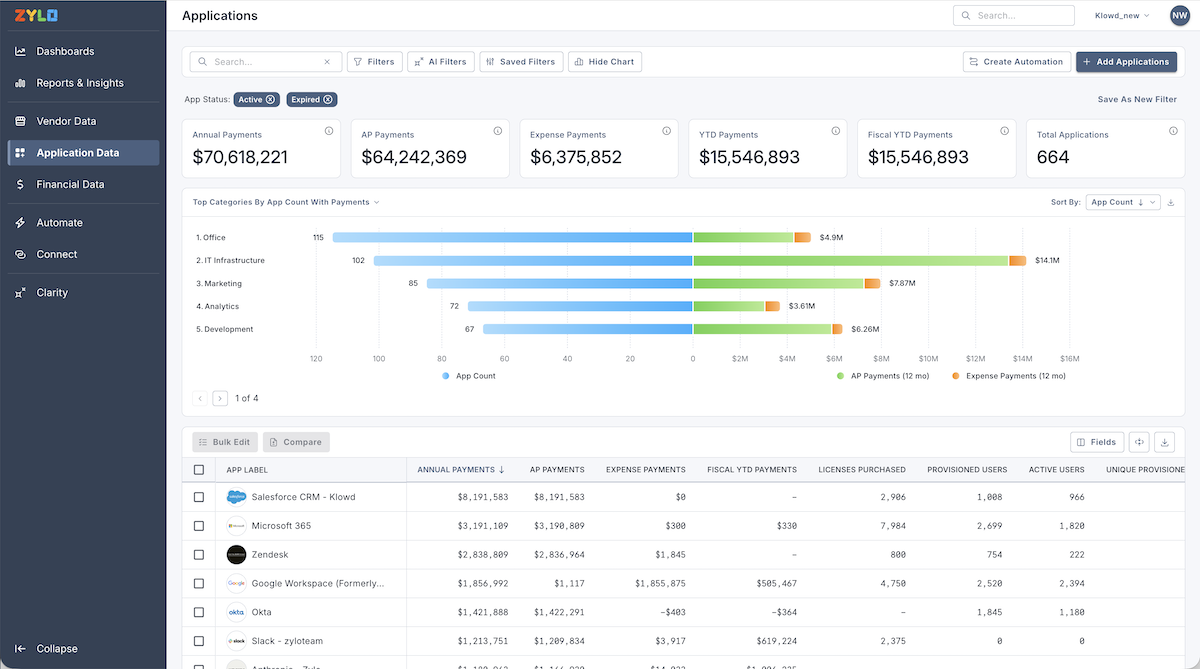
Zylo application management dashboard displaying annual payments, accounts payable, expense payments, application counts, top spending categories, and application-level license and payment details.

‍

Zylo is an enterprise SaaS and AI spend management platform. It keeps a continuously updated view of software spend, usage, AI consumption and contracts, and draws on a database of more than $100B in AI, SaaS and cloud spend to guide purchasing and renewals.

In April 2026 it launched Consumption Cost Management for usage-based spend from providers such as OpenAI, Anthropic, Databricks, Snowflake and Google Vertex AI. It monitors that spend against contract commitments, forecasts costs against contract terms and breaks them down by team and project.

Key Features

  • A continuously updated view of software spend, usage, AI consumption and contracts.
  • AI and consumption cost tracking against contract commitments, by team and project.
  • Idle license recovery and renewals ranked by potential savings.
  • An AI agent, Zylo Clarity, plus optional negotiation and SaaS operations services.

Pros

  • Built for enterprise-scale SaaS portfolios.
  • Tracks usage-based AI costs alongside SaaS licenses.

Cons

  • Identity governance and access workflows sit outside the core product.
  • Consumption tracking covers the providers it integrates with, with more still planned.

7. Spendflo

‍Best for: teams that want to automate the full procurement cycle.

‍

Spendflo subscription dashboard showing software subscriptions, gross spend, department ownership, billing frequency, renewal dates, contract status, and renewal or upgrade options.

‍

Spendflo now positions itself as an AI procurement workforce. Its Flo AI agents handle the buying cycle from purchase request to approvals, contracts and accounts payable, with a separate Contracts Agent for contract work.

Around that core, Spendflo covers supplier onboarding and third-party risk management. For renewals, it tracks upcoming dates, flags auto-renew risk and attaches benchmark data so teams can negotiate before the window closes. Budget checks run at the time of request, so spend commitments get flagged before a purchase is approved.

Key Features

  • Flo AI agents that run requests, approvals and contracts, plus a Contracts Agent.
  • Supplier onboarding and third-party risk management.
  • Renewal tracking with benchmark data and auto-renew risk alerts.
  • Budget checks at the time of request.

Pros

  • Automates procurement end to end, not just approvals.
  • Renewal benchmarks arrive before the negotiation window closes.

Cons

  • Intake management is still listed as coming soon.
  • SaaS usage and AI token tracking are not named capabilities.

8. Zluri

Best for: teams that want spend management inside an identity security platform.

‍

SaaS budget dashboard displaying department-level application counts, users, average monthly spend, year-to-date spend, budget utilization, and top applications by user count and spend.

‍

Zluri now positions itself as an identity security platform for human and non-human identities. Its product rests on three pillars: identity visibility, identity governance and administration, and identity security posture management, all running on its IRIS identity intelligence layer.

SaaS spend management remains part of the platform as a separate module. It covers shadow IT discovery, software spend optimization and renewal management. AI apps are monitored, and AI agents are governed as identities in their own right.

Key Features

  • Shadow IT discovery, software spend optimization and renewal management.
  • Identity governance with lifecycle automation and access reviews.
  • Posture checks for over-privileged and dormant accounts.
  • Monitoring of AI apps and governance of AI agents as identities.

Pros

  • Spend and identity governance in one platform.
  • Covers non-human identities as well as employees.

Cons

  • Spend is now a secondary module as the product focuses on identity security.
  • AI spend detail is limited on the product pages.

9. Snow

Best for: enterprises managing SaaS, on-prem, cloud and AI spend in one estate.
‍

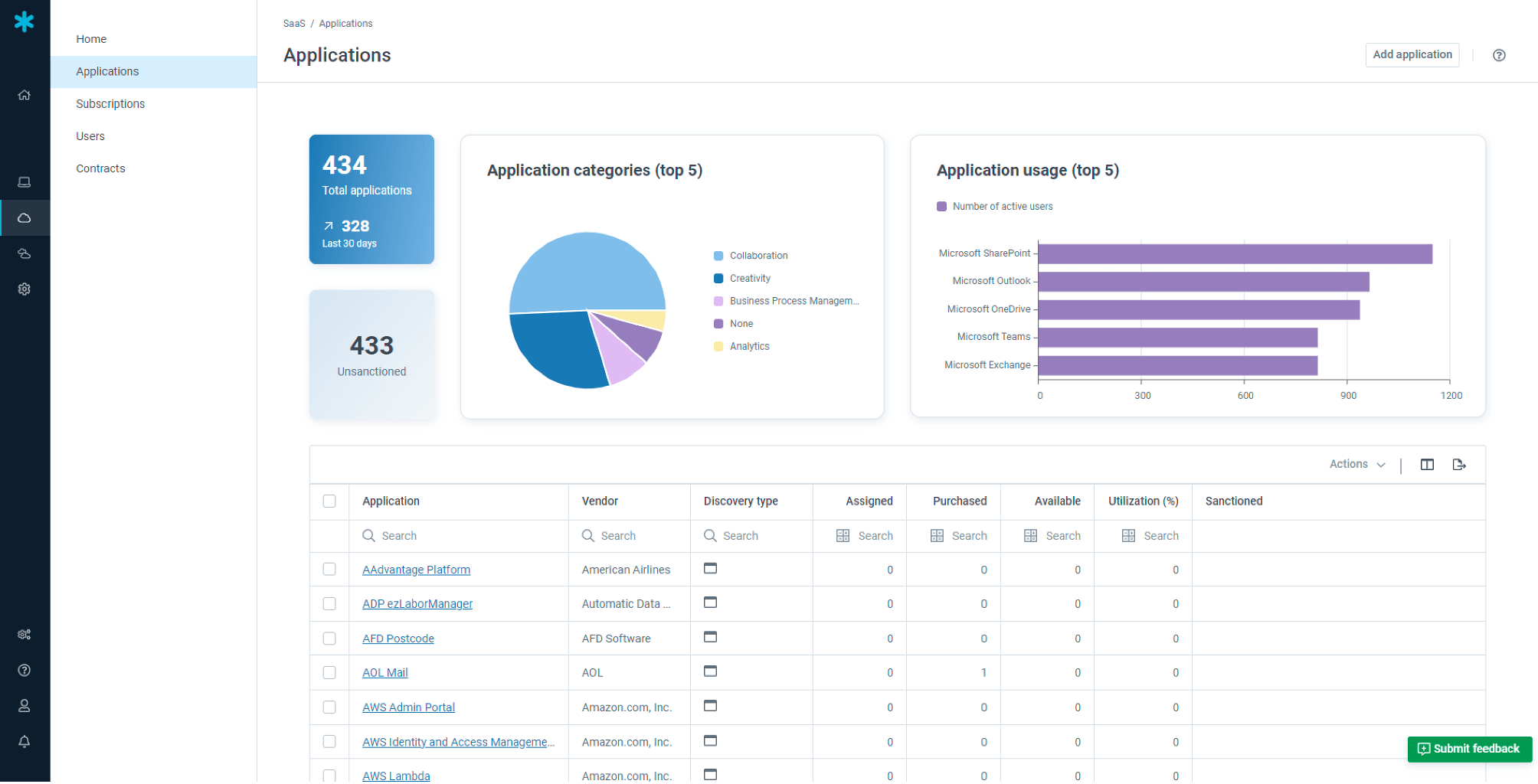
Application management dashboard showing total and unsanctioned applications, application category distribution, most-used applications, and an inventory with discovery types, assigned licenses, purchased licenses, and utilization rates.

‍

‍

Snow is now part of Flexera One, after Flexera completed its acquisition of Snow in February 2024. Flexera One covers SaaS management alongside software asset management, cloud FinOps and AI cost management, so one platform spans the full technology estate.

For SaaS, it detects known and shadow apps, including shadow AI, and uses four discovery methods to spot new AI tools. For AI, it tracks token and credit consumption across ChatGPT, Claude and Copilot, follows models across vendors and platforms such as AWS Bedrock and Microsoft Foundry, and analyzes vendor concentration to inform negotiations.

Key Features

  • Detection of known and shadow SaaS, including shadow AI.
  • License utilization data for major SaaS vendors such as Adobe, ServiceNow and Salesforce.
  • Token and credit tracking across ChatGPT, Claude and Copilot, and across platforms like AWS Bedrock.
  • Allocation of AI workloads to cost centers, products and business units.

Pros

  • One platform across SaaS, on-prem, cloud and AI.
  • Deep cost allocation for finance reporting.

Cons

  • Broad scope means a longer rollout for teams that only need SaaS spend.
  • SaaS usage depth is strongest for the major vendors it covers.

10. Certero

‍Best for: IT asset management teams that want every technology asset in one data model.
‍

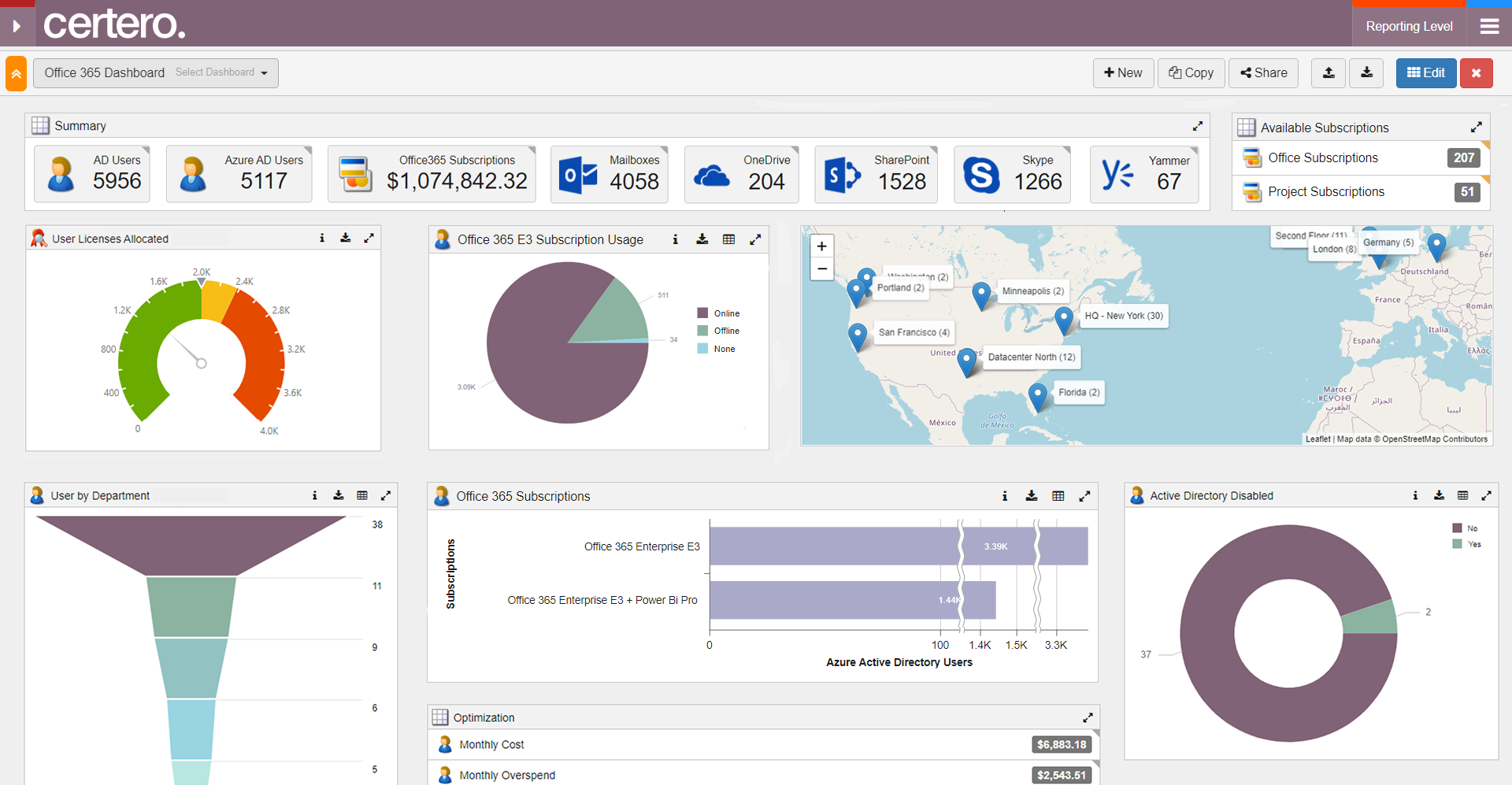
Certero Office 365 management dashboard displaying Active Directory users, subscriptions, mailboxes, OneDrive and SharePoint accounts, license allocation, subscription usage, user distribution, and optimization metrics.

‍

‍

Certero calls itself the unified platform for every technology asset a company owns. Its CerteroX platform brings ITAM, SAM, SaaS management, cloud management and AI management into one data model.

For SaaS, it finds unsanctioned apps, including shadow AI tools, reclaims unused licenses, completes offboarding and right-sizes spend. Its AI management product governs AI models, experiments, GPU use and AI seats, and tracks every copilot, model and token. SAM depth is strongest on publishers that commonly cause license compliance problems.

Key Features

  • Discovery of unsanctioned SaaS, including shadow AI tools.
  • License reclamation, offboarding and spend right-sizing.
  • AI management that tracks copilots, models, tokens and GPU use.
  • SAM with audit defence for complex software publishers.

Pros

  • One data model across every technology asset.
  • Strong support for license audits.

Cons

  • Built for ITAM teams, so finance and procurement workflows are lighter.
  • More platform than a team needs if it only wants SaaS spend.

‍

Which SaaS Spend Management Tools Also Track AI Spend?

CloudEagle.ai, Zylo, Torii and Flexera One all track AI spend alongside SaaS spend, but they measure it at different depths. The difference that matters is whether a tool sees token consumption per user and project, or only the vendor invoice.

AI spend behaves differently from SaaS spend. A seat license costs the same whether it is used once or every day, while token-based billing rises with every prompt, agent run and API call. That is why a tool that only reads invoices finds AI overspend a month late.

When comparing tools on AI spend management, check four things:

  • Token visibility: usage and cost by user, API key and project, not only the monthly total.
  • Spend limits and budgets: caps per user or department, with alerts before overages land.
  • Shadow AI discovery: AI tools bought outside IT, found through SSO, browser and expense data.
  • One view with SaaS: AI tools shown next to SaaS licenses, so duplicate copilots and idle seats show up in the same report.

‍

AI Bills Land a Month After the Usage Happens

Build the license tracking that catches token overruns before the invoice.
Download Checklist

‍

Why Do You Need Saas Spend Management Software?

SaaS spend management software pays for itself by finding money a company is already losing to idle licenses, duplicate tools and unprepared renewals. With software and AI budgets growing in double digits (Gartner, July 2026), manual tracking can't keep up.

Here are the key reasons enterprises use SaaS spend management tools:

1. Centralized Visibility‍

One view of every SaaS and AI app, its cost and its owner. Finance, IT and procurement work from the same numbers instead of separate spreadsheets.

2. Reduce SaaS Spend

Usage data shows where to renegotiate, downgrade or cancel. That data becomes leverage at renewal, which is where most savings land.

3. Remove Underused Apps

Low-usage apps get flagged early, so the team can decide whether to drive adoption or retire them. Fewer unused apps also means fewer unmanaged accounts sitting in the stack.

4. Prevent Shadow IT

Shadow IT is software bought or used without IT's approval, and shadow AI is the same pattern with AI tools. Spend management software catches both through finance and SSO data, closing the compliance gap they create.

5. Renewal Alerts

Alerts at 30, 60 or 90 days give owners time to review usage and decide before a contract auto-renews at unfavorable terms.

6. SaaS Overlap

Overlap detection finds tools that do the same job across departments. This is SaaS-level overlap, which is different from cloud infrastructure cost management tools that track compute and storage.

7. Automation

License reclamation, renewal reminders and approval routing run as workflows instead of manual follow-up, which frees IT and procurement for higher-value work.

‍

SaaS Spend Management vs. SaaS Spend Optimization

SaaS spend management is the ongoing program of visibility, policy, and renewal discipline across every app and contract. SaaS spend optimization is the targeted work of cutting waste in short sprints, often run with SaaS spend optimization software.

SaaS Spend Management SaaS Spend Optimization
Goal Ongoing control and governance Fast, measurable savings
Timeframe Continuous Sprints before renewals or budget cycles
Core work Ownership, approval workflows, system of record for contracts Right-sizing licenses, consolidating tools, reclaiming seats
Cadence Monthly and quarterly reviews Triggered by renewals, headcount changes or M&A
Measured by Policy adherence, renewal preparedness Savings realized against forecast

‍

Most teams need both: management builds the foundation, and optimization cashes it in before each renewal.

‍

Key Features of Effective SaaS Spend Management Tools

The features that matter most in SaaS cost management software are multi-source discovery, usage data beyond logins, and license reclamation tied to approvals. The table lists what to look for and the question that tests each vendor's claim.

Feature What it does Question to ask the vendor
Multi-source discovery Finds apps through SSO, finance, browser and direct integrations How many discovery sources do you use, and do you find AI apps?
Usage analytics Shows active users, feature use and trends Do you track usage beyond logins?
AI and token spend tracking Shows token cost by user, API key and project Can I set spend limits per user or team?
Unused and underutilized app alerts Flags idle licenses and low-usage apps How do you define an inactive user?
Duplicate and orphaned subscription detection Finds overlapping tools and seats with no active owner Do you group apps by function across departments?
License reclamation Reclaims or downgrades idle seats Is there an approval step before a license is removed?
Renewal alerts and contract visibility Stores contracts and alerts before notice periods Do you extract contract terms automatically?
Price benchmarking Compares your price with peer data Do I need to upload contracts to get benchmarks?
Procurement and ERP integrations Connects intake, approvals and finance systems Which procurement and expense systems do you integrate with?
Cost allocation Splits spend by department or cost center Can I run chargeback reports for AI spend?

‍

SaaS Spend Management Best Practices

These practices work with any tool, though most are far easier with a platform doing the data collection.

1. Build A System of Record: Keep apps, contracts, vendors, licenses, costs and owners in one place, so every decision starts from the same data.

2. Formalize Intake: Route new software and AI requests through a short intake covering business case, security review and budget owner.

3. Right-size Licenses Quarterly: Compare paid seats with active usage, downgrade tiers and reclaim idle licenses.

4. Eliminate Overlaps: Map use cases across teams and standardize on one tool per job, including AI assistants.

5. Set Renewal Cadences: Calendar renewals at 90, 60 and 30 days, assign an owner and prepare a decision memo before negotiation.

6. Benchmark Pricing: Compare your unit price, tier and add-ons with peer benchmarks before agreeing to terms.

7. Automate Access Reviews: Run periodic reviews and remove leavers and inactive users through HRIS and SSO signals.

8. Track KPIs: Watch cost per active user, license utilization, AI spend against budget, duplicate apps removed and savings realized against forecast.

‍

The Complete Guide To Saas Cost Management

Good SaaS cost management runs on a fixed cadence. This roadmap shows what to do, how often, and which KPI proves it worked.

Stage Cadence What to do KPI
1. Discovery Monthly Inventory all SaaS and AI apps and owners from SSO, finance and network data Discovered apps vs baseline, shadow IT and shadow AI reduction
2. Rationalization Quarterly Consolidate duplicate apps and copilots, reduce vendor count App overlap, vendor count
3. License right-sizing Quarterly Reclaim unused licenses using usage data License utilization, time to reclaim
4. Contract optimization 60 to 120 days before renewal Benchmark pricing, adjust terms, bundle where it helps Savings realized vs forecast
5. Budgeting and forecasting Quarterly Set app-level and AI spend budgets, reforecast on headcount changes Variance vs budget
6. Continuous governance Monthly and quarterly Enforce intake, renewal calendars and access reviews Renewal preparedness, policy adherence

‍

Conclusion

The best SaaS spend management software in 2026 does three things well: it finds every SaaS and AI app, it shows real license and token usage, and it turns that data into reclamation and renewal decisions. Tools that only read invoices miss the fastest-growing part of the bill.

Use the comparison above to shortlist two or three tools, then test each on your own data before committing. CloudEagle.ai has processed $50B+ in SaaS spend and delivered $3B+ in savings for enterprises like RingCentral and Automation Anywhere.

To see where your own stack stands, run the SaaS and AI spend calculator, or book a demo with CloudEagle.ai.

‍

Frequently Asked Questions

1. What is the best SaaS spend management software for large enterprises?

For enterprises with hundreds of SaaS and AI apps, the best fit is a platform with multi-source discovery, usage data beyond logins, and approval-based license reclamation. CloudEagle.ai, Zylo, and Flexera One are built for that scale, and CloudEagle.ai also tracks AI token spend in the same platform.

2. What tools help manage AI and SaaS subscription costs together?

CloudEagle.ai, Zylo, Torii and Flexera One track AI spend alongside SaaS spend. Look for token cost by user and project, spend limits and shadow AI discovery, since invoice-only tracking finds AI overspend a month late.

3. Which SaaS spend management software prevents duplicate and orphaned subscriptions?

Tools with app rationalization and owner tracking catch both. They group apps by function to find duplicates, and flag seats with no active user or owner so those licenses can be reclaimed.

4. Which SaaS spend management platform integrates with procurement tools?

Most enterprise platforms connect to procurement, ERP and expense systems. CloudEagle.ai, Spendflo and Vendr all support procurement workflows, so check which specific systems each one connects to before you buy.

5. Which SaaS spend management platform offers the most accurate cost tracking?

Accuracy depends on data sources. Platforms that combine finance data with direct app integrations and SSO track cost per active user far more accurately than those that rely on invoices or logins alone.

6. How soon does SaaS spend management software show savings?

Most teams see the first savings at the next renewal or license reclamation cycle. CloudEagle.ai customers typically see a 10 to 30% reduction in SaaS and AI spend, with onboarding taking about 30 minutes.

‍

Advertisement for a SaaS Subscription Tracking Template with a call-to-action button to download and a partial graphic of a tablet showing charts.Banner promoting a SaaS Agreement Checklist to streamline SaaS management and avoid budget waste with a call-to-action button labeled Download checklist.Blue banner with text 'The Ultimate Employee Offboarding Checklist!' and a black button labeled 'Download checklist' alongside partial views of checklist documents from cloudeagle.ai.Digital ad for download checklist titled 'The Ultimate Checklist for IT Leaders to Optimize SaaS Operations' by cloudeagle.ai, showing checklist pages.Slack Buyer's Guide offer with text 'Unlock insider insights to get the best deal on Slack!' and a button labeled 'Get Your Copy', accompanied by a preview of the guide featuring Slack's logo.Monday Pricing Guide by cloudeagle.ai offering exclusive pricing secrets to maximize investment with a call-to-action button labeled Get Your Copy and an image of the guide's cover.Blue banner for Canva Pricing Guide by cloudeagle.ai offering a guide to Canva costs, features, and alternatives with a call-to-action button saying Get Your Copy.Blue banner with white text reading 'Little-Known Negotiation Hacks to Get the Best Deal on Slack' and a white button labeled 'Get Your Copy'.Blue banner with text 'Little-Known Negotiation Hacks to Get the Best Deal on Monday.com' and a white button labeled 'Get Your Copy'.Blue banner with text 'Little-Known Negotiation Hacks to Get the Best Deal on Canva' and a white button labeled 'Get Your Copy'.Banner with text 'Slack Buyer's Guide' and a 'Download Now' button next to images of a guide titled 'Slack Buyer’s Guide: Features, Pricing & Best Practices'.Digital cover of Monday Pricing Guide with a button labeled Get Your Copy on a blue background.Canva Pricing Guide cover with a button labeled Get Your Copy on a blue gradient background.

Enter your email to
unlock the report

Oops! Something went wrong while submitting the form.
License Count
Benchmark
Per User/Per Year

Enter your email to
unlock the report

Oops! Something went wrong while submitting the form.
License Count
Benchmark
Per User/Per Year

Enter your email to
unlock the report

Oops! Something went wrong while submitting the form.
Notion Plus
License Count
Benchmark
Per User/Per Year
100-500
$67.20 - $78.72
500-1000
$59.52 - $72.00
1000+
$51.84 - $57.60
Canva Pro
License Count
Benchmark
Per User/Per Year
100-500
$74.33-$88.71
500-1000
$64.74-$80.32
1000+
$55.14-$62.34

Enter your email to
unlock the report

Oops! Something went wrong while submitting the form.

Enter your email to
unlock the report

Oops! Something went wrong while submitting the form.
Zoom Business
License Count
Benchmark
Per User/Per Year
100-500
$216.00 - $264.00
500-1000
$180.00 - $216.00
1000+
$156.00 - $180.00

Enter your email to
unlock the report

Oops! Something went wrong while submitting the form.

Get the Right Security Platform To Secure Your Cloud Infrastructure

Please enter a business email
Thank you!
The 2023 SaaS report has been sent to your email. Check your promotional or spam folder.
Oops! Something went wrong while submitting the form.

Access full report

Please enter a business email
Thank you!
The 2023 SaaS report has been sent to your email. Check your promotional or spam folder.
Oops! Something went wrong while submitting the form.

TL;DR

  • SaaS spend management software finds every SaaS and AI app, compares paid licenses with real usage, and drives reclamation and renewal decisions.
  • AI tools add token-based billing, so the right platform tracks token consumption next to license spend.
  • CloudEagle.ai covers discovery, license harvesting, app rationalization, AI token spend, and renewals in one platform.
  • Vendr, Tropic and Sastrify lead on negotiation support; Zylo and Torii on SaaS visibility; Flexera One on hybrid software assets.
  • Before buying, check discovery sources, usage depth beyond logins, AI spend coverage, and procurement integrations.

‍

Today, almost all companies are SaaS-powered. In fact, 80% of companies use at least one SaaS app and spend an average of $2,623 per employee per year on SaaS.

Software spending has become the third biggest expense in an organization, after employee and office spending. So, how do I keep my spending optimized?

Well, the answer is to use a SaaS spend management software.

These solutions help transform how your business manages spending, from simplifying SaaS cost tracking to optimizing procurement processes. However, with so many SaaS spend management platforms available, choosing the best among them might be tricky.

So, to assist you in making an informed decision, we've created a list of the best SaaS spend management tools to save you time and effort.

‍

TL;DR

  • SaaS spend management helps enterprises optimize their software costs by reducing waste, eliminating underutilized apps, and streamlining renewals.
  • Effective tools provide centralized visibility of all SaaS subscriptions, allowing businesses to make data-driven decisions, prevent shadow IT, and avoid unnecessary expenses.
  • Key features like contract optimization, license right-sizing, and automated renewal alerts help businesses control spending and ensure they're only paying for what they use.
  • Implementing SaaS spend management software leads to better procurement practices, improved vendor negotiations, and increased cost savings.
  • The best SaaS spend management platforms, like CloudEagle.ai, Vendr, and Sastrify, offer comprehensive tools for discovery, cost analysis, and workflow automation, making SaaS spending more efficient and manageable.

‍

What is SaaS Spend Management?

SaaS spend management is the ongoing process of tracking, controlling and optimizing everything a company spends on software subscriptions, including AI tools. It covers licenses, contracts, renewals, and, increasingly, usage-based AI billing such as tokens and API calls.

Software spend management helps teams see where the money goes, spot unused or duplicate tools, and right-size contracts to real usage. It also keeps purchases visible and approved, which closes the gaps that shadow SaaS and shadow AI open up.

For a full breakdown of the process, see this guide to SaaS spend management. Spend management applications built for SaaS turn that process into a running system.

Key goals of SaaS spend management:

  • Eliminate unused licenses and duplicate subscriptions.
  • See every SaaS and AI expense next to its actual usage.
  • Right-size licenses and vendor contracts before renewal.
  • Track token consumption and usage-based AI costs.
  • Align spend with what each team actually needs.

‍

Tracking Spend Without Usage Is Just Accounting

Build the visibility that connects invoices to what teams actually use.
Download Checklist

‍

10 Best SaaS Spend Management Software

The 10 best SaaS spend management software options for 2026 are CloudEagle.ai, Vendr, Sastrify, Torii, Tropic, Zylo, Spendflo, Zluri, Snow (now Flexera One) and Certero. Each fits a different buying motion, so the table below shows where each one is strongest.

Tool Best for Standout capability
CloudEagle.ai Enterprises managing SaaS and AI spend together Discovery, license harvesting, AI token tracking and renewals in one platform
Vendr Teams that want negotiation handled for them Transaction-based price data and buying support
Sastrify Mid-market procurement teams Pricing benchmarks with an expert negotiation team
Torii IT teams automating SaaS operations Usage insights and license reclamation workflows
Tropic Finance teams without a procurement function Outsourced negotiation with renewal monitoring
Zylo Large SaaS portfolios SaaS inventory plus AI consumption cost tracking
Spendflo Fast-growing companies Procurement intake and approval workflows
Zluri IT-led SaaS management Discovery with access and lifecycle automation
Snow (now Flexera One) Hybrid on-prem and SaaS estates Software asset management across both
Certero IT asset management teams Multi-SaaS license control and reporting

‍

1. CloudEagle.ai

CloudEagle.ai is an AI-powered SaaS Management, AI Governance, and SaaS Security platform. As a SaaS spend management platform, it finds every SaaS and AI app company pays for and ties each one to its real usage, then turns that data into reclamation, consolidation and renewal decisions.

‍

‍

Enterprises like RingCentral, Automation Anywhere and Shiji use it across IT, finance and procurement. CloudEagle.ai has processed $50B+ in SaaS spend and delivered $3B+ in savings, with customers typically cutting SaaS and AI spend by 10 to 30%. Onboarding takes about 30 minutes, and here is how the workflow runs from there.

A. Find Every SaaS and AI App on the Books

Spend control starts with a complete list, and most companies don't have one. Apps bought on cards, free trials that converted, and AI tools signed up for by individual teams rarely show up in the SSO directory.

CloudEagle.ai builds the inventory from several sources at once: SSO, finance and expense data, browser activity, and direct integrations. Its context graph, EagleIQ, classifies each app, including AI apps and agents, and 500+ direct integrations pull usage straight from the source.

‍

Application inventory dashboard showing ChatGPT, Salesforce, Slack, Claude, and Zoom, with application categories, owners, annual spend, discovery sources, and sanctioned or unsanctioned status.

‍

The result is one inventory with owner, cost, and usage for every app. With the full list in place, the next step is seeing which of those licenses people actually use.

B. See Which Licenses Are Actually Used

A license count tells you what you bought. It doesn't tell you what people use, and login data alone overstates activity.

CloudEagle.ai compares purchased licenses with active usage for each app, down to features, roles and permissions. It flags low-usage apps and inactive users so the team knows where the waste sits before anyone touches a contract.

‍

SaaS usage alert dashboard highlighting 45 applications with less than 50% license utilization, showing licenses purchased, licenses used, and usage levels for applications such as Gong, Sentry, and Salesforce.

‍

Teams get a clear split between licenses that earn their cost and licenses that sit idle. That idle list feeds directly into reclamation.

C. Reclaim Idle Licenses With an Approval Step

Finding an unused seat saves nothing until someone removes it, and manual follow-up is where most reclamation stalls.

CloudEagle.ai runs license harvesting through approval workflows. A team sets an inactivity rule, the app owner or user confirms in Slack or email, and the license is reclaimed, downgraded or reassigned to someone waiting for access.

‍

Salesforce license optimization summary displaying total, provisioned, and low-usage licenses, with an option to reclaim 129 unused licenses.

‍

Licenses stay matched to real demand without IT chasing every owner by hand. Once single seats are cleaned up, the bigger savings come from whole apps that overlap.

D. Cut Duplicate Apps and Overlapping Copilots

Different departments often buy different tools for the same job. The same pattern now shows up with AI, where teams pay for two or three copilots that do similar work.

CloudEagle.ai groups apps by function and shows where tools overlap across departments. Application rationalization then helps the team standardize on one tool and consolidate licenses, which also gives more volume to negotiate with.

‍

Overlapping users report identifying employees using duplicate SaaS applications across departments, with details of user names, departments, and overlapping applications.

‍

Fewer vendors, fewer contracts, and better pricing on the tools that stay. The AI tools that survive consolidation still need their own spend control, because they bill differently.

E. Track AI Token Spend by User, API Key and Project

Seat-based reports miss most AI cost. Tools like ChatGPT Enterprise, Claude and Cursor bill partly by token consumption, and that spend surfaces as one large line on the invoice.

CloudEagle.ai's AI usage control shows token usage and cost by user, API key and project over any time window. Teams can set spend limits per user or project, and seats heading past their limit are flagged before the invoice arrives.

‍

Claude usage analytics dashboard showing 30-day user-level activity trends through a multi-user line chart, with options to analyze usage by API key or project.

‍

Usage-based billing surprises get caught while there is still time to act. With SaaS and AI spend both visible, finance can split the bill.

F. Give Finance a Bill It Can Allocate

A single monthly total is hard to budget against or charge back. Finance needs to know which department drove which cost.

CloudEagle.ai produces chargeback reports that break SaaS and AI spend down by department, with token counts and cost on each line. Budgets can be set per department, manager, or application and tracked as spend comes in.

‍

AI chargeback report summarizing total transactions, token consumption, and associated costs across Sales, Marketing, Engineering, and HR departments.

‍

Each team owns its share of the spend, which makes budget conversations and renewals easier to justify. The last step is making sure the next renewal is priced right.

G. Benchmark Prices and Prepare Renewals Early

Most overpaying happens at renewal: a contract auto-renews at list price because nobody had usage or pricing data ready before the notice period.

CloudEagle.ai offers price benchmarking and buying guides drawn from one of the largest SaaS pricing datasets, with no contract upload needed. The renewal calendar sends alerts 30, 60, or 90 days out, so the owner walks into each negotiation with usage, price benchmarks, and a decision already prepared.

‍

Zoom Pro pricing benchmark displaying vendor negotiation difficulty and per-user annual license pricing across different license volume ranges.

‍

Renewals become a planned negotiation instead of a deadline scramble. Taken together, the workflow turns SaaS and AI spend management into a repeatable savings and negotiation engine rather than an annual fire drill.

Pricing: Custom pricing. Book a demo to request quote.

‍

‍

2. Vendr

Best for: teams that want software negotiations run for them.

‍

SaaS spend management dashboard displaying monthly spending trends, fiscal year-to-date spend of $345,657, vendor bill and expense breakdowns, and insights highlighting a 6% overspend against contracted values.

‍

Vendr is a software pricing and negotiation platform that positions itself as an authority on software pricing transparency. Its benchmarks come from real software transactions, so buyers can see what comparable companies pay before they sign or renew.

The platform now leans on AI agents. A Pricing Agent checks quotes, and a Negotiation Agent runs supplier outreach by email once the buyer approves the strategy. In June 2026, Vertice announced it is acquiring Vendr and combining Vendr's pricing insights with its own data, with Vendr customers getting access to Vertice's intake-to-procure platform.

Key Features

  • Pricing intelligence showing what comparable companies pay for the same software.
  • AI pricing and negotiation agents that run supplier outreach once the buyer approves the strategy.
  • Contract reviews that flag overcharges, renewal traps and negotiable terms.
  • Quote checks and renewal routing for smaller contracts.

Pros

  • Negotiation runs largely hands-off, by email, with human oversight.
  • Pricing and negotiation data is available through an API for procurement systems.

Cons

  • Focused on buying and negotiation rather than license-level usage or reclamation.
  • Product direction is tied to the ongoing integration with Vertice.

3. Sastrify

Best for: companies that want software spend managed alongside HR and IT on Deel.

‍

Sastrify dashboard displaying open tasks, recent activity, upcoming alerts, unassigned subscriptions, and potential savings from SaaS application management.

‍

‍

Sastrify describes itself as an AI co-pilot for software management, built for IT, procurement and finance teams. It covers two sides of spend: visibility into which apps are in use, and support with buying and renewing them.

On the visibility side, it detects shadow IT, tracks usage and runs third-party risk and compliance checks. On the buying side, it pairs intake-to-procure workflows with expert support and benchmarks contracts against more than $6B in pricing data. Deel acquired Sastrify in May 2026, and it now sits inside Deel's IT offering.

Key Features

  • Shadow IT detection, usage analytics and compliance monitoring.
  • Intake-to-procure workflows with expert-supported purchasing and renewals.
  • Contract benchmarking against live pricing data, plus renewal alerts.
  • A software marketplace with discounted rates.

Pros

  • Combines software visibility with hands-on procurement support.
  • A natural fit for companies already running HR and IT on Deel.

Cons

  • AI token spend tracking is not a named capability.
  • Roadmap now follows Deel's wider IT product plans.

4. Torii

Best for: IT teams running SaaS and AI operations from one place.

‍

Torii expense dashboard showing monthly SaaS spend, application category breakdowns, annual spending trends, and individual application costs for vendors such as AWS, Salesforce, and Dropbox.

‍

Torii is a SaaS management platform built to control every app, license and AI tool in a company. It discovers SaaS, AI and desktop apps continuously, maps the accounts and entitlements behind them, and flags unsanctioned tools through browser and OAuth signals.

Its AI management features, released in May 2026, track AI spend by user, model and time window, and forecast costs before the invoice arrives. Alongside spend, Torii runs access requests, access reviews and onboarding and offboarding as workflows, with an audit trail for each change.

Key Features

  • AI management that tracks AI spend by user, model and time, monitors keys, tokens and agents, and forecasts AI costs.
  • Continuous discovery of SaaS, AI and desktop apps through browser and OAuth signals.
  • License reclamation based on live usage, with contract ingestion and renewal alerts.
  • Access request, access review and onboarding and offboarding workflows.

Pros

  • AI spend and SaaS licenses sit in the same view.
  • Strong workflow automation for IT operations.

Cons

  • Built around IT operations, so procurement-led teams may need a separate intake or negotiation process.
  • Workflow depth takes time to configure well.

5. Tropic

Best for: finance teams that need procurement support without a dedicated procurement team.

‍

SaaS spend variance dashboard comparing contracted and actual spending, highlighting favorable and unfavorable monthly variances and cumulative spending trends throughout 2024.

‍

Tropic is a procurement platform for software buyers, and for many finance teams it works as an outsourced procurement function. It pairs software with expert negotiators who handle software and AI purchases.

Requests come in through intake and orchestration workflows, and suppliers are benchmarked against Tropic's pricing data. Three AI agents carry the work forward: an Intake Agent, a Proposal Agent for negotiation support and a Renewal Agent that manages upcoming contracts. Usage and overlap analysis, including AI cost optimization, helps decide what to renew and what to cut.

Key Features

  • Intake and orchestration workflows with spend compliance.
  • Supplier pricing benchmarks and negotiation strategies, with a Proposal Agent.
  • A Renewal Agent that manages upcoming contract renewals.
  • Usage and overlap analysis, including AI cost optimization.

Pros

  • Negotiation expertise is built into the buying process.
  • Works well where finance owns software buying.

Cons

  • Aimed mainly at small and midsize companies.
  • License-level usage data is lighter than in platforms that connect directly to each app.

6. Zylo

Best for: large enterprises with big SaaS portfolios and growing usage-based AI spend.

‍

Zylo application management dashboard displaying annual payments, accounts payable, expense payments, application counts, top spending categories, and application-level license and payment details.

‍

Zylo is an enterprise SaaS and AI spend management platform. It keeps a continuously updated view of software spend, usage, AI consumption and contracts, and draws on a database of more than $100B in AI, SaaS and cloud spend to guide purchasing and renewals.

In April 2026 it launched Consumption Cost Management for usage-based spend from providers such as OpenAI, Anthropic, Databricks, Snowflake and Google Vertex AI. It monitors that spend against contract commitments, forecasts costs against contract terms and breaks them down by team and project.

Key Features

  • A continuously updated view of software spend, usage, AI consumption and contracts.
  • AI and consumption cost tracking against contract commitments, by team and project.
  • Idle license recovery and renewals ranked by potential savings.
  • An AI agent, Zylo Clarity, plus optional negotiation and SaaS operations services.

Pros

  • Built for enterprise-scale SaaS portfolios.
  • Tracks usage-based AI costs alongside SaaS licenses.

Cons

  • Identity governance and access workflows sit outside the core product.
  • Consumption tracking covers the providers it integrates with, with more still planned.

7. Spendflo

‍Best for: teams that want to automate the full procurement cycle.

‍

Spendflo subscription dashboard showing software subscriptions, gross spend, department ownership, billing frequency, renewal dates, contract status, and renewal or upgrade options.

‍

Spendflo now positions itself as an AI procurement workforce. Its Flo AI agents handle the buying cycle from purchase request to approvals, contracts and accounts payable, with a separate Contracts Agent for contract work.

Around that core, Spendflo covers supplier onboarding and third-party risk management. For renewals, it tracks upcoming dates, flags auto-renew risk and attaches benchmark data so teams can negotiate before the window closes. Budget checks run at the time of request, so spend commitments get flagged before a purchase is approved.

Key Features

  • Flo AI agents that run requests, approvals and contracts, plus a Contracts Agent.
  • Supplier onboarding and third-party risk management.
  • Renewal tracking with benchmark data and auto-renew risk alerts.
  • Budget checks at the time of request.

Pros

  • Automates procurement end to end, not just approvals.
  • Renewal benchmarks arrive before the negotiation window closes.

Cons

  • Intake management is still listed as coming soon.
  • SaaS usage and AI token tracking are not named capabilities.

8. Zluri

Best for: teams that want spend management inside an identity security platform.

‍

SaaS budget dashboard displaying department-level application counts, users, average monthly spend, year-to-date spend, budget utilization, and top applications by user count and spend.

‍

Zluri now positions itself as an identity security platform for human and non-human identities. Its product rests on three pillars: identity visibility, identity governance and administration, and identity security posture management, all running on its IRIS identity intelligence layer.

SaaS spend management remains part of the platform as a separate module. It covers shadow IT discovery, software spend optimization and renewal management. AI apps are monitored, and AI agents are governed as identities in their own right.

Key Features

  • Shadow IT discovery, software spend optimization and renewal management.
  • Identity governance with lifecycle automation and access reviews.
  • Posture checks for over-privileged and dormant accounts.
  • Monitoring of AI apps and governance of AI agents as identities.

Pros

  • Spend and identity governance in one platform.
  • Covers non-human identities as well as employees.

Cons

  • Spend is now a secondary module as the product focuses on identity security.
  • AI spend detail is limited on the product pages.

9. Snow

Best for: enterprises managing SaaS, on-prem, cloud and AI spend in one estate.

‍

Application management dashboard showing total and unsanctioned applications, application category distribution, most-used applications, and an inventory with discovery types, assigned licenses, purchased licenses, and utilization rates.

‍

‍

Snow is now part of Flexera One, after Flexera completed its acquisition of Snow in February 2024. Flexera One covers SaaS management alongside software asset management, cloud FinOps and AI cost management, so one platform spans the full technology estate.

For SaaS, it detects known and shadow apps, including shadow AI, and uses four discovery methods to spot new AI tools. For AI, it tracks token and credit consumption across ChatGPT, Claude and Copilot, follows models across vendors and platforms such as AWS Bedrock and Microsoft Foundry, and analyzes vendor concentration to inform negotiations.

Key Features

  • Detection of known and shadow SaaS, including shadow AI.
  • License utilization data for major SaaS vendors such as Adobe, ServiceNow and Salesforce.
  • Token and credit tracking across ChatGPT, Claude and Copilot, and across platforms like AWS Bedrock.
  • Allocation of AI workloads to cost centers, products and business units.

Pros

  • One platform across SaaS, on-prem, cloud and AI.
  • Deep cost allocation for finance reporting.

Cons

  • Broad scope means a longer rollout for teams that only need SaaS spend.
  • SaaS usage depth is strongest for the major vendors it covers.

10. Certero

‍Best for: IT asset management teams that want every technology asset in one data model.

‍

Certero Office 365 management dashboard displaying Active Directory users, subscriptions, mailboxes, OneDrive and SharePoint accounts, license allocation, subscription usage, user distribution, and optimization metrics.

‍

‍

Certero calls itself the unified platform for every technology asset a company owns. Its CerteroX platform brings ITAM, SAM, SaaS management, cloud management and AI management into one data model.

For SaaS, it finds unsanctioned apps, including shadow AI tools, reclaims unused licenses, completes offboarding and right-sizes spend. Its AI management product governs AI models, experiments, GPU use and AI seats, and tracks every copilot, model and token. SAM depth is strongest on publishers that commonly cause license compliance problems.

Key Features

  • Discovery of unsanctioned SaaS, including shadow AI tools.
  • License reclamation, offboarding and spend right-sizing.
  • AI management that tracks copilots, models, tokens and GPU use.
  • SAM with audit defence for complex software publishers.

Pros

  • One data model across every technology asset.
  • Strong support for license audits.

Cons

  • Built for ITAM teams, so finance and procurement workflows are lighter.
  • More platform than a team needs if it only wants SaaS spend.

‍

Which SaaS Spend Management Tools Also Track AI Spend?

CloudEagle.ai, Zylo, Torii and Flexera One all track AI spend alongside SaaS spend, but they measure it at different depths. The difference that matters is whether a tool sees token consumption per user and project, or only the vendor invoice.

AI spend behaves differently from SaaS spend. A seat license costs the same whether it is used once or every day, while token-based billing rises with every prompt, agent run and API call. That is why a tool that only reads invoices finds AI overspend a month late.

When comparing tools on AI spend management, check four things:

  • Token visibility: usage and cost by user, API key and project, not only the monthly total.
  • Spend limits and budgets: caps per user or department, with alerts before overages land.
  • Shadow AI discovery: AI tools bought outside IT, found through SSO, browser and expense data.
  • One view with SaaS: AI tools shown next to SaaS licenses, so duplicate copilots and idle seats show up in the same report.

‍

AI Bills Land a Month After the Usage Happens

Build the license tracking that catches token overruns before the invoice.
Download Checklist

‍

Why Do You Need Saas Spend Management Software?

SaaS spend management software pays for itself by finding money a company is already losing to idle licenses, duplicate tools and unprepared renewals. With software and AI budgets growing in double digits (Gartner, July 2026), manual tracking can't keep up.

Here are the key reasons enterprises use SaaS spend management tools:

1. Centralized Visibility‍

One view of every SaaS and AI app, its cost and its owner. Finance, IT and procurement work from the same numbers instead of separate spreadsheets.

2. Reduce SaaS Spend

Usage data shows where to renegotiate, downgrade or cancel. That data becomes leverage at renewal, which is where most savings land.

3. Remove Underused Apps

Low-usage apps get flagged early, so the team can decide whether to drive adoption or retire them. Fewer unused apps also means fewer unmanaged accounts sitting in the stack.

4. Prevent Shadow IT

Shadow IT is software bought or used without IT's approval, and shadow AI is the same pattern with AI tools. Spend management software catches both through finance and SSO data, closing the compliance gap they create.

5. Renewal Alerts

Alerts at 30, 60 or 90 days give owners time to review usage and decide before a contract auto-renews at unfavorable terms.

6. SaaS Overlap

Overlap detection finds tools that do the same job across departments. This is SaaS-level overlap, which is different from cloud infrastructure cost management tools that track compute and storage.

7. Automation

License reclamation, renewal reminders and approval routing run as workflows instead of manual follow-up, which frees IT and procurement for higher-value work.

‍

SaaS Spend Management vs. SaaS Spend Optimization

SaaS spend management is the ongoing program of visibility, policy, and renewal discipline across every app and contract. SaaS spend optimization is the targeted work of cutting waste in short sprints, often run with SaaS spend optimization software.

SaaS Spend Management SaaS Spend Optimization
Goal Ongoing control and governance Fast, measurable savings
Timeframe Continuous Sprints before renewals or budget cycles
Core work Ownership, approval workflows, system of record for contracts Right-sizing licenses, consolidating tools, reclaiming seats
Cadence Monthly and quarterly reviews Triggered by renewals, headcount changes or M&A
Measured by Policy adherence, renewal preparedness Savings realized against forecast

‍

Most teams need both: management builds the foundation, and optimization cashes it in before each renewal.

‍

Key Features of Effective SaaS Spend Management Tools

The features that matter most in SaaS cost management software are multi-source discovery, usage data beyond logins, and license reclamation tied to approvals. The table lists what to look for and the question that tests each vendor's claim.

Feature What it does Question to ask the vendor
Multi-source discovery Finds apps through SSO, finance, browser and direct integrations How many discovery sources do you use, and do you find AI apps?
Usage analytics Shows active users, feature use and trends Do you track usage beyond logins?
AI and token spend tracking Shows token cost by user, API key and project Can I set spend limits per user or team?
Unused and underutilized app alerts Flags idle licenses and low-usage apps How do you define an inactive user?
Duplicate and orphaned subscription detection Finds overlapping tools and seats with no active owner Do you group apps by function across departments?
License reclamation Reclaims or downgrades idle seats Is there an approval step before a license is removed?
Renewal alerts and contract visibility Stores contracts and alerts before notice periods Do you extract contract terms automatically?
Price benchmarking Compares your price with peer data Do I need to upload contracts to get benchmarks?
Procurement and ERP integrations Connects intake, approvals and finance systems Which procurement and expense systems do you integrate with?
Cost allocation Splits spend by department or cost center Can I run chargeback reports for AI spend?

‍

SaaS Spend Management Best Practices

These practices work with any tool, though most are far easier with a platform doing the data collection.

1. Build A System of Record: Keep apps, contracts, vendors, licenses, costs and owners in one place, so every decision starts from the same data.

2. Formalize Intake: Route new software and AI requests through a short intake covering business case, security review and budget owner.

3. Right-size Licenses Quarterly: Compare paid seats with active usage, downgrade tiers and reclaim idle licenses.

4. Eliminate Overlaps: Map use cases across teams and standardize on one tool per job, including AI assistants.

5. Set Renewal Cadences: Calendar renewals at 90, 60 and 30 days, assign an owner and prepare a decision memo before negotiation.

6. Benchmark Pricing: Compare your unit price, tier and add-ons with peer benchmarks before agreeing to terms.

7. Automate Access Reviews: Run periodic reviews and remove leavers and inactive users through HRIS and SSO signals.

8. Track KPIs: Watch cost per active user, license utilization, AI spend against budget, duplicate apps removed and savings realized against forecast.

‍

The Complete Guide To Saas Cost Management

Good SaaS cost management runs on a fixed cadence. This roadmap shows what to do, how often, and which KPI proves it worked.

Stage Cadence What to do KPI
1. Discovery Monthly Inventory all SaaS and AI apps and owners from SSO, finance and network data Discovered apps vs baseline, shadow IT and shadow AI reduction
2. Rationalization Quarterly Consolidate duplicate apps and copilots, reduce vendor count App overlap, vendor count
3. License right-sizing Quarterly Reclaim unused licenses using usage data License utilization, time to reclaim
4. Contract optimization 60 to 120 days before renewal Benchmark pricing, adjust terms, bundle where it helps Savings realized vs forecast
5. Budgeting and forecasting Quarterly Set app-level and AI spend budgets, reforecast on headcount changes Variance vs budget
6. Continuous governance Monthly and quarterly Enforce intake, renewal calendars and access reviews Renewal preparedness, policy adherence

‍

Conclusion

The best SaaS spend management software in 2026 does three things well: it finds every SaaS and AI app, it shows real license and token usage, and it turns that data into reclamation and renewal decisions. Tools that only read invoices miss the fastest-growing part of the bill.

Use the comparison above to shortlist two or three tools, then test each on your own data before committing. CloudEagle.ai has processed $50B+ in SaaS spend and delivered $3B+ in savings for enterprises like RingCentral and Automation Anywhere.

To see where your own stack stands, run the SaaS and AI spend calculator, or book a demo with CloudEagle.ai.

‍

Frequently Asked Questions

1. What is the best SaaS spend management software for large enterprises?

For enterprises with hundreds of SaaS and AI apps, the best fit is a platform with multi-source discovery, usage data beyond logins, and approval-based license reclamation. CloudEagle.ai, Zylo, and Flexera One are built for that scale, and CloudEagle.ai also tracks AI token spend in the same platform.

2. What tools help manage AI and SaaS subscription costs together?

CloudEagle.ai, Zylo, Torii and Flexera One track AI spend alongside SaaS spend. Look for token cost by user and project, spend limits and shadow AI discovery, since invoice-only tracking finds AI overspend a month late.

3. Which SaaS spend management software prevents duplicate and orphaned subscriptions?

Tools with app rationalization and owner tracking catch both. They group apps by function to find duplicates, and flag seats with no active user or owner so those licenses can be reclaimed.

4. Which SaaS spend management platform integrates with procurement tools?

Most enterprise platforms connect to procurement, ERP and expense systems. CloudEagle.ai, Spendflo and Vendr all support procurement workflows, so check which specific systems each one connects to before you buy.

5. Which SaaS spend management platform offers the most accurate cost tracking?

Accuracy depends on data sources. Platforms that combine finance data with direct app integrations and SSO track cost per active user far more accurately than those that rely on invoices or logins alone.

6. How soon does SaaS spend management software show savings?

Most teams see the first savings at the next renewal or license reclamation cycle. CloudEagle.ai customers typically see a 10 to 30% reduction in SaaS and AI spend, with onboarding taking about 30 minutes.

‍

CloudEagle.ai recognized in the 2025 Gartner® Magic Quadrant™ for SaaS Management Platforms
Download now
gartner chart
5x
Faster employee
onboarding
80%
Reduction in time for
user access reviews
30k
Workflows
automated
$15Bn
Analyzed in
contract spend
$2Bn
Saved in
SaaS spend

Streamline SaaS governance and save 10-30%

Book a Demo with Expert
CTA image