You need to enable JavaScript in order to use the AI chatbot tool powered by ChatBot

Automate App Access Requests Solution

Automate App Access Requests Across Slack and CloudEagle

Give employees the tools they need in minutes, not days, while reducing access request tickets for IT and enforcing identity-based security controls.


iceye company logoringcentral company logonowpoets company logowefunder company logoaira company logorecroom company logofalkonry company logo

Simplify Access Requests and Approvals Directly in Slack

Imagine: Employees need quick access to tools to do their jobs, but the approval process is slow and manual, creating bottlenecks that waste time and hinder productivity.

Without CloudEagle

Access requests are submitted via emails or tickets, disconnected from identity context.
Managers and IT manually coordinate approvals and provisioning, increasing the chance of errors.
There’s no clear audit trail tying identity → approval → access granted.
Employees can see and request apps outside their role or department, increasing over-provisioning risk.
Non-integrated apps require manual handling, leading to inconsistent enforcement of access policies.
Result: Delays in getting the right access, inefficient processes, and potential security risks from unauthorized app access.

With CloudEagle

Access requests are initiated inside Slack, tied directly to the user’s identity.
Employees get productive faster with instant access, IT ticket volume drops dramatically, and security teams maintain consistent, auditable governance.
Access is provisioned with defined entitlements and durations, not open-ended permissions.
Employees only see apps and access options appropriate to their role, department, and identity context.
Both integrated and non-integrated apps follow a consistent identity governance process, with manual steps tracked when automation isn’t possible.
Result: Access requests are handled quickly, efficiently, and securely, saving time for everyone involved and ensuring the right access is always in place.
Customer Spotlight:
DataStax company logo
“We didn’t have a clear system to manage employee access. App requests came through different channels, access stayed active longer than needed, and ownership was unclear. CloudEagle helped us centralize access requests, apply time-bound controls, and bring structure to identity governance.”
~ Pushkala Pattabhiraman, Head of Security and Productivity, Datastax
Read Success Story
Pushkala Pattabhiraman, Head of Security and Productivity at DataStax

End-to-End Governance for Employee App Access

IT Defines and Governs which Apps Employees can Access
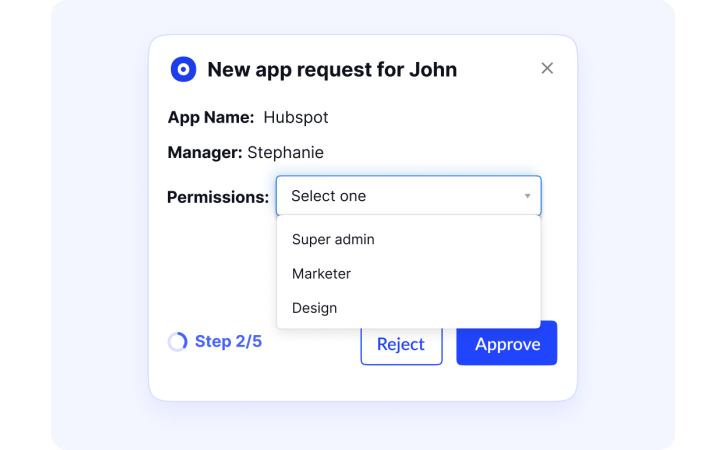
 CloudEagle role-based app catalog showing employees structured access request forms with tools filtered by department and job function
A single request system replaces scattered channels and keeps every workflow organized with complete visibility across teams.
  • A unified access management dashboard where employees submit structured requests
  • Configurable intake forms gather necessary details upfront for smoother processing
  • Tools are visible based on role, engineering tools for engineers, sales tools for sales
 CloudEagle role-based app catalog showing employees structured access request forms with tools filtered by department and job function
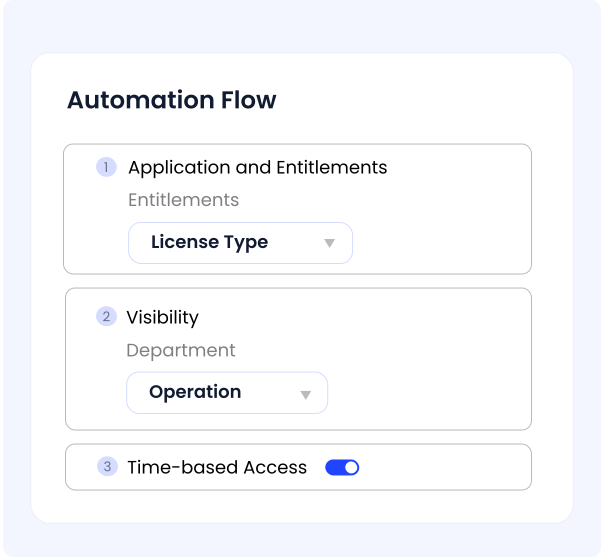
CloudEagle configurable access workflow builder showing approval paths by app sensitivity, role, entitlement type, and time-based access controls

Build Automated Workflows Tailored to Each App and Role Type

CloudEagle configurable access workflow builder showing approval paths by app sensitivity, role, entitlement type, and time-based access controls
Configurable workflows ensure each app follows its correct approval path, reducing manual effort and improving access accuracy.
  • Define applications, entitlements, license types, roles, and departments for precise access
  • Configure visibility so only relevant owners and reviewers see specific requests
  • Enable time-based access to grant temporary access for projects or short-term needs

Faster Employee Access With Fewer IT Tickets
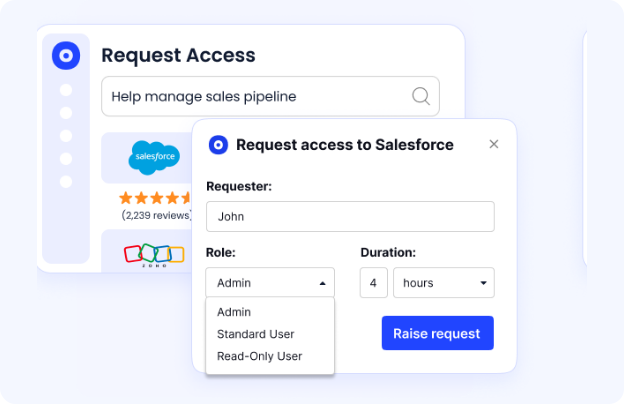
CloudEagle self-service access request dashboard showing employees getting app access without IT tickets or email queues
Employees get access to the tools they need in minutes, while IT eliminates repetitive access request tickets and manual follow-ups.
  • Employees self-serve access instead of waiting on email or ticket queues
  • IT resolves access requests automatically instead of handling them manually
  • Productivity improves without compromising identity or security controls
CloudEagle self-service access request dashboard showing employees getting app access without IT tickets or email queues
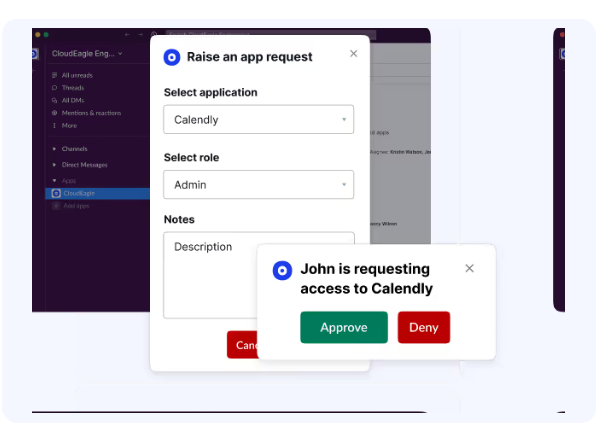
CloudEagle Slack integration showing employees submitting app access requests via slash command and managers approving directly in Slack

Request and Approve Access in Slack

CloudEagle Slack integration showing employees submitting app access requests via slash command and managers approving directly in Slack
Employees and managers stay productive with a workflow that lives where they already work, without creating new tickets or interrupting IT.
  • Employees trigger requests instantly using /raise-app-access-request
  • Managers approve or reject access directly from Slack notifications
  • Requestors get confirmation messages with workflow status and next steps

Configure Approval Policies with Identity Context
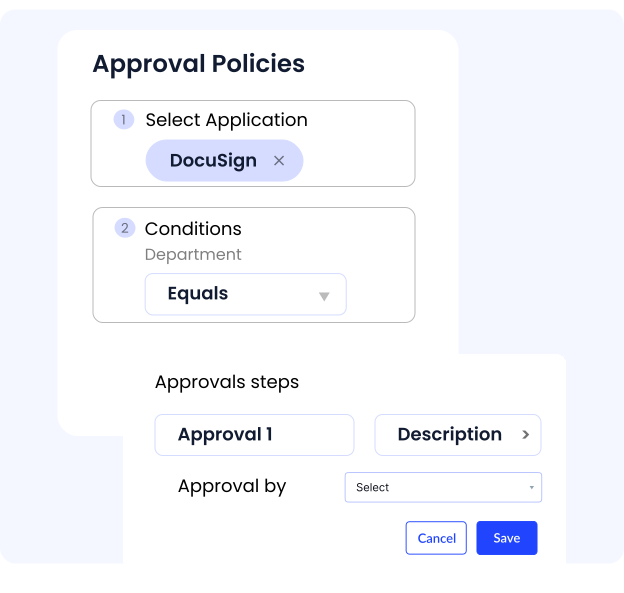
CloudEagle identity-based approval policy configuration showing role-driven, least-privilege access controls enforced consistently across all app requests
Approval decisions are governed by identity, role, and risk so access is granted consistently, not case by case.
  • Define who can approve access based on app sensitivity, role, and department
  • Enforce policy-driven approval paths instead of ad-hoc manager decisions
  • Ensure every approval follows least-privilege and compliance requirements
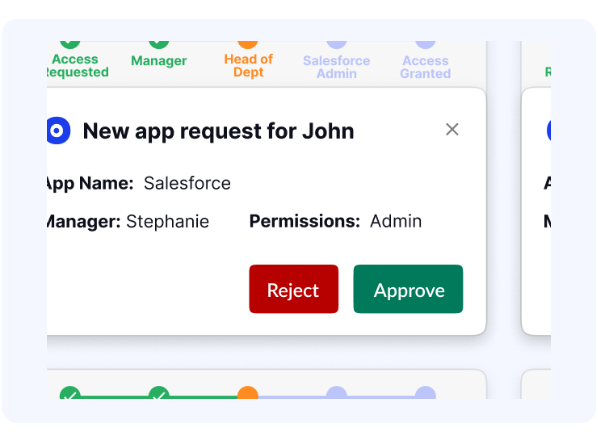
CloudEagle identity-based approval policy configuration showing role-driven, least-privilege access controls enforced consistently across all app requests
CloudEagle access provisioning view showing automatic fulfillment for integrated apps and owner-assigned tasks for non-integrated apps

Provision Access Automatically or Through App Owners

CloudEagle access provisioning view showing automatic fulfillment for integrated apps and owner-assigned tasks for non-integrated apps
Once approved, access is provisioned instantly for integrated apps or cleanly routed for manual assignment.
  • Direct access provisioning when the app integrates with CloudEagle.ai
  • For non-integrated apps, admins receive automated tasks to assign licenses
  • Requestors receive automatic notifications once access is granted or rejected

Frequently Asked Questions

1. How does automating app access requests streamline the onboarding process?

Automation ensures new hires receive all required apps instantly, removing delays and helping them become productive on Day 1.

2. How can CloudEagle ensure that app access is granted immediately after request approval?

CloudEagle triggers instant provisioning workflows once a request is approved, eliminating wait times and manual intervention.

3. How does automated access reduce the administrative burden for IT teams?

It replaces manual ticket handling with automated workflows, reducing repetitive tasks and freeing IT teams to focus on higher-value work.

4. What role does automation play in improving employee productivity?

Employees get the tools they need without waiting for IT, helping them start tasks sooner and avoid unnecessary downtime.

5. How does CloudEagle allow employees to request access to necessary tools efficiently?

Employees can browse a self-service catalog and request apps in one click, making the process simple and user-friendly.

6. How can CloudEagle help track who requested access and when?

CloudEagle keeps a complete audit trail of all access requests, approvals, timestamps, and provisioning actions for full transparency.

7. How does CloudEagle ensure that only authorized employees can request access to certain tools?

CloudEagle enforces role-based controls, ensuring employees only see and request apps that match their job functions or permissions.

8. What are the benefits of reducing manual app access request processing?

It minimizes errors, speeds up approvals, improves consistency, and reduces operational overhead across IT and HR.

9. How does CloudEagle integrate app access requests with other business processes?

CloudEagle connects with HRIS, SSO, and ITSM systems to activate provisioning automatically during onboarding, promotions, or team changes.

10. How does CloudEagle improve user access management and security through automation?

Access is granted only with the right approvals and automatically revoked when no longer needed, strengthening governance and reducing risk.

Streamline App Access Requests With Automated Workflows

Book a Demo